
Chi tiết cấu hình môi trường:
Hệ điều hành: Redhat Enterprise Linux 8.4 64 Bit
Phiên bản phần mềm Oracle và Grid: 21.0.0.0 RAC: CÓ
Phiên bản phần mềm Oracle và Grid: 21.0.0.0 RAC: CÓ
Có thể cắm thêm: Không
Những điểm cần kiểm tra trước khi bắt đầu cài đặt RAC:
1) Tôi có đang tải xuống phần mềm GRID và Oracle DB đúng phiên bản không?
2) GRID và cơ sở dữ liệu của tôi có được chứng nhận trên hệ điều hành hiện tại
không?
2) GRID và cơ sở dữ liệu của tôi có được chứng nhận trên hệ điều hành hiện tại
không?
3) Kiến trúc phần mềm GRID và cơ sở dữ liệu của tôi là 32 bit hay 64 bit?
4) Kiến trúc hệ điều hành là 32 bit hay 64 bit?
4) Kiến trúc hệ điều hành là 32 bit hay 64 bit?
5) Phiên bản nhân hệ điều hành có tương thích với phần mềm cần cài đặt không?
6) Máy chủ của tôi đang ở cấp độ hoạt động 3 hay 5?
7) Đảm bảo có ít nhất 8 GB RAM trống để cài đặt Oracle Grid Infrastructure.
8) Oracle đặc biệt khuyến nghị nên tắt Transparent HugePages và sử dụng HugePages tiêu chuẩn để nâng cao hiệu suất.
9) Để cài đặt Oracle RAC 21c, bạn phải cài đặt Oracle Grid Infrastructure (Oracle Clusterware và Oracle ASM) 21c trên cụm máy chủ của mình.
10) Phiên bản Oracle Clusterware phải bằng hoặc lớn hơn phiên bản Oracle RAC mà bạn dự định cài đặt.
11) Sử dụng phần cứng máy chủ giống hệt nhau trên mỗi nút để đơn giản hóa việc bảo trì máy chủ.
Các bước cài đặt và cấu hình Oracle 21c Grid Infrastructure -- Phần I
Bước 1: Ma trận chứng nhận
Oracle Real Application Clusters 21.0.0.0.0 đã được chứng nhận trên Linux x86-64 Red Hat Enterprise Linux 8 Update 2+
RHEL 8.2 với phiên bản kernel: 4.18.0-193.19.1.el8_2.x86_64 trở lên
Khả năng tương thích 32/64 bit:
- Oracle Real Application Clusters 21.0.0.0 64 Bit tương thích với Linux x86-64 Red Hat Enterprise Linux 8 64 Bit.
- Oracle Real Application Clusters 21.0.0.0 64 Bit không tương thích với Linux x86-64 Red Hat Enterprise Linux 8 32 Bit.
Bước 2: Cấu hình máy chủ
- Cần ít nhất 1 GB dung lượng trống trong thư mục dung lượng đĩa tạm thời (/tmp).
- Không gian trao đổi:
- Từ 4 GB đến 16 GB: Tương đương với RAM
- Hơn 16 GB: 16 GB
Nếu bạn bật HugePages cho máy chủ Linux của mình, thì bạn nên trừ dung lượng bộ nhớ được phân bổ cho HugePages khỏi RAM khả dụng trước khi tính toán dung lượng swap.
- Phân bổ bộ nhớ cho HugePages đủ lớn cho các Vùng Toàn cục Hệ thống (SGA) của tất cả các cơ sở dữ liệu dự kiến chạy trên cụm, và để chứa Vùng Toàn cục Hệ thống cho Kho lưu trữ Quản lý Cơ sở hạ tầng Lưới.
- Oracle Clusterware yêu cầu thiết lập biến môi trường múi giờ giống nhau trên tất cả các nút cụm. Hãy đảm bảo rằng bạn thiết lập đồng bộ hóa múi giờ trên tất cả các nút cụm bằng cách sử dụng giao thức thời gian mạng (NTP) được cấu hình bởi hệ điều hành hoặc Dịch vụ Đồng bộ hóa Thời gian Cụm Oracle.
- Theo mặc định, hệ điều hành của bạn bao gồm một mục trong /etc/fstab để gắn kết /dev/shm. Hãy đảm bảo rằng vùng gắn kết /dev/shm có kiểu tmpfs và được gắn kết với các tùy chọn sau:
- đã thiết lập quyền đọc và thực thi cho nó.
- Nếu không có thiết lập noexec hoặc nosuid thì sẽ không được bật.
- Thư mục Oracle home hoặc Oracle base không thể là liên kết tượng trưng, cũng như bất kỳ thư mục cha nào của chúng, cho đến tận thư mục gốc.
Mạng công cộng:
- Bộ chuyển mạch mạng công cộng được kết nối với cổng mạng công cộng và các cổng giao diện công cộng cho mỗi nút thành viên của cụm (khuyến nghị sử dụng bộ chuyển mạch dự phòng).
- Card giao diện Ethernet (khuyến nghị sử dụng các card mạng dự phòng, được ghép nối thành một tên cổng Ethernet duy nhất).
- Các thiết bị chuyển mạch và giao diện mạng phải có tốc độ tối thiểu 1 GbE.
- Giao thức mạng là Giao thức điều khiển truyền dẫn (TCP) và Giao thức Internet (IP).
Phần cứng mạng riêng cho kết nối liên mạng:
- Các bộ chuyển mạch mạng riêng biệt (khuyến nghị sử dụng bộ chuyển mạch dự phòng), được kết nối với các cổng giao diện riêng cho mỗi nút thành viên của cụm. Nếu bạn có nhiều hơn một card giao diện mạng riêng cho mỗi máy chủ, thì Oracle Clusterware sẽ tự động liên kết các giao diện này cho mạng riêng bằng cách sử dụng Giao tiếp liên tiến trình lưới (GIPC) và Kết nối dự phòng cơ sở hạ tầng lưới, còn được gọi là IP khả dụng cao của cụm (HAIP).
- Các thiết bị chuyển mạch và bộ điều hợp giao diện mạng phải có tốc độ tối thiểu 1 GbE.
- Hệ thống kết nối liên mạng phải hỗ trợ giao thức datagram người dùng (UDP) .
- Khung Jumbo (khung Ethernet lớn hơn 1500 bit) không phải là tiêu chuẩn IEEE, nhưng có thể giảm chi phí UDP nếu được cấu hình đúng cách. Oracle khuyến nghị sử dụng khung Jumbo cho các kết nối liên mạng. Tuy nhiên, cần lưu ý rằng bạn phải kiểm tra tải hệ thống và đảm bảo rằng chúng được bật trên toàn bộ hệ thống.
Phần cứng mạng Oracle Flex ASM:
- Oracle Flex ASM có thể sử dụng cùng mạng riêng với Oracle Clusterware hoặc sử dụng mạng riêng chuyên dụng của mình. Mỗi mạng có thể được phân loại là PUBLIC, PRIVATE+ASM, PRIVATE hoặc ASM. Mạng Oracle ASM sử dụng giao thức TCP.
Đối với cấu hình RAC 2 nút:
- 2 địa chỉ IP công cộng (public)
- 2 địa chỉ IP riêng (private)
- 2 địa chỉ IP ảo (public)
- 1 hoặc 3 địa chỉ IP scan (Nếu là 1 thì ghi rõ trong file /etc/hosts, nếu là 3 thì dùng DNS để phân vùng luân phiên)
Ở đây, tôi đã sử dụng dãy địa chỉ IP dưới đây cho cấu hình RAC 2 nút.
Lưu ý rằng các dòng địa chỉ IP Public, VIP và SCAN là giống nhau, còn dòng địa chỉ IP Private thì khác với các dòng Public, VIP và SCAN. Tuy nhiên, các dòng Public, VIP và SCAN có thể khác nhau.
- Mỗi nút phải có ít nhất hai bộ điều hợp mạng: một cho giao diện mạng công cộng (TCP/IP) và một cho kết nối liên mạng riêng (UDP).
- Để cải thiện tính khả dụng, có thể cấu hình các bộ điều hợp mạng công cộng và riêng tư dự phòng cho mỗi nút.
- Tên giao diện được liên kết với (các) bộ điều hợp mạng cho mỗi mạng phải giống nhau trên tất cả các nút. Ví dụ: nếu eth1 được sử dụng cho mạng công cộng trên nút thứ nhất thì eth1 cũng phải được sử dụng cho mạng công cộng trên nút thứ hai. Bạn không thể sử dụng eth1 cho mạng Ethernet riêng.
- Địa chỉ IP ảo và tên mạng không được phép đang được sử dụng.
- Địa chỉ IP ảo phải nằm trên cùng một mạng con với địa chỉ IP công cộng của bạn.
#Public IP 10.20.30.101 rac1.localdomain rac1 10.20.30.102 rac2.localdomain rac2 #Private IP 10.1.2.201 rac1-priv.localdomain rac1-priv 10.1.2.202 rac2-priv.localdomain rac2-priv #VIP IP 10.20.30.103 rac1-vip.localdomain rac1-vip 10.20.30.104 rac2-vip.localdomain rac2-vip #scan IP 10.20.30.105 rac-scan.localdomain rac-scan |
Cấu hình lưu trữ:
Cần tối thiểu 12 GB dung lượng cho Oracle Grid Infrastructure cho thư mục cài đặt cụm (Grid home). Oracle khuyến nghị nên phân bổ 100 GB để có thêm dung lượng cho các bản vá lỗi. Cần tối thiểu 10 GB cho Oracle Database Enterprise Edition.
Bắt đầu từ Oracle Grid Infrastructure 19c, việc cấu hình GIMR là tùy chọn đối với các triển khai Oracle Standalone Cluster.
Để cài đặt, hãy cấu hình yêu cầu dung lượng ổ đĩa tối thiểu:
- 100 GB trên mỗi nút - bộ nhớ cục bộ /u01 để lưu trữ các tệp nhị phân GRID và ORACLE
- 20 GB trên mỗi nút - bộ nhớ cục bộ /osw để lưu trữ nhật ký oswatcher (Tùy chọn)
- 3 ổ đĩa 10 GB để lưu trữ các tệp OCR và tệp bỏ phiếu - lưu trữ dùng chung trong trường hợp dự phòng thông thường. Nếu bạn sử dụng mức dự phòng cao thì hãy sử dụng 5 ổ đĩa 10 GB.
Bước 3: Tải xuống phần mềm


Bước 4: Cấu hình máy ảo

Nhấp vào tab "Mới" .

Bạn sẽ thấy hộp thoại bật lên bên dưới, hãy chỉnh sửa thông tin chi tiết và giữ nguyên như hình bên dưới.

Trong phần cài đặt bộ nhớ, tôi chỉ khai báo 6 GB. Bạn có thể thêm nhiều bộ nhớ hơn cho môi trường sản xuất thực tế.

Nhấp vào tab "Tạo ổ cứng ảo ngay bây giờ" .

Nhấp vào tab "VDI (Virtual Box Disk Image)" .

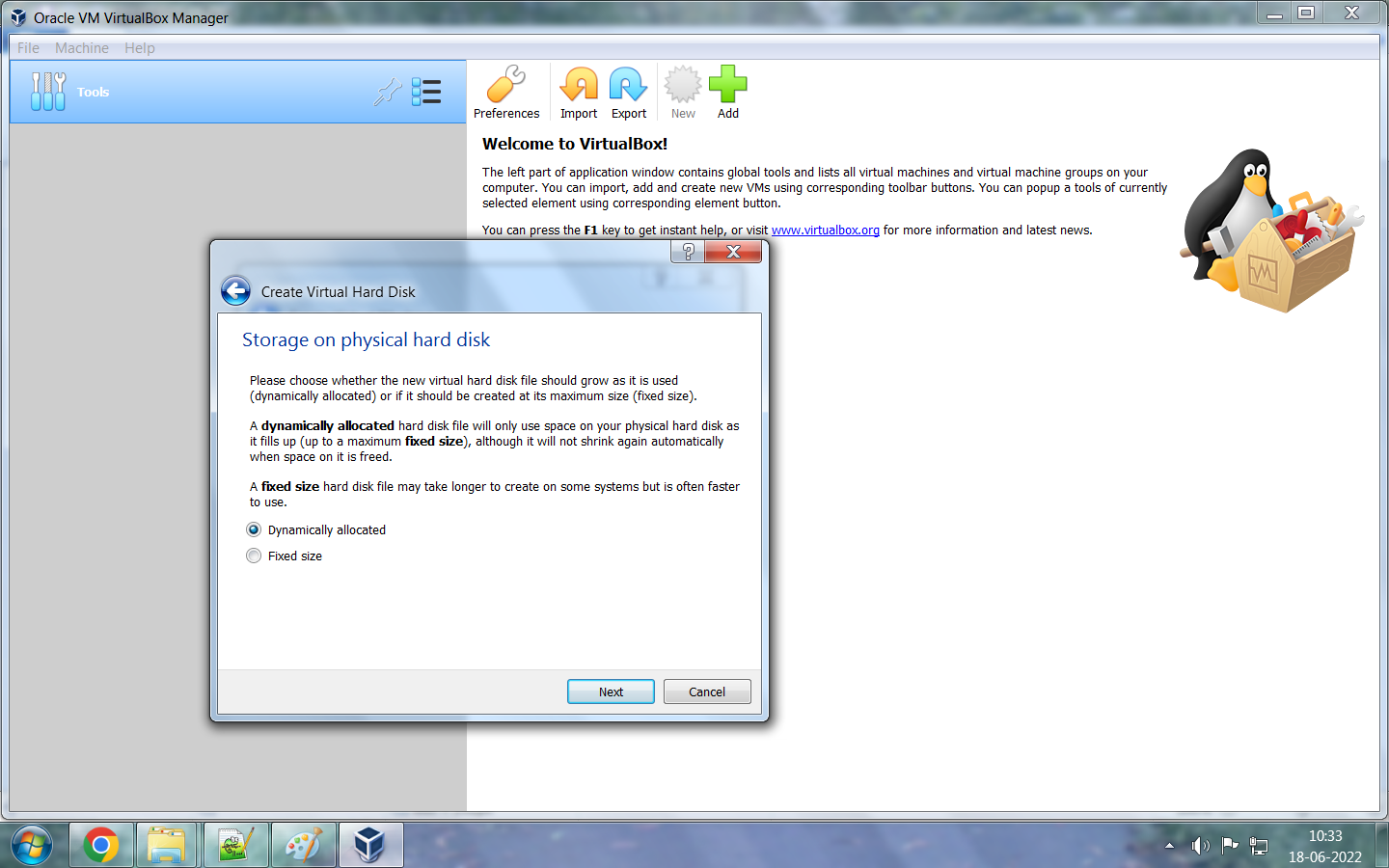


Nhấp vào Xác định mạng công cộng là pubnet và mạng Ethernet riêng là privnet .
Đối với Node1: pubnet và privnet
Đối với Node2: pubnet và privnet


Chọn ngôn ngữ và nhấn vào tiếp tục.


Ở đây, tôi đã sử dụng các địa chỉ IP bên dưới cho mạng Ethernet công cộng và riêng tư. Ngoài ra, hãy thêm tên máy chủ cho node1. Chúng ta sẽ thêm địa chỉ IP của node thứ 2 sau bằng quy trình sao chép.
#Public IP
10.20.30.101 rac1.localdomain rac1
10.20.30.102 rac2.localdomain rac2
#Private IP
10.1.2.201 rac1-priv.localdomain rac1-priv
10.1.2.202 rac2-priv.localdomain rac2-priv


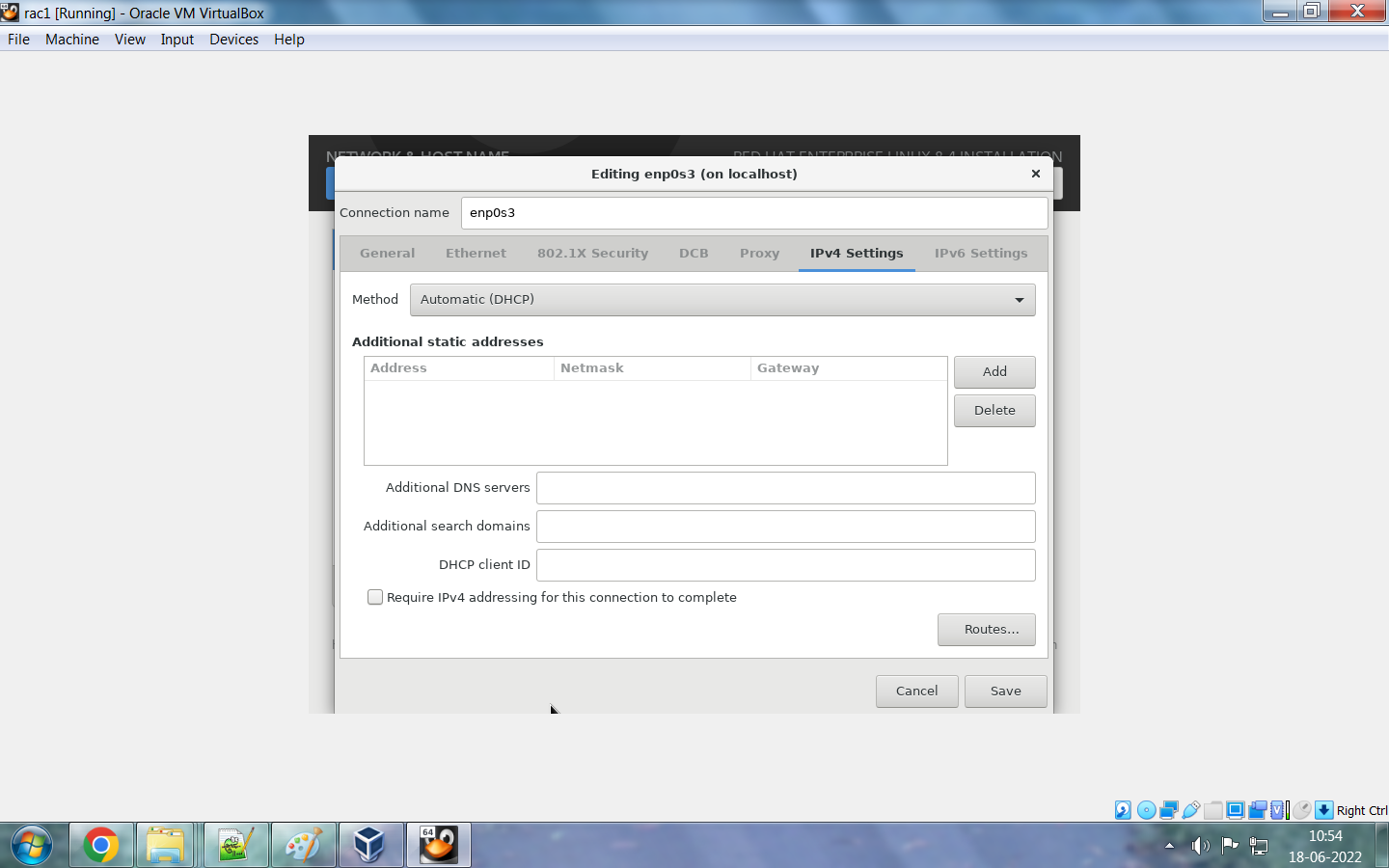


Nhấp vào tùy chọn "BẬT" rồi chọn "Xong" . Trạng thái mạng của cả hai bộ chuyển đổi sẽ hiển thị là " đã kết nối ".


Bước 6: Thực hiện kiểm tra sau khi lắp đặt.
Nhấp vào tùy chọn "Chèn ảnh đĩa CD Guest Additions" để sao chép/dán dữ liệu và kéo/thả tệp từ máy tính để bàn của bạn sang máy ảo VDI và ngược lại. Hệ thống sẽ yêu cầu thông tin đăng nhập người dùng root hoặc bạn cần đăng nhập với tư cách người dùng root để thực hiện thao tác này.


Giờ là lúc thực hiện các thay đổi ở cấp độ máy chủ. Hãy thực hiện các bước kiểm tra dưới đây sau khi cài đặt hệ điều hành.
- Cập nhật tệp /etc/hosts
- Dừng và tắt tường lửa.
- Vô hiệu hóa SELINUX
- Tạo cấu trúc thư mục
- Tạo người dùng và nhóm kèm quyền hạn
- Thêm các giới hạn và tham số kernel vào tệp cấu hình.
Hãy thực hiện các thay đổi trên máy chủ chính rồi sao chép máy ảo; nếu không, bạn cũng phải thực hiện các thay đổi trên máy chủ đã sao chép.
/etc/hosts file entry for both Nodes: #Public IP 10.20.30.101 rac1.localdomain rac1 10.20.30.102 rac2.localdomain rac2 #Private IP 10.1.2.201 rac1-priv.localdomain rac1-priv 10.1.2.202 rac2-priv.localdomain rac2-priv #VIP IP 10.20.30.103 rac1-vip.localdomain rac1-vip 10.20.30.104 rac2-vip.localdomain rac2-vip #scan IP 10.20.30.105 rac-scan.localdomain rac-scan Lệnh để view/stop/disable firewall: #systemctl status firewalld #systemctl stop firewalld #systemctl disable firewalld #systemctl status firewalld Lệnh để view/stop/disable firewall: #systemctl status firewalld User và group với quyền: [root@rac1 ~]# groupadd -g 2000 oinstall [root@rac1 ~]# groupadd -g 2100 asmadmin [root@rac1 ~]# groupadd -g 2200 dba [root@rac1 ~]# groupadd -g 2300 oper [root@rac1 ~]# groupadd -g 2400 asmdba [root@rac1 ~]# groupadd -g 2500 asmoper [root@rac1 /]# useradd grid [root@rac1 /]# useradd oracle [root@rac1 /]# passwd grid Changing password for user grid. New password: BAD PASSWORD: The password is shorter than 8 characters Retype new password: passwd: all authentication tokens updated successfully. [root@rac1 /]# [root@rac1 /]# passwd oracle Changing password for user oracle. New password: BAD PASSWORD: The password is shorter than 8 characters Retype new password: passwd: all authentication tokens updated successfully. [root@rac1 /]# usermod -g oinstall -G asmadmin,dba,oper,asmdba,asmoper grid [root@rac1 /]# usermod -g oinstall -G asmadmin,dba,oper,asmdba,asmoper oracle [root@rac1 /]# id grid uid=1001(grid) gid=2000(oinstall) groups=2000(oinstall),2100(asmadmin),2200(dba),2300(oper),2400(asmdba),2500(asmoper) [root@rac1 /]# id oracle uid=1002(oracle) gid=2000(oinstall) groups=2000(oinstall),2100(asmadmin),2200(dba),2300(oper),2400(asmdba),2500(asmoper) Tạo cấu trúc thư mục: [root@rac1 /]# mkdir -p /u01/app/grid [root@rac1 /]# mkdir -p /u01/app/21.0.0/grid [root@rac1 /]# mkdir -p /u01/app/oraInventory [root@rac1 /]# mkdir -p /u01/app/oracle [root@rac1 /]# chown -R grid:oinstall /u01/app/grid [root@rac1 /]# chown -R grid:oinstall /u01/app/21.0.0/grid [root@rac1 /]# chown -R grid:oinstall /u01/app/oraInventory [root@rac1 /]# chown -R oracle:oinstall /u01/app/oracle [root@rac1 /]# chmod -R 755 /u01/app/grid [root@rac1 /]# chmod -R 755 /u01/app/21.0.0/grid [root@rac1 /]# chmod -R 755 /u01/app/oraInventory [root@rac1 /]# chmod -R 755 /u01/app/oracle Thêm tham số cấu hình kernel và limits : [root@rac1 /]# vi /etc/sysctl.conf fs.file-max = 6815744 kernel.sem = 250 32000 100 128 kernel.shmmni = 4096 kernel.shmall = 1073741824 kernel.shmmax = 4398046511104 kernel.panic_on_oops = 1 net.core.rmem_default = 262144 net.core.rmem_max = 4194304 net.core.wmem_default = 262144 net.core.wmem_max = 1048576 net.ipv4.conf.all.rp_filter = 2 net.ipv4.conf.default.rp_filter = 2 fs.aio-max-nr = 1048576 net.ipv4.ip_local_port_range = 9000 65500 Apply thay đổi root@rac1 /]# sysctl -p [root@rac1 /]# vi /etc/security/limits.conf oracle soft nofile 1024 oracle hard nofile 65536 oracle soft nproc 16384 oracle hard nproc 16384 oracle soft stack 10240 oracle hard stack 32768 oracle hard memlock 134217728 oracle soft memlock 134217728 oracle soft data unlimited oracle hard data unlimited grid soft nofile 1024 grid hard nofile 65536 grid soft nproc 16384 grid hard nproc 16384 grid soft stack 10240 grid hard stack 32768 grid hard memlock 134217728 grid soft memlock 134217728 grid soft data unlimited grid hard data unlimited [root@rac1 /]# cat /etc/security/limits.conf | grep -v "#" |


Chuột phải vào máy ảo --> Cone


Đổi tên máy ảo thành rac2 với tùy chọn "Generate new mac addresses for all network adapters". Thao tác này sẽ loại bỏ nhu cầu phải thêm địa chỉ MAC thủ công sau khi sao chép máy.
Trong các phiên bản Virtual Box trước đây, chúng ta phải tự thay đổi địa chỉ MAC của máy chủ nhân bản, nhưng giờ đây chúng ta có tùy chọn tạo địa chỉ MAC mới trong quá trình nhân bản máy chủ.
 |




Nhấp vào "File" rồi chọn "Virtual Media Manager" .

Nhấp vào tùy chọn "Create" để tạo 3 đĩa OCR phục vụ mục đích cài đặt nhằm đảm bảo tính dự phòng thông thường.
- ocr1 - 10 GB
- ocr2 - 10 GB
- ocr3 - 10 GB


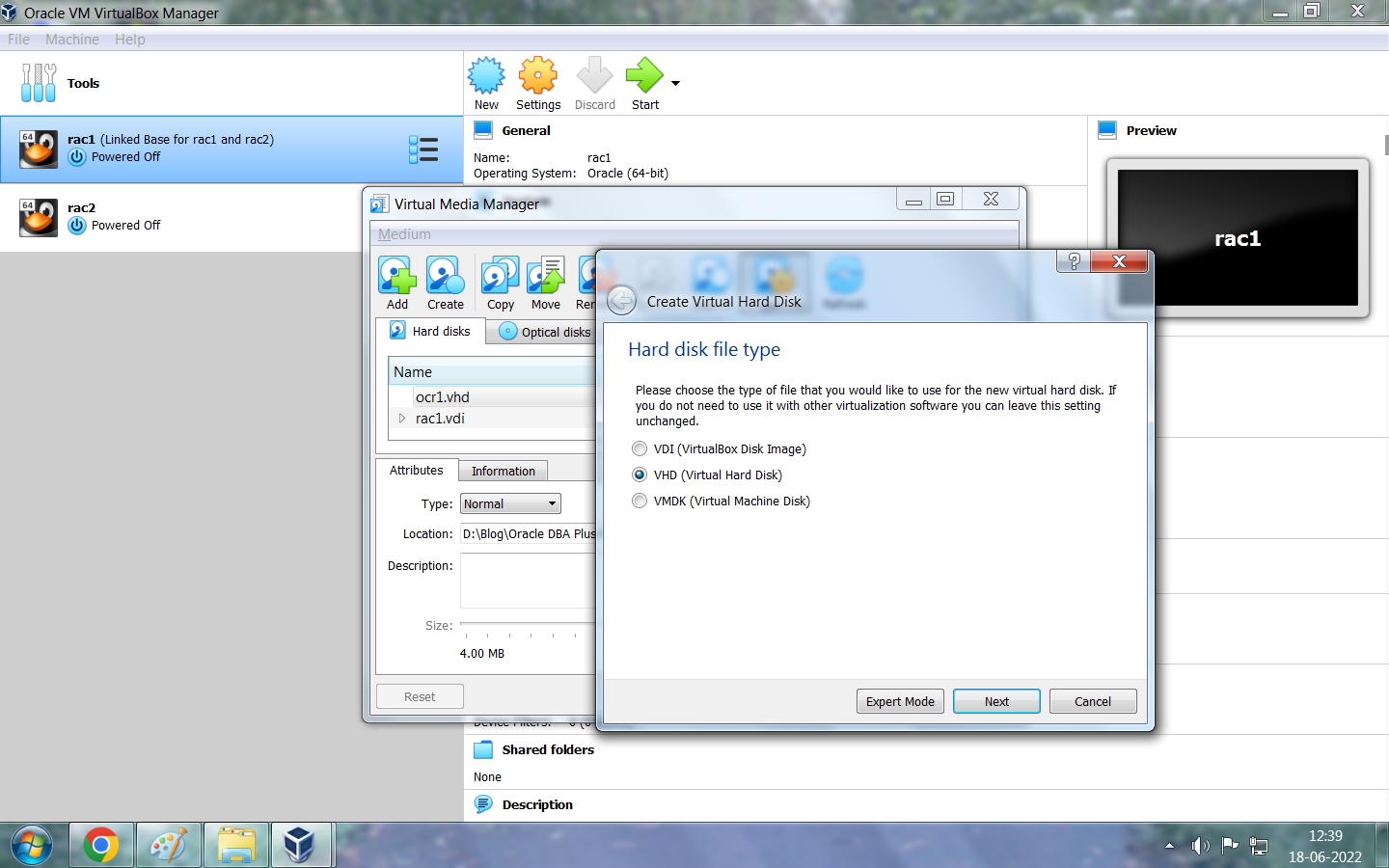


Tiếp tục vào "Tệp" rồi chọn "Trình quản lý phương tiện ảo" . Nhấp vào từng ổ đĩa OCR và đánh dấu 3 ổ đĩa OCR là "Có thể chia sẻ" .


Bạn có thể kiểm tra xem tất cả các ổ đĩa đã hiển thị trên màn hình bên dưới cho cả hai nút hay chưa.


- oracleasmlib
- hỗ trợ oracleasm
- kmod ----- Chỉ dành cho Redhat Linux
Dưới đây là một vài liên kết để tải xuống các gói oracleasm và kmod.
- Bạn có thể tải xuống gói oracleasmlib từ https://www.oracle.com/linux/downloads/linux-asmlib-v8-downloads.html
- Link tải xuống gói RPM "oracleasm-support": https://public-yum.oracle.com/repo/OracleLinux/OL8/addons/x86_64/index.html
- Link tải gói kmod : https://public-yum.oracle.com/oracle-linux-8.html


# Thực hiện các lệnh bên dưới để cài đặt gói RPM "libnsl" trên cả hai nút . [root@rac1 grid]# cd /media/ [root@rac1 media]# ll total 12 drwxrwx--- 1 root vboxsf 4096 Jun 18 14:42 sf_RHEL_8.4_64-bit drwxrwx--- 1 root vboxsf 8192 Jun 6 18:37 sf_Software [root@rac1 media]# cd sf_RHEL_8.4_64-bit/ [root@rac1 sf_RHEL_8.4_64-bit]# ll drwxrwx--- 1 root vboxsf 0 May 4 2021 AppStream drwxrwx--- 1 root vboxsf 0 May 4 2021 BaseOS drwxrwx--- 1 root vboxsf 0 May 4 2021 EFI -rwxrwx--- 1 root vboxsf 8154 May 4 2021 EULA -rwxrwx--- 1 root vboxsf 1455 May 4 2021 extra_files.json -rwxrwx--- 1 root vboxsf 18092 May 4 2021 GPL drwxrwx--- 1 root vboxsf 0 May 4 2021 images drwxrwx--- 1 root vboxsf 4096 May 4 2021 isolinux -rwxrwx--- 1 root vboxsf 103 May 4 2021 media.repo -rwxrwx--- 1 root vboxsf 10130292736 Sep 25 2021 rhel-8.4-x86_64-dvd.iso -rwxrwx--- 1 root vboxsf 1669 May 4 2021 RPM-GPG-KEY-redhat-beta -rwxrwx--- 1 root vboxsf 5134 May 4 2021 RPM-GPG-KEY-redhat-release -rwxrwx--- 1 root vboxsf 1796 May 4 2021 TRANS.TBL [root@rac1 sf_RHEL_8.4_64-bit]# pwd /media/sf_RHEL_8.4_64-bit [root@rac1 sf_RHEL_8.4_64-bit]# cp media.repo /etc/yum.repos.d/rhel7dvd.repo [root@rac1 sf_RHEL_8.4_64-bit]# vi /etc/yum.repos.d/rhel7dvd.repo [root@rac1 sf_RHEL_8.4_64-bit]# pwd /media/sf_RHEL_8.4_64-bit [root@rac1 sf_RHEL_8.4_64-bit]# ll drwxrwx--- 1 root vboxsf 0 May 4 2021 AppStream drwxrwx--- 1 root vboxsf 0 May 4 2021 BaseOS drwxrwx--- 1 root vboxsf 0 May 4 2021 EFI -rwxrwx--- 1 root vboxsf 8154 May 4 2021 EULA -rwxrwx--- 1 root vboxsf 1455 May 4 2021 extra_files.json -rwxrwx--- 1 root vboxsf 18092 May 4 2021 GPL drwxrwx--- 1 root vboxsf 0 May 4 2021 images drwxrwx--- 1 root vboxsf 4096 May 4 2021 isolinux -rwxrwx--- 1 root vboxsf 103 May 4 2021 media.repo -rwxrwx--- 1 root vboxsf 10130292736 Sep 25 2021 rhel-8.4-x86_64-dvd.iso -rwxrwx--- 1 root vboxsf 1669 May 4 2021 RPM-GPG-KEY-redhat-beta -rwxrwx--- 1 root vboxsf 5134 May 4 2021 RPM-GPG-KEY-redhat-release -rwxrwx--- 1 root vboxsf 1796 May 4 2021 TRANS.TBL [root@rac1 sf_RHEL_8.4_64-bit]# cd BaseOS/ [root@rac1 BaseOS]# pwd /media/sf_RHEL_8.4_64-bit/BaseOS [root@rac1 BaseOS]# ll drwxrwx--- 1 root vboxsf 1048576 May 4 2021 Packages drwxrwx--- 1 root vboxsf 4096 May 4 2021 repodata [root@rac1 BaseOS]# cd - /media/sf_RHEL_8.4_64-bit [root@rac1 sf_RHEL_8.4_64-bit]# vi /etc/yum.repos.d/rhel7dvd.repo [root@rac1 sf_RHEL_8.4_64-bit]# [root@rac1 sf_RHEL_8.4_64-bit]# cat /etc/yum.repos.d/rhel7dvd.repo [InstallMedia] name=Red Hat Enterprise Linux 8.4.0 mediaid=None metadata_expire=-1 gpgcheck=1 cost=500 enabled=1 baseurl=file:///media/sf_RHEL_8.4_64-bit/BaseOS gpgkey=file:///etc/pki/rpm-gpg/RPM-GPG-KEY-redhat-release [root@rac1 sf_RHEL_8.4_64-bit]# chmod 644 /etc/yum.repos.d/rhel7dvd.repo [root@rac1 sf_RHEL_8.4_64-bit]# yum install libnsl Updating Subscription Management repositories. Unable to read consumer identity This system is not registered to Red Hat Subscription Management. You can use subscription-manager to register. Red Hat Enterprise Linux 8.4.0 104 MB/s | 2.3 MB 00:00 Dependencies resolved. ============================================================================================================================================================== Package Architecture Version Repository Size ============================================================================================================================================================== Installing: libnsl x86_64 2.28-151.el8 InstallMedia 102 k Transaction Summary ============================================================================================================================================================== Install 1 Package Total size: 102 k Installed size: 160 k Is this ok [y/N]: y Downloading Packages: warning: /media/sf_RHEL_8.4_64-bit/BaseOS/Packages/libnsl-2.28-151.el8.x86_64.rpm: Header V3 RSA/SHA256 Signature, key ID fd431d51: NOKEY Red Hat Enterprise Linux 8.4.0 459 kB/s | 5.0 kB 00:00 Importing GPG key 0xFD431D51: Userid : "Red Hat, Inc. (release key 2) <security@redhat.com>" Fingerprint: 567E 347A D004 4ADE 55BA 8A5F 199E 2F91 FD43 1D51 From : /etc/pki/rpm-gpg/RPM-GPG-KEY-redhat-release Is this ok [y/N]: y Key imported successfully Importing GPG key 0xD4082792: Userid : "Red Hat, Inc. (auxiliary key) <security@redhat.com>" Fingerprint: 6A6A A7C9 7C88 90AE C6AE BFE2 F76F 66C3 D408 2792 From : /etc/pki/rpm-gpg/RPM-GPG-KEY-redhat-release Is this ok [y/N]: y Key imported successfully Running transaction check Transaction check succeeded. Running transaction test Transaction test succeeded. Running transaction Preparing : 1/1 Installing : libnsl-2.28-151.el8.x86_64 1/1 Running scriptlet: libnsl-2.28-151.el8.x86_64 1/1 Verifying : libnsl-2.28-151.el8.x86_64 1/1 Installed products updated. Installed: libnsl-2.28-151.el8.x86_64 Complete! [root@rac2 sf_RHEL_8.4_64-bit]# cp media.repo /etc/yum.repos.d/rhel7dvd.repo [root@rac2 sf_RHEL_8.4_64-bit]# vi /etc/yum.repos.d/rhel7dvd.repo [root@rac2 sf_RHEL_8.4_64-bit]# cat /etc/yum.repos.d/rhel7dvd.repo [InstallMedia] name=Red Hat Enterprise Linux 8.4.0 mediaid=None metadata_expire=-1 gpgcheck=1 cost=500 enabled=1 baseurl=file:///media/sf_RHEL_8.4_64-bit/BaseOS gpgkey=file:///etc/pki/rpm-gpg/RPM-GPG-KEY-redhat-release [root@rac2 sf_RHEL_8.4_64-bit]# chmod 644 /etc/yum.repos.d/rhel7dvd.repo [root@rac2 sf_RHEL_8.4_64-bit]# yum install libnsl Updating Subscription Management repositories. Unable to read consumer identity This system is not registered to Red Hat Subscription Management. You can use subscription-manager to register. Red Hat Enterprise Linux 8.4.0 120 MB/s | 2.3 MB 00:00 Dependencies resolved. ============================================================================================================================================================== Package Architecture Version Repository Size ============================================================================================================================================================== Installing: libnsl x86_64 2.28-151.el8 InstallMedia 102 k Transaction Summary ============================================================================================================================================================== Install 1 Package Total size: 102 k Installed size: 160 k Is this ok [y/N]: y Downloading Packages: warning: /media/sf_RHEL_8.4_64-bit/BaseOS/Packages/libnsl-2.28-151.el8.x86_64.rpm: Header V3 RSA/SHA256 Signature, key ID fd431d51: NOKEY Red Hat Enterprise Linux 8.4.0 257 kB/s | 5.0 kB 00:00 Importing GPG key 0xFD431D51: Userid : "Red Hat, Inc. (release key 2) <security@redhat.com>" Fingerprint: 567E 347A D004 4ADE 55BA 8A5F 199E 2F91 FD43 1D51 From : /etc/pki/rpm-gpg/RPM-GPG-KEY-redhat-release Is this ok [y/N]: y Key imported successfully Importing GPG key 0xD4082792: Userid : "Red Hat, Inc. (auxiliary key) <security@redhat.com>" Fingerprint: 6A6A A7C9 7C88 90AE C6AE BFE2 F76F 66C3 D408 2792 From : /etc/pki/rpm-gpg/RPM-GPG-KEY-redhat-release Is this ok [y/N]: y Key imported successfully Running transaction check Transaction check succeeded. Running transaction test Transaction test succeeded. Running transaction Preparing : 1/1 Installing : libnsl-2.28-151.el8.x86_64 1/1 Running scriptlet: libnsl-2.28-151.el8.x86_64 1/1 Verifying : libnsl-2.28-151.el8.x86_64 1/1 Installed products updated. Installed: libnsl-2.28-151.el8.x86_64 Complete! |

Cài đặt gói RPM " cvuqdisk" [grid@rac1 rpm]$ su - Password: [root@rac1 ~]# cd /u01/app/21.0.0/grid/cv cv/ cvu/ [root@rac1 ~]# cd /u01/app/21.0.0/grid/cv/r remenv/ rpm/ [root@rac1 ~]# cd /u01/app/21.0.0/grid/cv/rpm/ [root@rac1 rpm]# pwd /u01/app/21.0.0/grid/cv/rpm [root@rac1 rpm]# ll -rw-r--r-- 1 grid oinstall 11904 Jul 8 2021 cvuqdisk-1.0.10-1.rpm [root@rac1 rpm]# rpm -ivh cvuqdisk-1.0.10-1.rpm Verifying... ################################# [100%] Preparing... ################################# [100%] Using default group oinstall to install package Updating / installing... 1:cvuqdisk-1.0.10-1 ################################# [100%] [root@rac1 rpm]# scp cvuqdisk-1.0.10-1.rpm grid@rac2:/tmp/ The authenticity of host 'rac2 (10.20.30.102)' can't be established. ECDSA key fingerprint is SHA256:paSUsPHPoUwF04C4TJffskwngg82TS389hoEYRvbWJ4. Are you sure you want to continue connecting (yes/no/[fingerprint])? yes Warning: Permanently added 'rac2,10.20.30.102' (ECDSA) to the list of known hosts. grid@rac2's password: [root@rac1 rpm]# scp cvuqdisk-1.0.10-1.rpm grid@rac2:/tmp/^C [root@rac1 rpm]# scp cvuqdisk-1.0.10-1.rpm root@rac2:/tmp/ root@rac2's password: cvuqdisk-1.0.10-1.rpm 100% 12KB 14.6MB/s 00:00 [root@rac2 ~]# cd /tmp [root@rac2 tmp]# ll -rw-r--r--. 1 root root 2956 Jun 18 11:22 anaconda.log drwxr-x--- 3 grid oinstall 4096 Jun 18 23:11 CVU_21.0.0.0.0_grid -rw-r--r-- 1 root root 11904 Jun 18 23:13 cvuqdisk-1.0.10-1.rpm -rw-r--r--. 1 root root 2286 Jun 18 11:20 dbus.log -rw-r--r--. 1 root root 0 Jun 18 11:20 dnf.librepo.log drwxr-xr-x. 2 root root 19 Jun 18 11:10 hsperfdata_root -rwx------. 1 root root 701 Jun 18 11:19 ks-script-7ob6m6ob -rwx------. 1 root root 291 Jun 18 11:19 ks-script-9ryflhsk -rw-r--r--. 1 root root 0 Jun 18 11:20 packaging.log -rw-r--r--. 1 root root 131 Jun 18 11:20 program.log -rw-r--r--. 1 root root 0 Jun 18 11:20 sensitive-info.log drwx------ 3 root root 17 Jun 18 22:49 systemd-private-618118b2a7c04baca8d32b7487e3a26d-colord.service-Kt0f9i drwx------ 3 root root 17 Jun 18 23:13 systemd-private-618118b2a7c04baca8d32b7487e3a26d-fprintd.service-h0qY6i drwx------ 3 root root 17 Jun 18 22:55 systemd-private-618118b2a7c04baca8d32b7487e3a26d-fwupd.service-X9p7Kh drwx------ 3 root root 17 Jun 18 22:47 systemd-private-618118b2a7c04baca8d32b7487e3a26d-ModemManager.service-Mkm12g drwx------ 3 root root 17 Jun 18 22:47 systemd-private-618118b2a7c04baca8d32b7487e3a26d-rtkit-daemon.service-YUTjcf drwx------. 2 rupesh rupesh 6 Jun 18 14:52 tracker-extract-files.1000 drwx------ 2 grid oinstall 6 Jun 18 22:55 tracker-extract-files.1001 -rw-r--r--. 1 root root 25965 Jun 18 11:29 vboxguest-Module.symvers [root@rac2 tmp]# [root@rac2 tmp]# rpm -ivh cvuqdisk-1.0.10-1.rpm Verifying... ################################# [100%] Preparing... ################################# [100%] Using default group oinstall to install package Updating / installing... 1:cvuqdisk-1.0.10-1 ################################# [100%] |


Node1: [root@rac1 Oracle 21c]# oracleasm configure -i Configuring the Oracle ASM library driver. This will configure the on-boot properties of the Oracle ASM library driver. The following questions will determine whether the driver is loaded on boot and what permissions it will have. The current values will be shown in brackets ('[]'). Hitting <ENTER> without typing an answer will keep that current value. Ctrl-C will abort. Default user to own the driver interface []: grid Default group to own the driver interface []: oinstall Start Oracle ASM library driver on boot (y/n) [n]: y Scan for Oracle ASM disks on boot (y/n) [y]: y Writing Oracle ASM library driver configuration: done [root@rac1 Oracle 21c]# oracleasm init Creating /dev/oracleasm mount point: /dev/oracleasm Loading module "oracleasm": oracleasm Configuring "oracleasm" to use device physical block size Mounting ASMlib driver filesystem: /dev/oracleasm Node2: [root@rac2 Oracle 21c]# oracleasm configure -i Configuring the Oracle ASM library driver. This will configure the on-boot properties of the Oracle ASM library driver. The following questions will determine whether the driver is loaded on boot and what permissions it will have. The current values will be shown in brackets ('[]'). Hitting <ENTER> without typing an answer will keep that current value. Ctrl-C will abort. Default user to own the driver interface []: grid Default group to own the driver interface []: oinstall Start Oracle ASM library driver on boot (y/n) [n]: y Scan for Oracle ASM disks on boot (y/n) [y]: y Writing Oracle ASM library driver configuration: done [root@rac2 Oracle 21c]# oracleasm init Creating /dev/oracleasm mount point: /dev/oracleasm Loading module "oracleasm": oracleasm Configuring "oracleasm" to use device physical block size Mounting ASMlib driver filesystem: /dev/oracleasm |

Lưu ý: Phân vùng thiết bị từ bất kỳ một nút nào. Không cần phân vùng thiết bị trên tất cả các nút.
[rupesh@rac1 ~]$ su - Password: [root@rac1 ~]# fdisk -l Disk /dev/sdc: 10 GiB, 10737418240 bytes, 20971520 sectors Units: sectors of 1 * 512 = 512 bytes Sector size (logical/physical): 512 bytes / 512 bytes I/O size (minimum/optimal): 512 bytes / 512 bytes Disk /dev/sda: 35 GiB, 37580963840 bytes, 73400320 sectors Units: sectors of 1 * 512 = 512 bytes Sector size (logical/physical): 512 bytes / 512 bytes I/O size (minimum/optimal): 512 bytes / 512 bytes Disklabel type: dos Disk identifier: 0x81d908ce Device Boot Start End Sectors Size Id Type /dev/sda1 * 2048 2099199 2097152 1G 83 Linux /dev/sda2 2099200 73400319 71301120 34G 8e Linux LVM Disk /dev/sdb: 10 GiB, 10737418240 bytes, 20971520 sectors Units: sectors of 1 * 512 = 512 bytes Sector size (logical/physical): 512 bytes / 512 bytes I/O size (minimum/optimal): 512 bytes / 512 bytes Disk /dev/sdd: 10 GiB, 10737418240 bytes, 20971520 sectors Units: sectors of 1 * 512 = 512 bytes Sector size (logical/physical): 512 bytes / 512 bytes I/O size (minimum/optimal): 512 bytes / 512 bytes Disk /dev/mapper/rhel-root: 30.5 GiB, 32744931328 bytes, 63954944 sectors Units: sectors of 1 * 512 = 512 bytes Sector size (logical/physical): 512 bytes / 512 bytes I/O size (minimum/optimal): 512 bytes / 512 bytes Disk /dev/mapper/rhel-swap: 3.5 GiB, 3758096384 bytes, 7340032 sectors Units: sectors of 1 * 512 = 512 bytes Sector size (logical/physical): 512 bytes / 512 bytes I/O size (minimum/optimal): 512 bytes / 512 bytes [root@rac1 ~]# fdisk -l /dev/sdb Disk /dev/sdb: 10 GiB, 10737418240 bytes, 20971520 sectors Units: sectors of 1 * 512 = 512 bytes Sector size (logical/physical): 512 bytes / 512 bytes I/O size (minimum/optimal): 512 bytes / 512 bytes [root@rac1 ~]# fdisk -l /dev/sdc Disk /dev/sdc: 10 GiB, 10737418240 bytes, 20971520 sectors Units: sectors of 1 * 512 = 512 bytes Sector size (logical/physical): 512 bytes / 512 bytes I/O size (minimum/optimal): 512 bytes / 512 bytes [root@rac1 ~]# fdisk -l /dev/sdd Disk /dev/sdd: 10 GiB, 10737418240 bytes, 20971520 sectors Units: sectors of 1 * 512 = 512 bytes Sector size (logical/physical): 512 bytes / 512 bytes I/O size (minimum/optimal): 512 bytes / 512 bytes [root@rac1 ~]# fdisk /dev/sdb Welcome to fdisk (util-linux 2.32.1). Changes will remain in memory only, until you decide to write them. Be careful before using the write command. Device does not contain a recognized partition table. Created a new DOS disklabel with disk identifier 0x6f9ec9f0. Command (m for help): m Help: DOS (MBR) a toggle a bootable flag b edit nested BSD disklabel c toggle the dos compatibility flag Generic d delete a partition F list free unpartitioned space l list known partition types n add a new partition p print the partition table t change a partition type v verify the partition table i print information about a partition Misc m print this menu u change display/entry units x extra functionality (experts only) Script I load disk layout from sfdisk script file O dump disk layout to sfdisk script file Save & Exit w write table to disk and exit q quit without saving changes Create a new label g create a new empty GPT partition table G create a new empty SGI (IRIX) partition table o create a new empty DOS partition table s create a new empty Sun partition table Command (m for help): n Partition type p primary (0 primary, 0 extended, 4 free) e extended (container for logical partitions) Select (default p): p Partition number (1-4, default 1): First sector (2048-20971519, default 2048): Last sector, +sectors or +size{K,M,G,T,P} (2048-20971519, default 20971519): Created a new partition 1 of type 'Linux' and of size 10 GiB. Command (m for help): w The partition table has been altered. Calling ioctl() to re-read partition table. Syncing disks. [root@rac1 ~]# fdisk /dev/sdc Welcome to fdisk (util-linux 2.32.1). Changes will remain in memory only, until you decide to write them. Be careful before using the write command. Device does not contain a recognized partition table. Created a new DOS disklabel with disk identifier 0xe7c7d1b9. Command (m for help): n Partition type p primary (0 primary, 0 extended, 4 free) e extended (container for logical partitions) Select (default p): p Partition number (1-4, default 1): First sector (2048-20971519, default 2048): Last sector, +sectors or +size{K,M,G,T,P} (2048-20971519, default 20971519): Created a new partition 1 of type 'Linux' and of size 10 GiB. Command (m for help): w The partition table has been altered. Calling ioctl() to re-read partition table. Syncing disks. [root@rac1 ~]# fdisk /dev/sdd Welcome to fdisk (util-linux 2.32.1). Changes will remain in memory only, until you decide to write them. Be careful before using the write command. Device does not contain a recognized partition table. Created a new DOS disklabel with disk identifier 0x0541b9c6. Command (m for help): n Partition type p primary (0 primary, 0 extended, 4 free) e extended (container for logical partitions) Select (default p): p Partition number (1-4, default 1): First sector (2048-20971519, default 2048): Last sector, +sectors or +size{K,M,G,T,P} (2048-20971519, default 20971519): Created a new partition 1 of type 'Linux' and of size 10 GiB. Command (m for help): w The partition table has been altered. Calling ioctl() to re-read partition table. Syncing disks. [root@rac1 ~]# fdisk -l /dev/sdb Disk /dev/sdb: 10 GiB, 10737418240 bytes, 20971520 sectors Units: sectors of 1 * 512 = 512 bytes Sector size (logical/physical): 512 bytes / 512 bytes I/O size (minimum/optimal): 512 bytes / 512 bytes Disklabel type: dos Disk identifier: 0x6f9ec9f0 Device Boot Start End Sectors Size Id Type /dev/sdb1 2048 20971519 20969472 10G 83 Linux [root@rac1 ~]# fdisk -l /dev/sdc Disk /dev/sdc: 10 GiB, 10737418240 bytes, 20971520 sectors Units: sectors of 1 * 512 = 512 bytes Sector size (logical/physical): 512 bytes / 512 bytes I/O size (minimum/optimal): 512 bytes / 512 bytes Disklabel type: dos Disk identifier: 0xe7c7d1b9 Device Boot Start End Sectors Size Id Type /dev/sdc1 2048 20971519 20969472 10G 83 Linux [root@rac1 ~]# fdisk -l /dev/sdd Disk /dev/sdd: 10 GiB, 10737418240 bytes, 20971520 sectors Units: sectors of 1 * 512 = 512 bytes Sector size (logical/physical): 512 bytes / 512 bytes I/O size (minimum/optimal): 512 bytes / 512 bytes Disklabel type: dos Disk identifier: 0x0541b9c6 Device Boot Start End Sectors Size Id Type /dev/sdd1 2048 20971519 20969472 10G 83 Linux [root@rac1 Oracle 21c]# id uid=0(root) gid=0(root) groups=0(root) [root@rac1 Oracle 21c]# oracleasm createdisk OCRDISK1 /dev/sdb1 Writing disk header: done Instantiating disk: done [root@rac1 Oracle 21c]# oracleasm createdisk OCRDISK2 /dev/sdc1 Writing disk header: done Instantiating disk: done [root@rac1 Oracle 21c]# oracleasm createdisk OCRDISK3 /dev/sdd1 Writing disk header: done Instantiating disk: done |


#ssh configuration for grid user on both node: Node1: [grid@rac1 ~]$ rm -rf .ssh [grid@rac1 ~]$ mkdir .ssh [grid@rac1 ~]$ chmod 700 .ssh [grid@rac1 ~]$ cd .ssh [grid@rac1 .ssh]$ ssh-keygen -t rsa Generating public/private rsa key pair. Enter file in which to save the key (/home/grid/.ssh/id_rsa): Enter passphrase (empty for no passphrase): Enter same passphrase again: Your identification has been saved in /home/grid/.ssh/id_rsa. Your public key has been saved in /home/grid/.ssh/id_rsa.pub. The key fingerprint is: SHA256:Wh0g51+87cEgTuPsV4xfYUr8OwDkFzOPCLCp6/9xmPQ grid@rac1.localdomain The key's randomart image is: +---[RSA 3072]----+ | ..+. . + | | +o.+.o * | | o. =++= + | | . B =+B+ .| | . S.* oo*..| | .o..+ +.o.| | .. +.E. oo | | . o. .| | ..... | +----[SHA256]-----+ [grid@rac1 .ssh]$ ssh-keygen -t dsa Generating public/private dsa key pair. Enter file in which to save the key (/home/grid/.ssh/id_dsa): Enter passphrase (empty for no passphrase): Enter same passphrase again: Your identification has been saved in /home/grid/.ssh/id_dsa. Your public key has been saved in /home/grid/.ssh/id_dsa.pub. The key fingerprint is: SHA256://6QZ2gvCr4xk8Bhm+djuO7kkIc8jVgSo+rEQ0YqAQ8 grid@rac1.localdomain The key's randomart image is: +---[DSA 1024]----+ |E | |.o | |..+ o | |oo o o + | |+o. . = S | |* = = = o o | |.+. B = X . = o | |o . * + * o.= | | . o= o..oooo | +----[SHA256]-----+ [grid@rac1 .ssh]$ cat *.pub >> authorized_keys.rac1 [grid@rac1 .ssh]$ ll -rw-r--r-- 1 grid oinstall 1186 Jun 18 22:59 authorized_keys.rac1 -rw------- 1 grid oinstall 1393 Jun 18 22:59 id_dsa -rw-r--r-- 1 grid oinstall 611 Jun 18 22:59 id_dsa.pub -rw------- 1 grid oinstall 2610 Jun 18 22:58 id_rsa -rw-r--r-- 1 grid oinstall 575 Jun 18 22:58 id_rsa.pub [grid@rac1 .ssh]$ scp authorized_keys.rac1 grid@rac2:/home/grid/.ssh/ The authenticity of host 'rac2 (10.20.30.102)' can't be established. ECDSA key fingerprint is SHA256:paSUsPHPoUwF04C4TJffskwngg82TS389hoEYRvbWJ4. Are you sure you want to continue connecting (yes/no/[fingerprint])? yes Warning: Permanently added 'rac2,10.20.30.102' (ECDSA) to the list of known hosts. grid@rac2's password: authorized_keys.rac1 100% 1186 1.6MB/s 00:00 [grid@rac1 .ssh]$ ll -rw-r--r-- 1 grid oinstall 1186 Jun 18 22:59 authorized_keys.rac1 -rw-r--r-- 1 grid oinstall 1186 Jun 18 23:00 authorized_keys.rac2 -rw------- 1 grid oinstall 1393 Jun 18 22:59 id_dsa -rw-r--r-- 1 grid oinstall 611 Jun 18 22:59 id_dsa.pub -rw------- 1 grid oinstall 2610 Jun 18 22:58 id_rsa -rw-r--r-- 1 grid oinstall 575 Jun 18 22:58 id_rsa.pub -rw-r--r-- 1 grid oinstall 179 Jun 18 23:00 known_hosts [grid@rac1 .ssh]$ cd $HOME/.ssh [grid@rac1 .ssh]$ cat *.rac* >> authorized_keys [grid@rac1 .ssh]$ chmod 600 authorized_keys [grid@rac1 .ssh]$ ll -rw------- 1 grid oinstall 2372 Jun 18 23:01 authorized_keys -rw-r--r-- 1 grid oinstall 1186 Jun 18 22:59 authorized_keys.rac1 -rw-r--r-- 1 grid oinstall 1186 Jun 18 23:00 authorized_keys.rac2 -rw------- 1 grid oinstall 1393 Jun 18 22:59 id_dsa -rw-r--r-- 1 grid oinstall 611 Jun 18 22:59 id_dsa.pub -rw------- 1 grid oinstall 2610 Jun 18 22:58 id_rsa -rw-r--r-- 1 grid oinstall 575 Jun 18 22:58 id_rsa.pub -rw-r--r-- 1 grid oinstall 179 Jun 18 23:00 known_hosts Node2: [grid@rac2 ~]$ cd $HOME [grid@rac2 ~]$ pwd /home/grid [grid@rac2 ~]$ mkdir .ssh [grid@rac2 ~]$ chmod 700 .ssh [grid@rac2 ~]$ cd .ssh [grid@rac2 .ssh]$ ssh-keygen -t rsa Generating public/private rsa key pair. Enter file in which to save the key (/home/grid/.ssh/id_rsa): Enter passphrase (empty for no passphrase): Enter same passphrase again: Your identification has been saved in /home/grid/.ssh/id_rsa. Your public key has been saved in /home/grid/.ssh/id_rsa.pub. The key fingerprint is: SHA256:KEuM3Mq0C0JFkbRyAKlVVU96WRoNeCtVdJrtoZNoK5E grid@rac2.localdomain The key's randomart image is: +---[RSA 3072]----+ |oo.=+.....+=+ . | |. +.. .+o=.= | |.o + .o=.o o | |..++ ..o.. + . | | .+ = . E.o + . | |.o + o o . . | |o + . . . | |.. . . | | . | +----[SHA256]-----+ [grid@rac2 .ssh]$ ssh-keygen -t dsa Generating public/private dsa key pair. Enter file in which to save the key (/home/grid/.ssh/id_dsa): Enter passphrase (empty for no passphrase): Enter same passphrase again: Your identification has been saved in /home/grid/.ssh/id_dsa. Your public key has been saved in /home/grid/.ssh/id_dsa.pub. The key fingerprint is: SHA256:QcEIHs/2Pqdwvrk458WufjiEcFfjD1SZpt00s5/n4Yw grid@rac2.localdomain The key's randomart image is: +---[DSA 1024]----+ | o. oo. ..o | | . +... + + + | | . + .+ = o + | | ......+ . o | | o oS o ..| | .... . oo| | ..+.+ +.o| | .=+B. E o.| | .=X*. | +----[SHA256]-----+ [grid@rac2 .ssh]$ cat *.pub >> authorized_keys.rac2 [grid@rac2 .ssh]$ ll -rw-r--r-- 1 grid oinstall 1186 Jun 18 22:59 authorized_keys.rac2 -rw------- 1 grid oinstall 1393 Jun 18 22:59 id_dsa -rw-r--r-- 1 grid oinstall 611 Jun 18 22:59 id_dsa.pub -rw------- 1 grid oinstall 2610 Jun 18 22:58 id_rsa -rw-r--r-- 1 grid oinstall 575 Jun 18 22:58 id_rsa.pub -rw-r--r-- 1 grid oinstall 179 Jun 18 22:57 known_hosts [grid@rac2 .ssh]$ ll -rw-r--r-- 1 grid oinstall 1186 Jun 18 23:00 authorized_keys.rac1 -rw-r--r-- 1 grid oinstall 1186 Jun 18 22:59 authorized_keys.rac2 -rw------- 1 grid oinstall 1393 Jun 18 22:59 id_dsa -rw-r--r-- 1 grid oinstall 611 Jun 18 22:59 id_dsa.pub -rw------- 1 grid oinstall 2610 Jun 18 22:58 id_rsa -rw-r--r-- 1 grid oinstall 575 Jun 18 22:58 id_rsa.pub -rw-r--r-- 1 grid oinstall 179 Jun 18 22:57 known_hosts [grid@rac2 .ssh]$ scp authorized_keys.rac2 grid@rac1:/home/grid/.ssh/ grid@rac1's password: authorized_keys.rac2 100% 1186 2.0MB/s 00:00 [grid@rac2 .ssh]$ ll -rw-r--r-- 1 grid oinstall 1186 Jun 18 23:00 authorized_keys.rac1 -rw-r--r-- 1 grid oinstall 1186 Jun 18 22:59 authorized_keys.rac2 -rw------- 1 grid oinstall 1393 Jun 18 22:59 id_dsa -rw-r--r-- 1 grid oinstall 611 Jun 18 22:59 id_dsa.pub -rw------- 1 grid oinstall 2610 Jun 18 22:58 id_rsa -rw-r--r-- 1 grid oinstall 575 Jun 18 22:58 id_rsa.pub -rw-r--r-- 1 grid oinstall 179 Jun 18 22:57 known_hosts [grid@rac2 .ssh]$ cd $HOME/.ssh [grid@rac2 .ssh]$ cat *.rac* >> authorized_keys [grid@rac2 .ssh]$ chmod 600 authorized_keys [grid@rac2 .ssh]$ ll -rw------- 1 grid oinstall 2372 Jun 18 23:01 authorized_keys -rw-r--r-- 1 grid oinstall 1186 Jun 18 23:00 authorized_keys.rac1 -rw-r--r-- 1 grid oinstall 1186 Jun 18 22:59 authorized_keys.rac2 -rw------- 1 grid oinstall 1393 Jun 18 22:59 id_dsa -rw-r--r-- 1 grid oinstall 611 Jun 18 22:59 id_dsa.pub -rw------- 1 grid oinstall 2610 Jun 18 22:58 id_rsa -rw-r--r-- 1 grid oinstall 575 Jun 18 22:58 id_rsa.pub -rw-r--r-- 1 grid oinstall 179 Jun 18 22:57 known_hosts [grid@rac1 .ssh]$ ssh rac1 The authenticity of host 'rac1 (10.20.30.101)' can't be established. ECDSA key fingerprint is SHA256:paSUsPHPoUwF04C4TJffskwngg82TS389hoEYRvbWJ4. Are you sure you want to continue connecting (yes/no/[fingerprint])? yes Warning: Permanently added 'rac1,10.20.30.101' (ECDSA) to the list of known hosts. Activate the web console with: systemctl enable --now cockpit.socket This system is not registered to Red Hat Insights. See https://cloud.redhat.com/ To register this system, run: insights-client --register Last login: Sat Jun 18 22:57:45 2022 from 10.20.30.102 [grid@rac1 ~]$ ssh rac2 Activate the web console with: systemctl enable --now cockpit.socket This system is not registered to Red Hat Insights. See https://cloud.redhat.com/ To register this system, run: insights-client --register Last login: Sat Jun 18 22:57:33 2022 from 10.20.30.101 [grid@rac2 ~]$ ssh rac1 Activate the web console with: systemctl enable --now cockpit.socket This system is not registered to Red Hat Insights. See https://cloud.redhat.com/ To register this system, run: insights-client --register Last login: Sat Jun 18 23:03:35 2022 from 10.20.30.101 grid@rac2 .ssh]$ ssh rac2 The authenticity of host 'rac2 (10.20.30.102)' can't be established. ECDSA key fingerprint is SHA256:paSUsPHPoUwF04C4TJffskwngg82TS389hoEYRvbWJ4. Are you sure you want to continue connecting (yes/no/[fingerprint])? yes Warning: Permanently added 'rac2,10.20.30.102' (ECDSA) to the list of known hosts. Activate the web console with: systemctl enable --now cockpit.socket This system is not registered to Red Hat Insights. See https://cloud.redhat.com/ To register this system, run: insights-client --register Last login: Sat Jun 18 23:03:37 2022 from 10.20.30.101 [grid@rac2 ~]$ ssh rac1 Activate the web console with: systemctl enable --now cockpit.socket This system is not registered to Red Hat Insights. See https://cloud.redhat.com/ To register this system, run: insights-client --register Last login: Sat Jun 18 23:03:46 2022 from 10.20.30.102 [grid@rac1 ~]$ [grid@rac1 ~]$ ssh rac2 Activate the web console with: systemctl enable --now cockpit.socket This system is not registered to Red Hat Insights. See https://cloud.redhat.com/ To register this system, run: insights-client --register Last login: Sat Jun 18 23:04:00 2022 from 10.20.30.102 |
Bước 10: Cài đặt và cấu hình GRID
1) Sao chép cơ sở hạ tầng GRID vào máy chủ đích trong thư mục GRID_HOME vì đây là bản sao ảnh gốc (Gold Image Copy setup). Đăng nhập với tư cách người dùng grid và giải nén các tệp cài đặt GRID, bạn sẽ nhận được các tệp nhị phân HOME hoàn chỉnh trong thư mục GRID_HOME.
2) Chạy cluvfy và khắc phục mọi sự cố.
3) Bắt đầu cài đặt GRID kèm bản vá.


Hãy giữ tất cả phần mềm và các tệp RPM trong một thư mục chung và thiết lập thư mục đó ở chế độ chia sẻ.


[grid@rac1 ~]$ cd /u01/app/21.0.0/grid/ [grid@rac1 grid]$ ./runcluvfy.sh stage -pre crsinst -n rac1,rac2 -verbose This standalone version of CVU is "345" days old. The latest release of standalone CVU can be obtained from the Oracle support site. Refer to MOS note 2731675.1 for more details. Performing following verification checks ... Physical Memory ... Node Name Available Required Status ------------ ------------------------ ------------------------ ---------- rac2 5.6179GB (5890792.0KB) 8GB (8388608.0KB) failed rac1 5.6179GB (5890792.0KB) 8GB (8388608.0KB) failed Physical Memory ...FAILED (PRVF-7530) Available Physical Memory ... Node Name Available Required Status ------------ ------------------------ ------------------------ ---------- rac2 4.6453GB (4870908.0KB) 50MB (51200.0KB) passed rac1 4.4736GB (4690864.0KB) 50MB (51200.0KB) passed Available Physical Memory ...PASSED Swap Size ... Node Name Available Required Status ------------ ------------------------ ------------------------ ---------- rac2 3.5GB (3670012.0KB) 5.6179GB (5890792.0KB) failed rac1 3.5GB (3670012.0KB) 5.6179GB (5890792.0KB) failed Swap Size ...FAILED (PRVF-7573) Free Space: rac2:/usr,rac2:/var,rac2:/etc,rac2:/sbin,rac2:/tmp ... Path Node Name Mount point Available Required Status ---------------- ------------ ------------ ------------ ------------ ------------ /usr rac2 / 25.0459GB 25MB passed /var rac2 / 25.0459GB 5MB passed /etc rac2 / 25.0459GB 25MB passed /sbin rac2 / 25.0459GB 10MB passed /tmp rac2 / 25.0459GB 1GB passed Free Space: rac2:/usr,rac2:/var,rac2:/etc,rac2:/sbin,rac2:/tmp ...PASSED Free Space: rac1:/usr,rac1:/var,rac1:/etc,rac1:/sbin,rac1:/tmp ... Path Node Name Mount point Available Required Status ---------------- ------------ ------------ ------------ ------------ ------------ /usr rac1 / 17.1792GB 25MB passed /var rac1 / 17.1792GB 5MB passed /etc rac1 / 17.1792GB 25MB passed /sbin rac1 / 17.1792GB 10MB passed /tmp rac1 / 17.1792GB 1GB passed Free Space: rac1:/usr,rac1:/var,rac1:/etc,rac1:/sbin,rac1:/tmp ...PASSED User Existence: grid ... Node Name Status Comment ------------ ------------------------ ------------------------ rac2 passed exists(1001) rac1 passed exists(1001) Users With Same UID: 1001 ...PASSED User Existence: grid ...PASSED Group Existence: asmadmin ... Node Name Status Comment ------------ ------------------------ ------------------------ rac2 passed exists rac1 passed exists Group Existence: asmadmin ...PASSED Group Existence: asmdba ... Node Name Status Comment ------------ ------------------------ ------------------------ rac2 passed exists rac1 passed exists Group Existence: asmdba ...PASSED Group Existence: oinstall ... Node Name Status Comment ------------ ------------------------ ------------------------ rac2 passed exists rac1 passed exists Group Existence: oinstall ...PASSED Group Membership: asmdba ... Node Name User Exists Group Exists User in Group Status ---------------- ------------ ------------ ------------ ---------------- rac2 yes yes yes passed rac1 yes yes yes passed Group Membership: asmdba ...PASSED Group Membership: asmadmin ... Node Name User Exists Group Exists User in Group Status ---------------- ------------ ------------ ------------ ---------------- rac2 yes yes yes passed rac1 yes yes yes passed Group Membership: asmadmin ...PASSED Group Membership: oinstall(Primary) ... Node Name User Exists Group Exists User in Group Primary Status ---------------- ------------ ------------ ------------ ------------ ------------ rac2 yes yes yes yes passed rac1 yes yes yes yes passed Group Membership: oinstall(Primary) ...PASSED Run Level ... Node Name run level Required Status ------------ ------------------------ ------------------------ ---------- rac2 5 3,5 passed rac1 5 3,5 passed Run Level ...PASSED Hard Limit: maximum open file descriptors ... Node Name Type Available Required Status ---------------- ------------ ------------ ------------ ---------------- rac2 hard 65536 65536 passed rac1 hard 65536 65536 passed Hard Limit: maximum open file descriptors ...PASSED Soft Limit: maximum open file descriptors ... Node Name Type Available Required Status ---------------- ------------ ------------ ------------ ---------------- rac2 soft 1024 1024 passed rac1 soft 1024 1024 passed Soft Limit: maximum open file descriptors ...PASSED Hard Limit: maximum user processes ... Node Name Type Available Required Status ---------------- ------------ ------------ ------------ ---------------- rac2 hard 16384 16384 passed rac1 hard 16384 16384 passed Hard Limit: maximum user processes ...PASSED Soft Limit: maximum user processes ... Node Name Type Available Required Status ---------------- ------------ ------------ ------------ ---------------- rac2 soft 16384 2047 passed rac1 soft 16384 2047 passed Soft Limit: maximum user processes ...PASSED Soft Limit: maximum stack size ... Node Name Type Available Required Status ---------------- ------------ ------------ ------------ ---------------- rac2 soft 10240 10240 passed rac1 soft 10240 10240 passed Soft Limit: maximum stack size ...PASSED Architecture ... Node Name Available Required Status ------------ ------------------------ ------------------------ ---------- rac2 x86_64 x86_64 passed rac1 x86_64 x86_64 passed Architecture ...PASSED OS Kernel Version ... Node Name Available Required Status ------------ ------------------------ ------------------------ ---------- rac2 4.18.0-305.el8.x86_64 4.18.0 passed rac1 4.18.0-305.el8.x86_64 4.18.0 passed OS Kernel Version ...PASSED OS Kernel Parameter: semmsl ... Node Name Current Configured Required Status Comment ---------------- ------------ ------------ ------------ ------------ ------------ rac1 250 250 250 passed rac2 250 250 250 passed OS Kernel Parameter: semmsl ...PASSED OS Kernel Parameter: semmns ... Node Name Current Configured Required Status Comment ---------------- ------------ ------------ ------------ ------------ ------------ rac1 32000 32000 32000 passed rac2 32000 32000 32000 passed OS Kernel Parameter: semmns ...PASSED OS Kernel Parameter: semopm ... Node Name Current Configured Required Status Comment ---------------- ------------ ------------ ------------ ------------ ------------ rac1 100 100 100 passed rac2 100 100 100 passed OS Kernel Parameter: semopm ...PASSED OS Kernel Parameter: semmni ... Node Name Current Configured Required Status Comment ---------------- ------------ ------------ ------------ ------------ ------------ rac1 128 128 128 passed rac2 128 128 128 passed OS Kernel Parameter: semmni ...PASSED OS Kernel Parameter: shmmax ... Node Name Current Configured Required Status Comment ---------------- ------------ ------------ ------------ ------------ ------------ rac1 4398046511104 4398046511104 3016085504 passed rac2 4398046511104 4398046511104 3016085504 passed OS Kernel Parameter: shmmax ...PASSED OS Kernel Parameter: shmmni ... Node Name Current Configured Required Status Comment ---------------- ------------ ------------ ------------ ------------ ------------ rac1 4096 4096 4096 passed rac2 4096 4096 4096 passed OS Kernel Parameter: shmmni ...PASSED OS Kernel Parameter: shmall ... Node Name Current Configured Required Status Comment ---------------- ------------ ------------ ------------ ------------ ------------ rac1 1073741824 1073741824 1073741824 passed rac2 1073741824 1073741824 1073741824 passed OS Kernel Parameter: shmall ...PASSED OS Kernel Parameter: file-max ... Node Name Current Configured Required Status Comment ---------------- ------------ ------------ ------------ ------------ ------------ rac1 6815744 6815744 6815744 passed rac2 6815744 6815744 6815744 passed OS Kernel Parameter: file-max ...PASSED OS Kernel Parameter: ip_local_port_range ... Node Name Current Configured Required Status Comment ---------------- ------------ ------------ ------------ ------------ ------------ rac1 between 9000 & 65500 between 9000 & 65500 between 9000 & 65535 passed rac2 between 9000 & 65500 between 9000 & 65500 between 9000 & 65535 passed OS Kernel Parameter: ip_local_port_range ...PASSED OS Kernel Parameter: rmem_default ... Node Name Current Configured Required Status Comment ---------------- ------------ ------------ ------------ ------------ ------------ rac1 262144 262144 262144 passed rac2 262144 262144 262144 passed OS Kernel Parameter: rmem_default ...PASSED OS Kernel Parameter: rmem_max ... Node Name Current Configured Required Status Comment ---------------- ------------ ------------ ------------ ------------ ------------ rac1 4194304 4194304 4194304 passed rac2 4194304 4194304 4194304 passed OS Kernel Parameter: rmem_max ...PASSED OS Kernel Parameter: wmem_default ... Node Name Current Configured Required Status Comment ---------------- ------------ ------------ ------------ ------------ ------------ rac1 262144 262144 262144 passed rac2 262144 262144 262144 passed OS Kernel Parameter: wmem_default ...PASSED OS Kernel Parameter: wmem_max ... Node Name Current Configured Required Status Comment ---------------- ------------ ------------ ------------ ------------ ------------ rac1 1048576 1048576 1048576 passed rac2 1048576 1048576 1048576 passed OS Kernel Parameter: wmem_max ...PASSED OS Kernel Parameter: aio-max-nr ... Node Name Current Configured Required Status Comment ---------------- ------------ ------------ ------------ ------------ ------------ rac1 1048576 1048576 1048576 passed rac2 1048576 1048576 1048576 passed OS Kernel Parameter: aio-max-nr ...PASSED OS Kernel Parameter: panic_on_oops ... Node Name Current Configured Required Status Comment ---------------- ------------ ------------ ------------ ------------ ------------ rac1 1 1 1 passed rac2 1 1 1 passed OS Kernel Parameter: panic_on_oops ...PASSED Package: kmod-20-21 (x86_64) ... Node Name Available Required Status ------------ ------------------------ ------------------------ ---------- rac2 kmod(x86_64)-25-17.el8 kmod(x86_64)-20-21 passed rac1 kmod(x86_64)-25-17.el8 kmod(x86_64)-20-21 passed Package: kmod-20-21 (x86_64) ...PASSED Package: kmod-libs-20-21 (x86_64) ... Node Name Available Required Status ------------ ------------------------ ------------------------ ---------- rac2 kmod-libs(x86_64)-25-17.el8 kmod-libs(x86_64)-20-21 passed rac1 kmod-libs(x86_64)-25-17.el8 kmod-libs(x86_64)-20-21 passed Package: kmod-libs-20-21 (x86_64) ...PASSED Package: binutils-2.30-49.0.2 ... Node Name Available Required Status ------------ ------------------------ ------------------------ ---------- rac2 binutils-2.30-93.el8 binutils-2.30-49.0.2 passed rac1 binutils-2.30-93.el8 binutils-2.30-49.0.2 passed Package: binutils-2.30-49.0.2 ...PASSED Package: libgcc-8.2.1 (x86_64) ... Node Name Available Required Status ------------ ------------------------ ------------------------ ---------- rac2 libgcc(x86_64)-8.4.1-1.el8 libgcc(x86_64)-8.2.1 passed rac1 libgcc(x86_64)-8.4.1-1.el8 libgcc(x86_64)-8.2.1 passed Package: libgcc-8.2.1 (x86_64) ...PASSED Package: libstdc++-8.2.1 (x86_64) ... Node Name Available Required Status ------------ ------------------------ ------------------------ ---------- rac2 libstdc++(x86_64)-8.4.1-1.el8 libstdc++(x86_64)-8.2.1 passed rac1 libstdc++(x86_64)-8.4.1-1.el8 libstdc++(x86_64)-8.2.1 passed Package: libstdc++-8.2.1 (x86_64) ...PASSED Package: sysstat-10.1.5 ... Node Name Available Required Status ------------ ------------------------ ------------------------ ---------- rac2 sysstat-11.7.3-5.el8 sysstat-10.1.5 passed rac1 sysstat-11.7.3-5.el8 sysstat-10.1.5 passed Package: sysstat-10.1.5 ...PASSED Package: ksh ... Node Name Available Required Status ------------ ------------------------ ------------------------ ---------- rac2 missing ksh failed rac1 missing ksh failed Package: ksh ...FAILED (PRVF-7532) Package: make-4.2.1 ... Node Name Available Required Status ------------ ------------------------ ------------------------ ---------- rac2 make-4.2.1-10.el8 make-4.2.1 passed rac1 make-4.2.1-10.el8 make-4.2.1 passed Package: make-4.2.1 ...PASSED Package: glibc-2.28 (x86_64) ... Node Name Available Required Status ------------ ------------------------ ------------------------ ---------- rac2 glibc(x86_64)-2.28-151.el8 glibc(x86_64)-2.28 passed rac1 glibc(x86_64)-2.28-151.el8 glibc(x86_64)-2.28 passed Package: glibc-2.28 (x86_64) ...PASSED Package: glibc-devel-2.28 (x86_64) ... Node Name Available Required Status ------------ ------------------------ ------------------------ ---------- rac2 glibc-devel(x86_64)-2.28-151.el8 glibc-devel(x86_64)-2.28 passed rac1 glibc-devel(x86_64)-2.28-151.el8 glibc-devel(x86_64)-2.28 passed Package: glibc-devel-2.28 (x86_64) ...PASSED Package: libaio-0.3.110 (x86_64) ... Node Name Available Required Status ------------ ------------------------ ------------------------ ---------- rac2 libaio(x86_64)-0.3.112-1.el8 libaio(x86_64)-0.3.110 passed rac1 libaio(x86_64)-0.3.112-1.el8 libaio(x86_64)-0.3.110 passed Package: libaio-0.3.110 (x86_64) ...PASSED Package: nfs-utils-2.3.3-14 ... Node Name Available Required Status ------------ ------------------------ ------------------------ ---------- rac2 nfs-utils-2.3.3-41.el8 nfs-utils-2.3.3-14 passed rac1 nfs-utils-2.3.3-41.el8 nfs-utils-2.3.3-14 passed Package: nfs-utils-2.3.3-14 ...PASSED Package: smartmontools-6.6-3 ... Node Name Available Required Status ------------ ------------------------ ------------------------ ---------- rac2 smartmontools-7.1-1.el8 smartmontools-6.6-3 passed rac1 smartmontools-7.1-1.el8 smartmontools-6.6-3 passed Package: smartmontools-6.6-3 ...PASSED Package: net-tools-2.0-0.51 ... Node Name Available Required Status ------------ ------------------------ ------------------------ ---------- rac2 net-tools-2.0-0.52.20160912git.el8 net-tools-2.0-0.51 passed rac1 net-tools-2.0-0.52.20160912git.el8 net-tools-2.0-0.51 passed Package: net-tools-2.0-0.51 ...PASSED Package: policycoreutils-2.9-3 ... Node Name Available Required Status ------------ ------------------------ ------------------------ ---------- rac2 policycoreutils-2.9-14.el8 policycoreutils-2.9-3 passed rac1 policycoreutils-2.9-14.el8 policycoreutils-2.9-3 passed Package: policycoreutils-2.9-3 ...PASSED Package: policycoreutils-python-utils-2.9-3 ... Node Name Available Required Status ------------ ------------------------ ------------------------ ---------- rac2 policycoreutils-python-utils-2.9-14.el8 policycoreutils-python-utils-2.9-3 passed rac1 policycoreutils-python-utils-2.9-14.el8 policycoreutils-python-utils-2.9-3 passed Package: policycoreutils-python-utils-2.9-3 ...PASSED Port Availability for component "Oracle Notification Service (ONS)" ... Node Name Port Number Protocol Available Status ---------------- ------------ ------------ ------------ ---------------- Port Availability for component "Oracle Notification Service (ONS)" ...PASSED Port Availability for component "Oracle Cluster Synchronization Services (CSSD)" ... Node Name Port Number Protocol Available Status ---------------- ------------ ------------ ------------ ---------------- Port Availability for component "Oracle Cluster Synchronization Services (CSSD)" ...PASSED Users With Same UID: 0 ...PASSED Current Group ID ...PASSED Root user consistency ... Node Name Status ------------------------------------ ------------------------ rac2 passed rac1 passed Root user consistency ...PASSED Host name ...PASSED Node Connectivity ... Hosts File ... Node Name Status ------------------------------------ ------------------------ rac1 passed rac2 passed Hosts File ...PASSED Interface information for node "rac1" Name IP Address Subnet Gateway Def. Gateway HW Address MTU ------ --------------- --------------- --------------- --------------- ----------------- ------ enp0s3 10.20.30.101 10.20.30.0 0.0.0.0 UNKNOWN 08:00:27:6C:9A:FB 1500 enp0s8 10.1.2.201 10.1.2.0 0.0.0.0 UNKNOWN 08:00:27:7E:D7:1A 1500 Interface information for node "rac2" Name IP Address Subnet Gateway Def. Gateway HW Address MTU ------ --------------- --------------- --------------- --------------- ----------------- ------ enp0s3 10.20.30.102 10.20.30.0 0.0.0.0 UNKNOWN 08:00:27:79:B4:29 1500 enp0s8 10.1.2.202 10.1.2.0 0.0.0.0 UNKNOWN 08:00:27:73:FE:D9 1500 Check: MTU consistency of the subnet "10.1.2.0". Node Name IP Address Subnet MTU ---------------- ------------ ------------ ------------ ---------------- rac1 enp0s8 10.1.2.201 10.1.2.0 1500 rac2 enp0s8 10.1.2.202 10.1.2.0 1500 Check: MTU consistency of the subnet "10.20.30.0". Node Name IP Address Subnet MTU ---------------- ------------ ------------ ------------ ---------------- rac1 enp0s3 10.20.30.101 10.20.30.0 1500 rac2 enp0s3 10.20.30.102 10.20.30.0 1500 Source Destination Connected? ------------------------------ ------------------------------ ---------------- rac1[enp0s8:10.1.2.201] rac2[enp0s8:10.1.2.202] yes Source Destination Connected? ------------------------------ ------------------------------ ---------------- rac1[enp0s3:10.20.30.101] rac2[enp0s3:10.20.30.102] yes Check that maximum (MTU) size packet goes through subnet ...PASSED subnet mask consistency for subnet "10.1.2.0" ...PASSED subnet mask consistency for subnet "10.20.30.0" ...PASSED Node Connectivity ...PASSED Multicast or broadcast check ... Checking subnet "10.1.2.0" for multicast communication with multicast group "224.0.0.251" Multicast or broadcast check ...PASSED ASMLib installation and configuration verification. ... '/etc/init.d/oracleasm' ...PASSED '/dev/oracleasm' ...PASSED '/etc/sysconfig/oracleasm' ...PASSED Node Name Status ------------------------------------ ------------------------ rac1 passed rac2 passed ASMLib installation and configuration verification. ...PASSED Network Time Protocol (NTP) ... '/etc/chrony.conf' ... Node Name File exists? ------------------------------------ ------------------------ rac2 yes rac1 yes '/etc/chrony.conf' ...PASSED Network Time Protocol (NTP) ...FAILED (PRVG-1017) Same core file name pattern ...PASSED User Mask ... Node Name Available Required Comment ------------ ------------------------ ------------------------ ---------- rac2 0022 0022 passed rac1 0022 0022 passed User Mask ...PASSED User Not In Group "root": grid ... Node Name Status Comment ------------ ------------------------ ------------------------ rac2 passed does not exist rac1 passed does not exist User Not In Group "root": grid ...PASSED Time zone consistency ...PASSED Path existence, ownership, permissions and attributes ... Path "/var" ...PASSED Path "/dev/shm" ...PASSED Path existence, ownership, permissions and attributes ...PASSED Time offset between nodes ...PASSED resolv.conf Integrity ...PASSED DNS/NIS name service ...PASSED Domain Sockets ...PASSED Daemon "avahi-daemon" not configured and running ... Node Name Configured Status ------------ ------------------------ ------------------------ rac2 yes failed rac1 yes failed Node Name Running? Status ------------ ------------------------ ------------------------ rac2 yes failed rac1 yes failed Daemon "avahi-daemon" not configured and running ...FAILED (PRVG-1359, PRVG-1360) Daemon "proxyt" not configured and running ... Node Name Configured Status ------------ ------------------------ ------------------------ rac2 no passed rac1 no passed Node Name Running? Status ------------ ------------------------ ------------------------ rac2 no passed rac1 no passed Daemon "proxyt" not configured and running ...PASSED User Equivalence ...PASSED RPM Package Manager database ...INFORMATION (PRVG-11250) /dev/shm mounted as temporary file system ...PASSED File system mount options for path /var ...PASSED DefaultTasksMax parameter ...PASSED zeroconf check ...FAILED (PRVE-10077) ASM Filter Driver configuration ...PASSED Systemd login manager IPC parameter ...PASSED Pre-check for cluster services setup was unsuccessful on all the nodes. Failures were encountered during execution of CVU verification request "stage -pre crsinst". Physical Memory ...FAILED rac2: PRVF-7530 : Sufficient physical memory is not available on node "rac2" [Required physical memory = 8GB (8388608.0KB)] rac1: PRVF-7530 : Sufficient physical memory is not available on node "rac1" [Required physical memory = 8GB (8388608.0KB)] Swap Size ...FAILED rac2: PRVF-7573 : Sufficient swap size is not available on node "rac2" [Required = 5.6179GB (5890792.0KB) ; Found = 3.5GB (3670012.0KB)] rac1: PRVF-7573 : Sufficient swap size is not available on node "rac1" [Required = 5.6179GB (5890792.0KB) ; Found = 3.5GB (3670012.0KB)] Package: ksh ...FAILED rac2: PRVF-7532 : Package "ksh" is missing on node "rac2" rac1: PRVF-7532 : Package "ksh" is missing on node "rac1" Network Time Protocol (NTP) ...FAILED rac2: PRVG-1017 : NTP configuration file "/etc/chrony.conf" is present on nodes "rac2,rac1" on which NTP daemon or service was not running rac1: PRVG-1017 : NTP configuration file "/etc/chrony.conf" is present on nodes "rac2,rac1" on which NTP daemon or service was not running Daemon "avahi-daemon" not configured and running ...FAILED rac2: PRVG-1359 : Daemon process "avahi-daemon" is configured on node "rac2" rac2: PRVG-1360 : Daemon process "avahi-daemon" is running on node "rac2" rac1: PRVG-1359 : Daemon process "avahi-daemon" is configured on node "rac1" rac1: PRVG-1360 : Daemon process "avahi-daemon" is running on node "rac1" Refer to My Oracle Support notes "2625498.1" for more details regarding errors PRVG-1359". RPM Package Manager database ...INFORMATION PRVG-11250 : The check "RPM Package Manager database" was not performed because it needs 'root' user privileges. Refer to My Oracle Support notes "2548970.1" for more details regarding errors PRVG-11250". zeroconf check ...FAILED rac2: PRVE-10077 : NOZEROCONF parameter was not specified or was not set to 'yes' in file "/etc/sysconfig/network" on node "rac2.localdomain" rac1: PRVE-10077 : NOZEROCONF parameter was not specified or was not set to 'yes' in file "/etc/sysconfig/network" on node "rac1.localdomain" CVU operation performed: stage -pre crsinst Date: Jun 18, 2022 11:15:37 PM CVU home: /u01/app/21.0.0/grid User: grid Operating system: Linux4.18.0-305.el8.x86_64 [grid@rac1 grid]$ Execute below commands to resolve cluvfy failed issue. Node1: [root@rac1 Packages]# ll ksh-20120801-254.el8.x86_64.rpm -rwxrwx--- 1 root vboxsf 948716 Feb 6 2020 ksh-20120801-254.el8.x86_64.rpm [root@rac1 Packages]# [root@rac1 Packages]# [root@rac1 Packages]# rpm -ivh ksh-20120801-254.el8.x86_64.rpm Verifying... ################################# [100%] Preparing... ################################# [100%] Updating / installing... 1:ksh-20120801-254.el8 ################################# [100%] [root@rac1 Packages]# pwd /media/sf_Software/Linux/RHEL 8.4 64-bit/AppStream/Packages [root@rac1 Packages]# systemctl status -l chronyd ● chronyd.service - NTP client/server Loaded: loaded (/usr/lib/systemd/system/chronyd.service; disabled; vendor preset: enabled) Active: inactive (dead) Docs: man:chronyd(8) man:chrony.conf(5) [root@rac1 Packages]# systemctl start chronyd [root@rac1 Packages]# systemctl status -l chronyd ● chronyd.service - NTP client/server Loaded: loaded (/usr/lib/systemd/system/chronyd.service; disabled; vendor preset: enabled) Active: active (running) since Sat 2022-06-18 23:27:14 IST; 2s ago Docs: man:chronyd(8) man:chrony.conf(5) Process: 12002 ExecStartPost=/usr/libexec/chrony-helper update-daemon (code=exited, status=0/SUCCESS) Process: 11998 ExecStart=/usr/sbin/chronyd $OPTIONS (code=exited, status=0/SUCCESS) Main PID: 12000 (chronyd) Tasks: 1 (limit: 36448) Memory: 908.0K CGroup: /system.slice/chronyd.service └─12000 /usr/sbin/chronyd Jun 18 23:27:14 rac1.localdomain systemd[1]: Starting NTP client/server... Jun 18 23:27:14 rac1.localdomain chronyd[12000]: chronyd version 3.5 starting (+CMDMON +NTP +REFCLOCK +RTC +PRIVDROP +SCFILTER +SIGND +ASYNCDNS +SECHASH +IPV> Jun 18 23:27:14 rac1.localdomain chronyd[12000]: Using right/UTC timezone to obtain leap second data Jun 18 23:27:14 rac1.localdomain systemd[1]: Started NTP client/server. [root@rac1 Packages]# systemctl status avahi-daemon ● avahi-daemon.service - Avahi mDNS/DNS-SD Stack Loaded: loaded (/usr/lib/systemd/system/avahi-daemon.service; enabled; vendor preset: enabled) Active: active (running) since Sat 2022-06-18 22:47:38 IST; 46min ago Main PID: 906 (avahi-daemon) Status: "avahi-daemon 0.7 starting up." Tasks: 2 (limit: 36448) Memory: 1.7M CGroup: /system.slice/avahi-daemon.service ├─ 906 avahi-daemon: running [rac1.local] └─1271 avahi-daemon: chroot helper Jun 18 22:47:46 rac1.localdomain avahi-daemon[906]: Registering new address record for 10.1.2.201 on enp0s8.IPv4. Jun 18 22:48:04 rac1.localdomain avahi-daemon[906]: Joining mDNS multicast group on interface virbr0-nic.IPv6 with address fe80::5054:ff:fec8:d4c2. Jun 18 22:48:04 rac1.localdomain avahi-daemon[906]: New relevant interface virbr0-nic.IPv6 for mDNS. Jun 18 22:48:04 rac1.localdomain avahi-daemon[906]: Registering new address record for fe80::5054:ff:fec8:d4c2 on virbr0-nic.*. Jun 18 22:48:04 rac1.localdomain avahi-daemon[906]: Joining mDNS multicast group on interface virbr0.IPv4 with address 192.168.122.1. Jun 18 22:48:04 rac1.localdomain avahi-daemon[906]: New relevant interface virbr0.IPv4 for mDNS. Jun 18 22:48:04 rac1.localdomain avahi-daemon[906]: Registering new address record for 192.168.122.1 on virbr0.IPv4. Jun 18 22:48:04 rac1.localdomain avahi-daemon[906]: Interface virbr0-nic.IPv6 no longer relevant for mDNS. Jun 18 22:48:04 rac1.localdomain avahi-daemon[906]: Leaving mDNS multicast group on interface virbr0-nic.IPv6 with address fe80::5054:ff:fec8:d4c2. Jun 18 22:48:04 rac1.localdomain avahi-daemon[906]: Withdrawing address record for fe80::5054:ff:fec8:d4c2 on virbr0-nic. [root@rac1 Packages]# systemctl stop avahi-daemon Warning: Stopping avahi-daemon.service, but it can still be activated by: avahi-daemon.socket [root@rac1 Packages]# systemctl disable avahi-daemon Removed /etc/systemd/system/multi-user.target.wants/avahi-daemon.service. Removed /etc/systemd/system/sockets.target.wants/avahi-daemon.socket. Removed /etc/systemd/system/dbus-org.freedesktop.Avahi.service. [root@rac1 Packages]# systemctl status avahi-daemon ● avahi-daemon.service - Avahi mDNS/DNS-SD Stack Loaded: loaded (/usr/lib/systemd/system/avahi-daemon.service; disabled; vendor preset: enabled) Active: active (running) since Sat 2022-06-18 23:34:16 IST; 15s ago Main PID: 12399 (avahi-daemon) Status: "avahi-daemon 0.7 starting up." Tasks: 2 (limit: 36448) Memory: 1.1M CGroup: /system.slice/avahi-daemon.service ├─12399 avahi-daemon: running [rac1.local] └─12400 avahi-daemon: chroot helper Jun 18 23:34:16 rac1.localdomain avahi-daemon[12399]: New relevant interface enp0s3.IPv6 for mDNS. Jun 18 23:34:16 rac1.localdomain avahi-daemon[12399]: Joining mDNS multicast group on interface enp0s3.IPv4 with address 10.20.30.101. Jun 18 23:34:16 rac1.localdomain avahi-daemon[12399]: New relevant interface enp0s3.IPv4 for mDNS. Jun 18 23:34:16 rac1.localdomain avahi-daemon[12399]: Network interface enumeration completed. Jun 18 23:34:16 rac1.localdomain avahi-daemon[12399]: Registering new address record for 192.168.122.1 on virbr0.IPv4. Jun 18 23:34:16 rac1.localdomain avahi-daemon[12399]: Registering new address record for fe80::a00:27ff:fe7e:d71a on enp0s8.*. Jun 18 23:34:16 rac1.localdomain avahi-daemon[12399]: Registering new address record for 10.1.2.201 on enp0s8.IPv4. Jun 18 23:34:16 rac1.localdomain avahi-daemon[12399]: Registering new address record for fe80::a00:27ff:fe6c:9afb on enp0s3.*. Jun 18 23:34:16 rac1.localdomain avahi-daemon[12399]: Registering new address record for 10.20.30.101 on enp0s3.IPv4. Jun 18 23:34:17 rac1.localdomain avahi-daemon[12399]: Server startup complete. Host name is rac1.local. Local service cookie is 3646102400. [root@rac1 Packages]# systemctl stop avahi-daemon Warning: Stopping avahi-daemon.service, but it can still be activated by: avahi-daemon.socket [root@rac1 Packages]# systemctl stop avahi-daemon -f Warning: Stopping avahi-daemon.service, but it can still be activated by: avahi-daemon.socket [root@rac1 Packages]# systemctl stop avahi-daemon -force Unknown output 'rce'. [root@rac1 Packages]# systemctl disable avahi-daemon [root@rac1 Packages]# systemctl stop avahi-daemon -force Unknown output 'rce'. [root@rac1 Packages]# systemctl stop avahi-daemon Warning: Stopping avahi-daemon.service, but it can still be activated by: avahi-daemon.socket [root@rac1 Packages]# systemctl status avahi-daemon ● avahi-daemon.service - Avahi mDNS/DNS-SD Stack Loaded: loaded (/usr/lib/systemd/system/avahi-daemon.service; disabled; vendor preset: enabled) Active: inactive (dead) since Sat 2022-06-18 23:34:42 IST; 58s ago Main PID: 12399 (code=exited, status=0/SUCCESS) Status: "avahi-daemon 0.7 starting up." Jun 18 23:34:42 rac1.localdomain systemd[1]: Stopping Avahi mDNS/DNS-SD Stack... Jun 18 23:34:42 rac1.localdomain avahi-daemon[12399]: Got SIGTERM, quitting. Jun 18 23:34:42 rac1.localdomain avahi-daemon[12399]: Leaving mDNS multicast group on interface virbr0.IPv4 with address 192.168.122.1. Jun 18 23:34:42 rac1.localdomain avahi-daemon[12399]: Leaving mDNS multicast group on interface enp0s8.IPv6 with address fe80::a00:27ff:fe7e:d71a. Jun 18 23:34:42 rac1.localdomain avahi-daemon[12399]: Leaving mDNS multicast group on interface enp0s8.IPv4 with address 10.1.2.201. Jun 18 23:34:42 rac1.localdomain avahi-daemon[12399]: Leaving mDNS multicast group on interface enp0s3.IPv6 with address fe80::a00:27ff:fe6c:9afb. Jun 18 23:34:42 rac1.localdomain avahi-daemon[12399]: Leaving mDNS multicast group on interface enp0s3.IPv4 with address 10.20.30.101. Jun 18 23:34:42 rac1.localdomain avahi-daemon[12399]: avahi-daemon 0.7 exiting. Jun 18 23:34:42 rac1.localdomain systemd[1]: avahi-daemon.service: Succeeded. Jun 18 23:34:42 rac1.localdomain systemd[1]: Stopped Avahi mDNS/DNS-SD Stack. [root@rac1 Packages]# Node2: [root@rac2 Packages]# ls -ltr *ksh* -rwxrwx--- 1 root vboxsf 948716 Feb 6 2020 ksh-20120801-254.el8.x86_64.rpm [root@rac2 Packages]# [root@rac2 Packages]# rpm -ivh ksh-20120801-254.el8.x86_64.rpm Verifying... ################################# [100%] Preparing... ################################# [100%] Updating / installing... 1:ksh-20120801-254.el8 ################################# [100%] [root@rac2 Packages]# pwd /media/sf_Software/Linux/RHEL 8.4 64-bit/AppStream/Packages [root@rac2 Packages]# systemctl status -l chronyd ● chronyd.service - NTP client/server Loaded: loaded (/usr/lib/systemd/system/chronyd.service; disabled; vendor preset: enabled) Active: inactive (dead) Docs: man:chronyd(8) man:chrony.conf(5) [root@rac2 Packages]# systemctl startchronyd Unknown operation startchronyd. [root@rac2 Packages]# systemctl start chronyd [root@rac2 Packages]# systemctl status -l chronyd ● chronyd.service - NTP client/server Loaded: loaded (/usr/lib/systemd/system/chronyd.service; disabled; vendor preset: enabled) Active: active (running) since Sat 2022-06-18 23:27:26 IST; 2s ago Docs: man:chronyd(8) man:chrony.conf(5) Process: 20864 ExecStartPost=/usr/libexec/chrony-helper update-daemon (code=exited, status=0/SUCCESS) Process: 20860 ExecStart=/usr/sbin/chronyd $OPTIONS (code=exited, status=0/SUCCESS) Main PID: 20862 (chronyd) Tasks: 1 (limit: 36448) Memory: 904.0K CGroup: /system.slice/chronyd.service └─20862 /usr/sbin/chronyd Jun 18 23:27:26 rac2.localdomain systemd[1]: Starting NTP client/server... Jun 18 23:27:26 rac2.localdomain chronyd[20862]: chronyd version 3.5 starting (+CMDMON +NTP +REFCLOCK +RTC +PRIVDROP +SCFILTER +SIGND +ASYNCDNS +SECHASH +IPV> Jun 18 23:27:26 rac2.localdomain chronyd[20862]: Using right/UTC timezone to obtain leap second data Jun 18 23:27:26 rac2.localdomain systemd[1]: Started NTP client/server. [root@rac1 Packages]# vi /etc/sysconfig/network [root@rac1 Packages]# cat /etc/sysconfig/network # Created by anaconda NOZEROCONF=yes [root@rac2 Packages]# vi /etc/sysconfig/network [root@rac2 Packages]# cat /etc/sysconfig/network # Created by anaconda NOZEROCONF=yes [root@rac2 Packages]# systemctl status avahi-daemon ● avahi-daemon.service - Avahi mDNS/DNS-SD Stack Loaded: loaded (/usr/lib/systemd/system/avahi-daemon.service; enabled; vendor preset: enabled) Active: active (running) since Sat 2022-06-18 22:47:12 IST; 46min ago Main PID: 908 (avahi-daemon) Status: "avahi-daemon 0.7 starting up." Tasks: 2 (limit: 36448) Memory: 1.6M CGroup: /system.slice/avahi-daemon.service ├─908 avahi-daemon: running [rac2.local] └─957 avahi-daemon: chroot helper Jun 18 22:47:19 rac2.localdomain avahi-daemon[908]: Registering new address record for 10.1.2.202 on enp0s8.IPv4. Jun 18 22:47:46 rac2.localdomain avahi-daemon[908]: Joining mDNS multicast group on interface virbr0-nic.IPv6 with address fe80::5054:ff:fec8:d4c2. Jun 18 22:47:46 rac2.localdomain avahi-daemon[908]: New relevant interface virbr0-nic.IPv6 for mDNS. Jun 18 22:47:46 rac2.localdomain avahi-daemon[908]: Registering new address record for fe80::5054:ff:fec8:d4c2 on virbr0-nic.*. Jun 18 22:47:51 rac2.localdomain avahi-daemon[908]: Joining mDNS multicast group on interface virbr0.IPv4 with address 192.168.122.1. Jun 18 22:47:51 rac2.localdomain avahi-daemon[908]: New relevant interface virbr0.IPv4 for mDNS. Jun 18 22:47:51 rac2.localdomain avahi-daemon[908]: Registering new address record for 192.168.122.1 on virbr0.IPv4. Jun 18 22:47:51 rac2.localdomain avahi-daemon[908]: Interface virbr0-nic.IPv6 no longer relevant for mDNS. Jun 18 22:47:51 rac2.localdomain avahi-daemon[908]: Leaving mDNS multicast group on interface virbr0-nic.IPv6 with address fe80::5054:ff:fec8:d4c2. Jun 18 22:47:51 rac2.localdomain avahi-daemon[908]: Withdrawing address record for fe80::5054:ff:fec8:d4c2 on virbr0-nic. [root@rac2 Packages]# systemctl disable avahi-daemon Removed /etc/systemd/system/multi-user.target.wants/avahi-daemon.service. Removed /etc/systemd/system/sockets.target.wants/avahi-daemon.socket. Removed /etc/systemd/system/dbus-org.freedesktop.Avahi.service. [root@rac2 Packages]# systemctl disable avahi-daemon [root@rac2 Packages]# systemctl stop avahi-daemon Warning: Stopping avahi-daemon.service, but it can still be activated by: avahi-daemon.socket [root@rac2 Packages]# systemctl status avahi-daemon ● avahi-daemon.service - Avahi mDNS/DNS-SD Stack Loaded: loaded (/usr/lib/systemd/system/avahi-daemon.service; disabled; vendor preset: enabled) Active: inactive (dead) since Sat 2022-06-18 23:35:57 IST; 3s ago Process: 908 ExecStart=/usr/sbin/avahi-daemon -s (code=exited, status=0/SUCCESS) Main PID: 908 (code=exited, status=0/SUCCESS) Status: "avahi-daemon 0.7 starting up." Jun 18 23:35:57 rac2.localdomain systemd[1]: Stopping Avahi mDNS/DNS-SD Stack... Jun 18 23:35:57 rac2.localdomain avahi-daemon[908]: Got SIGTERM, quitting. Jun 18 23:35:57 rac2.localdomain avahi-daemon[908]: Leaving mDNS multicast group on interface virbr0.IPv4 with address 192.168.122.1. Jun 18 23:35:57 rac2.localdomain avahi-daemon[908]: Leaving mDNS multicast group on interface enp0s8.IPv6 with address fe80::a00:27ff:fe73:fed9. Jun 18 23:35:57 rac2.localdomain avahi-daemon[908]: Leaving mDNS multicast group on interface enp0s8.IPv4 with address 10.1.2.202. Jun 18 23:35:57 rac2.localdomain avahi-daemon[908]: Leaving mDNS multicast group on interface enp0s3.IPv6 with address fe80::a00:27ff:fe79:b429. Jun 18 23:35:57 rac2.localdomain avahi-daemon[908]: Leaving mDNS multicast group on interface enp0s3.IPv4 with address 10.20.30.102. Jun 18 23:35:57 rac2.localdomain avahi-daemon[908]: avahi-daemon 0.7 exiting. Jun 18 23:35:57 rac2.localdomain systemd[1]: avahi-daemon.service: Succeeded. Jun 18 23:35:57 rac2.localdomain systemd[1]: Stopped Avahi mDNS/DNS-SD Stack. [root@rac1 ~]# mv /etc/chrony.conf /etc/chrony.conf_bkp [root@rac2 ~]# mv /etc/chrony.conf /etc/chrony.conf_bkp [grid@rac1 grid]$ ./runcluvfy.sh stage -pre crsinst -n rac1,rac2 -verbose -method root Enter "ROOT" password: This standalone version of CVU is "345" days old. The latest release of standalone CVU can be obtained from the Oracle support site. Refer to MOS note 2731675.1 for more details. Performing following verification checks ... Physical Memory ... Node Name Available Required Status ------------ ------------------------ ------------------------ ---------- rac2 5.6179GB (5890792.0KB) 8GB (8388608.0KB) failed rac1 5.6179GB (5890792.0KB) 8GB (8388608.0KB) failed Physical Memory ...FAILED (PRVF-7530) Available Physical Memory ... Node Name Available Required Status ------------ ------------------------ ------------------------ ---------- rac2 4.5853GB (4808048.0KB) 50MB (51200.0KB) passed rac1 4.336GB (4546676.0KB) 50MB (51200.0KB) passed Available Physical Memory ...PASSED Swap Size ... Node Name Available Required Status ------------ ------------------------ ------------------------ ---------- rac2 3.5GB (3670012.0KB) 5.6179GB (5890792.0KB) failed rac1 3.5GB (3670012.0KB) 5.6179GB (5890792.0KB) failed Swap Size ...FAILED (PRVF-7573) Free Space: rac2:/usr,rac2:/var,rac2:/etc,rac2:/sbin,rac2:/tmp ... Path Node Name Mount point Available Required Status ---------------- ------------ ------------ ------------ ------------ ------------ /usr rac2 / 25.0215GB 25MB passed /var rac2 / 25.0215GB 5MB passed /etc rac2 / 25.0215GB 25MB passed /sbin rac2 / 25.0215GB 10MB passed /tmp rac2 / 25.0215GB 1GB passed Free Space: rac2:/usr,rac2:/var,rac2:/etc,rac2:/sbin,rac2:/tmp ...PASSED Free Space: rac1:/usr,rac1:/var,rac1:/etc,rac1:/sbin,rac1:/tmp ... Path Node Name Mount point Available Required Status ---------------- ------------ ------------ ------------ ------------ ------------ /usr rac1 / 17.1274GB 25MB passed /var rac1 / 17.1274GB 5MB passed /etc rac1 / 17.1274GB 25MB passed /sbin rac1 / 17.1274GB 10MB passed /tmp rac1 / 17.1274GB 1GB passed Free Space: rac1:/usr,rac1:/var,rac1:/etc,rac1:/sbin,rac1:/tmp ...PASSED User Existence: grid ... Node Name Status Comment ------------ ------------------------ ------------------------ rac2 passed exists(1001) rac1 passed exists(1001) Users With Same UID: 1001 ...PASSED User Existence: grid ...PASSED Group Existence: asmadmin ... Node Name Status Comment ------------ ------------------------ ------------------------ rac2 passed exists rac1 passed exists Group Existence: asmadmin ...PASSED Group Existence: asmdba ... Node Name Status Comment ------------ ------------------------ ------------------------ rac2 passed exists rac1 passed exists Group Existence: asmdba ...PASSED Group Existence: oinstall ... Node Name Status Comment ------------ ------------------------ ------------------------ rac2 passed exists rac1 passed exists Group Existence: oinstall ...PASSED Group Membership: asmdba ... Node Name User Exists Group Exists User in Group Status ---------------- ------------ ------------ ------------ ---------------- rac2 yes yes yes passed rac1 yes yes yes passed Group Membership: asmdba ...PASSED Group Membership: asmadmin ... Node Name User Exists Group Exists User in Group Status ---------------- ------------ ------------ ------------ ---------------- rac2 yes yes yes passed rac1 yes yes yes passed Group Membership: asmadmin ...PASSED Group Membership: oinstall(Primary) ... Node Name User Exists Group Exists User in Group Primary Status ---------------- ------------ ------------ ------------ ------------ ------------ rac2 yes yes yes yes passed rac1 yes yes yes yes passed Group Membership: oinstall(Primary) ...PASSED Run Level ... Node Name run level Required Status ------------ ------------------------ ------------------------ ---------- rac2 5 3,5 passed rac1 5 3,5 passed Run Level ...PASSED Hard Limit: maximum open file descriptors ... Node Name Type Available Required Status ---------------- ------------ ------------ ------------ ---------------- rac2 hard 65536 65536 passed rac1 hard 65536 65536 passed Hard Limit: maximum open file descriptors ...PASSED Soft Limit: maximum open file descriptors ... Node Name Type Available Required Status ---------------- ------------ ------------ ------------ ---------------- rac2 soft 1024 1024 passed rac1 soft 1024 1024 passed Soft Limit: maximum open file descriptors ...PASSED Hard Limit: maximum user processes ... Node Name Type Available Required Status ---------------- ------------ ------------ ------------ ---------------- rac2 hard 16384 16384 passed rac1 hard 16384 16384 passed Hard Limit: maximum user processes ...PASSED Soft Limit: maximum user processes ... Node Name Type Available Required Status ---------------- ------------ ------------ ------------ ---------------- rac2 soft 16384 2047 passed rac1 soft 16384 2047 passed Soft Limit: maximum user processes ...PASSED Soft Limit: maximum stack size ... Node Name Type Available Required Status ---------------- ------------ ------------ ------------ ---------------- rac2 soft 10240 10240 passed rac1 soft 10240 10240 passed Soft Limit: maximum stack size ...PASSED Architecture ... Node Name Available Required Status ------------ ------------------------ ------------------------ ---------- rac2 x86_64 x86_64 passed rac1 x86_64 x86_64 passed Architecture ...PASSED OS Kernel Version ... Node Name Available Required Status ------------ ------------------------ ------------------------ ---------- rac2 4.18.0-305.el8.x86_64 4.18.0 passed rac1 4.18.0-305.el8.x86_64 4.18.0 passed OS Kernel Version ...PASSED OS Kernel Parameter: semmsl ... Node Name Current Configured Required Status Comment ---------------- ------------ ------------ ------------ ------------ ------------ rac1 250 250 250 passed rac2 250 250 250 passed OS Kernel Parameter: semmsl ...PASSED OS Kernel Parameter: semmns ... Node Name Current Configured Required Status Comment ---------------- ------------ ------------ ------------ ------------ ------------ rac1 32000 32000 32000 passed rac2 32000 32000 32000 passed OS Kernel Parameter: semmns ...PASSED OS Kernel Parameter: semopm ... Node Name Current Configured Required Status Comment ---------------- ------------ ------------ ------------ ------------ ------------ rac1 100 100 100 passed rac2 100 100 100 passed OS Kernel Parameter: semopm ...PASSED OS Kernel Parameter: semmni ... Node Name Current Configured Required Status Comment ---------------- ------------ ------------ ------------ ------------ ------------ rac1 128 128 128 passed rac2 128 128 128 passed OS Kernel Parameter: semmni ...PASSED OS Kernel Parameter: shmmax ... Node Name Current Configured Required Status Comment ---------------- ------------ ------------ ------------ ------------ ------------ rac1 4398046511104 4398046511104 3016085504 passed rac2 4398046511104 4398046511104 3016085504 passed OS Kernel Parameter: shmmax ...PASSED OS Kernel Parameter: shmmni ... Node Name Current Configured Required Status Comment ---------------- ------------ ------------ ------------ ------------ ------------ rac1 4096 4096 4096 passed rac2 4096 4096 4096 passed OS Kernel Parameter: shmmni ...PASSED OS Kernel Parameter: shmall ... Node Name Current Configured Required Status Comment ---------------- ------------ ------------ ------------ ------------ ------------ rac1 1073741824 1073741824 1073741824 passed rac2 1073741824 1073741824 1073741824 passed OS Kernel Parameter: shmall ...PASSED OS Kernel Parameter: file-max ... Node Name Current Configured Required Status Comment ---------------- ------------ ------------ ------------ ------------ ------------ rac1 6815744 6815744 6815744 passed rac2 6815744 6815744 6815744 passed OS Kernel Parameter: file-max ...PASSED OS Kernel Parameter: ip_local_port_range ... Node Name Current Configured Required Status Comment ---------------- ------------ ------------ ------------ ------------ ------------ rac1 between 9000 & 65500 between 9000 & 65500 between 9000 & 65535 passed rac2 between 9000 & 65500 between 9000 & 65500 between 9000 & 65535 passed OS Kernel Parameter: ip_local_port_range ...PASSED OS Kernel Parameter: rmem_default ... Node Name Current Configured Required Status Comment ---------------- ------------ ------------ ------------ ------------ ------------ rac1 262144 262144 262144 passed rac2 262144 262144 262144 passed OS Kernel Parameter: rmem_default ...PASSED OS Kernel Parameter: rmem_max ... Node Name Current Configured Required Status Comment ---------------- ------------ ------------ ------------ ------------ ------------ rac1 4194304 4194304 4194304 passed rac2 4194304 4194304 4194304 passed OS Kernel Parameter: rmem_max ...PASSED OS Kernel Parameter: wmem_default ... Node Name Current Configured Required Status Comment ---------------- ------------ ------------ ------------ ------------ ------------ rac1 262144 262144 262144 passed rac2 262144 262144 262144 passed OS Kernel Parameter: wmem_default ...PASSED OS Kernel Parameter: wmem_max ... Node Name Current Configured Required Status Comment ---------------- ------------ ------------ ------------ ------------ ------------ rac1 1048576 1048576 1048576 passed rac2 1048576 1048576 1048576 passed OS Kernel Parameter: wmem_max ...PASSED OS Kernel Parameter: aio-max-nr ... Node Name Current Configured Required Status Comment ---------------- ------------ ------------ ------------ ------------ ------------ rac1 1048576 1048576 1048576 passed rac2 1048576 1048576 1048576 passed OS Kernel Parameter: aio-max-nr ...PASSED OS Kernel Parameter: panic_on_oops ... Node Name Current Configured Required Status Comment ---------------- ------------ ------------ ------------ ------------ ------------ rac1 1 1 1 passed rac2 1 1 1 passed OS Kernel Parameter: panic_on_oops ...PASSED Package: kmod-20-21 (x86_64) ... Node Name Available Required Status ------------ ------------------------ ------------------------ ---------- rac2 kmod(x86_64)-25-17.el8 kmod(x86_64)-20-21 passed rac1 kmod(x86_64)-25-17.el8 kmod(x86_64)-20-21 passed Package: kmod-20-21 (x86_64) ...PASSED Package: kmod-libs-20-21 (x86_64) ... Node Name Available Required Status ------------ ------------------------ ------------------------ ---------- rac2 kmod-libs(x86_64)-25-17.el8 kmod-libs(x86_64)-20-21 passed rac1 kmod-libs(x86_64)-25-17.el8 kmod-libs(x86_64)-20-21 passed Package: kmod-libs-20-21 (x86_64) ...PASSED Package: binutils-2.30-49.0.2 ... Node Name Available Required Status ------------ ------------------------ ------------------------ ---------- rac2 binutils-2.30-93.el8 binutils-2.30-49.0.2 passed rac1 binutils-2.30-93.el8 binutils-2.30-49.0.2 passed Package: binutils-2.30-49.0.2 ...PASSED Package: libgcc-8.2.1 (x86_64) ... Node Name Available Required Status ------------ ------------------------ ------------------------ ---------- rac2 libgcc(x86_64)-8.4.1-1.el8 libgcc(x86_64)-8.2.1 passed rac1 libgcc(x86_64)-8.4.1-1.el8 libgcc(x86_64)-8.2.1 passed Package: libgcc-8.2.1 (x86_64) ...PASSED Package: libstdc++-8.2.1 (x86_64) ... Node Name Available Required Status ------------ ------------------------ ------------------------ ---------- rac2 libstdc++(x86_64)-8.4.1-1.el8 libstdc++(x86_64)-8.2.1 passed rac1 libstdc++(x86_64)-8.4.1-1.el8 libstdc++(x86_64)-8.2.1 passed Package: libstdc++-8.2.1 (x86_64) ...PASSED Package: sysstat-10.1.5 ... Node Name Available Required Status ------------ ------------------------ ------------------------ ---------- rac2 sysstat-11.7.3-5.el8 sysstat-10.1.5 passed rac1 sysstat-11.7.3-5.el8 sysstat-10.1.5 passed Package: sysstat-10.1.5 ...PASSED Package: ksh ... Node Name Available Required Status ------------ ------------------------ ------------------------ ---------- rac2 ksh ksh passed rac1 ksh ksh passed Package: ksh ...PASSED Package: make-4.2.1 ... Node Name Available Required Status ------------ ------------------------ ------------------------ ---------- rac2 make-4.2.1-10.el8 make-4.2.1 passed rac1 make-4.2.1-10.el8 make-4.2.1 passed Package: make-4.2.1 ...PASSED Package: glibc-2.28 (x86_64) ... Node Name Available Required Status ------------ ------------------------ ------------------------ ---------- rac2 glibc(x86_64)-2.28-151.el8 glibc(x86_64)-2.28 passed rac1 glibc(x86_64)-2.28-151.el8 glibc(x86_64)-2.28 passed Package: glibc-2.28 (x86_64) ...PASSED Package: glibc-devel-2.28 (x86_64) ... Node Name Available Required Status ------------ ------------------------ ------------------------ ---------- rac2 glibc-devel(x86_64)-2.28-151.el8 glibc-devel(x86_64)-2.28 passed rac1 glibc-devel(x86_64)-2.28-151.el8 glibc-devel(x86_64)-2.28 passed Package: glibc-devel-2.28 (x86_64) ...PASSED Package: libaio-0.3.110 (x86_64) ... Node Name Available Required Status ------------ ------------------------ ------------------------ ---------- rac2 libaio(x86_64)-0.3.112-1.el8 libaio(x86_64)-0.3.110 passed rac1 libaio(x86_64)-0.3.112-1.el8 libaio(x86_64)-0.3.110 passed Package: libaio-0.3.110 (x86_64) ...PASSED Package: nfs-utils-2.3.3-14 ... Node Name Available Required Status ------------ ------------------------ ------------------------ ---------- rac2 nfs-utils-2.3.3-41.el8 nfs-utils-2.3.3-14 passed rac1 nfs-utils-2.3.3-41.el8 nfs-utils-2.3.3-14 passed Package: nfs-utils-2.3.3-14 ...PASSED Package: smartmontools-6.6-3 ... Node Name Available Required Status ------------ ------------------------ ------------------------ ---------- rac2 smartmontools-7.1-1.el8 smartmontools-6.6-3 passed rac1 smartmontools-7.1-1.el8 smartmontools-6.6-3 passed Package: smartmontools-6.6-3 ...PASSED Package: net-tools-2.0-0.51 ... Node Name Available Required Status ------------ ------------------------ ------------------------ ---------- rac2 net-tools-2.0-0.52.20160912git.el8 net-tools-2.0-0.51 passed rac1 net-tools-2.0-0.52.20160912git.el8 net-tools-2.0-0.51 passed Package: net-tools-2.0-0.51 ...PASSED Package: policycoreutils-2.9-3 ... Node Name Available Required Status ------------ ------------------------ ------------------------ ---------- rac2 policycoreutils-2.9-14.el8 policycoreutils-2.9-3 passed rac1 policycoreutils-2.9-14.el8 policycoreutils-2.9-3 passed Package: policycoreutils-2.9-3 ...PASSED Package: policycoreutils-python-utils-2.9-3 ... Node Name Available Required Status ------------ ------------------------ ------------------------ ---------- rac2 policycoreutils-python-utils-2.9-14.el8 policycoreutils-python-utils-2.9-3 passed rac1 policycoreutils-python-utils-2.9-14.el8 policycoreutils-python-utils-2.9-3 passed Package: policycoreutils-python-utils-2.9-3 ...PASSED Port Availability for component "Oracle Notification Service (ONS)" ... Node Name Port Number Protocol Available Status ---------------- ------------ ------------ ------------ ---------------- Port Availability for component "Oracle Notification Service (ONS)" ...PASSED Port Availability for component "Oracle Cluster Synchronization Services (CSSD)" ... Node Name Port Number Protocol Available Status ---------------- ------------ ------------ ------------ ---------------- Port Availability for component "Oracle Cluster Synchronization Services (CSSD)" ...PASSED Users With Same UID: 0 ...PASSED Current Group ID ...PASSED Root user consistency ... Node Name Status ------------------------------------ ------------------------ rac2 passed rac1 passed Root user consistency ...PASSED Host name ...PASSED Node Connectivity ... Hosts File ... Node Name Status ------------------------------------ ------------------------ rac1 passed rac2 passed Hosts File ...PASSED Interface information for node "rac1" Name IP Address Subnet Gateway Def. Gateway HW Address MTU ------ --------------- --------------- --------------- --------------- ----------------- ------ enp0s3 10.20.30.101 10.20.30.0 0.0.0.0 UNKNOWN 08:00:27:6C:9A:FB 1500 enp0s8 10.1.2.201 10.1.2.0 0.0.0.0 UNKNOWN 08:00:27:7E:D7:1A 1500 Interface information for node "rac2" Name IP Address Subnet Gateway Def. Gateway HW Address MTU ------ --------------- --------------- --------------- --------------- ----------------- ------ enp0s3 10.20.30.102 10.20.30.0 0.0.0.0 UNKNOWN 08:00:27:79:B4:29 1500 enp0s8 10.1.2.202 10.1.2.0 0.0.0.0 UNKNOWN 08:00:27:73:FE:D9 1500 Check: MTU consistency of the subnet "10.1.2.0". Node Name IP Address Subnet MTU ---------------- ------------ ------------ ------------ ---------------- rac1 enp0s8 10.1.2.201 10.1.2.0 1500 rac2 enp0s8 10.1.2.202 10.1.2.0 1500 Check: MTU consistency of the subnet "10.20.30.0". Node Name IP Address Subnet MTU ---------------- ------------ ------------ ------------ ---------------- rac1 enp0s3 10.20.30.101 10.20.30.0 1500 rac2 enp0s3 10.20.30.102 10.20.30.0 1500 Source Destination Connected? ------------------------------ ------------------------------ ---------------- rac1[enp0s8:10.1.2.201] rac2[enp0s8:10.1.2.202] yes Source Destination Connected? ------------------------------ ------------------------------ ---------------- rac1[enp0s3:10.20.30.101] rac2[enp0s3:10.20.30.102] yes Check that maximum (MTU) size packet goes through subnet ...PASSED subnet mask consistency for subnet "10.1.2.0" ...PASSED subnet mask consistency for subnet "10.20.30.0" ...PASSED Node Connectivity ...PASSED Multicast or broadcast check ... Checking subnet "10.1.2.0" for multicast communication with multicast group "224.0.0.251" Multicast or broadcast check ...PASSED ASMLib installation and configuration verification. ... '/etc/init.d/oracleasm' ...PASSED '/dev/oracleasm' ...PASSED '/etc/sysconfig/oracleasm' ...PASSED Node Name Status ------------------------------------ ------------------------ rac1 passed rac2 passed ASMLib installation and configuration verification. ...PASSED Network Time Protocol (NTP) ...PASSED Same core file name pattern ...PASSED User Mask ... Node Name Available Required Comment ------------ ------------------------ ------------------------ ---------- rac2 0022 0022 passed rac1 0022 0022 passed User Mask ...PASSED User Not In Group "root": grid ... Node Name Status Comment ------------ ------------------------ ------------------------ rac2 passed does not exist rac1 passed does not exist User Not In Group "root": grid ...PASSED Time zone consistency ...PASSED Path existence, ownership, permissions and attributes ... Path "/var" ...PASSED Path "/dev/shm" ...PASSED Path existence, ownership, permissions and attributes ...PASSED Time offset between nodes ...PASSED resolv.conf Integrity ...PASSED DNS/NIS name service ...PASSED Domain Sockets ...PASSED Daemon "avahi-daemon" not configured and running ... Node Name Configured Status ------------ ------------------------ ------------------------ rac2 no passed rac1 no passed Node Name Running? Status ------------ ------------------------ ------------------------ rac2 no passed rac1 no passed Daemon "avahi-daemon" not configured and running ...PASSED Daemon "proxyt" not configured and running ... Node Name Configured Status ------------ ------------------------ ------------------------ rac2 no passed rac1 no passed Node Name Running? Status ------------ ------------------------ ------------------------ rac2 no passed rac1 no passed Daemon "proxyt" not configured and running ...PASSED User Equivalence ...PASSED RPM Package Manager database ...PASSED /dev/shm mounted as temporary file system ...PASSED File system mount options for path /var ...PASSED DefaultTasksMax parameter ...PASSED zeroconf check ...PASSED ASM Filter Driver configuration ...PASSED Systemd login manager IPC parameter ...PASSED Pre-check for cluster services setup was unsuccessful on all the nodes. Failures were encountered during execution of CVU verification request "stage -pre crsinst". Physical Memory ...FAILED rac2: PRVF-7530 : Sufficient physical memory is not available on node "rac2" [Required physical memory = 8GB (8388608.0KB)] rac1: PRVF-7530 : Sufficient physical memory is not available on node "rac1" [Required physical memory = 8GB (8388608.0KB)] Swap Size ...FAILED rac2: PRVF-7573 : Sufficient swap size is not available on node "rac2" [Required = 5.6179GB (5890792.0KB) ; Found = 3.5GB (3670012.0KB)] rac1: PRVF-7573 : Sufficient swap size is not available on node "rac1" [Required = 5.6179GB (5890792.0KB) ; Found = 3.5GB (3670012.0KB)] CVU operation performed: stage -pre crsinst Date: Jun 18, 2022 11:53:00 PM CVU home: /u01/app/21.0.0/grid User: grid Operating system: Linux4.18.0-305.el8.x86_64 [grid@rac1 grid]$ Here, i have skipped memory related checks, but you don't skip it on actual production server. |
Lưu ý: Tôi đã bỏ qua các lỗi liên quan đến bộ nhớ ở đây vì đây là môi trường thử nghiệm, nhưng đừng bỏ qua các lỗi này đối với máy chủ cơ sở dữ liệu sản xuất thực tế.
Bạn nên áp dụng các bản vá trong quá trình chạy trình cài đặt và trước khi khởi động giao diện người dùng đồ họa (GUI). Vui lòng tham khảo các bước bên dưới để áp dụng bản vá "Patch 33859395 - GI Release Update 21.6.0.0.220419" , đây là bản vá mới nhất hiện có. Bạn có thể áp dụng bất kỳ bản vá RU/RUR mới nhất nào.
Tải bản vá từ trang hỗ trợ của Oracle và chuyển bản vá đó sang máy chủ đích. Chỉ người dùng grid mới được giải nén tệp zip bản vá.
Lưu ý: Nếu chủ sở hữu thư mục bản vá là root hoặc bất kỳ người dùng nào khác ngoài người dùng cài đặt (grid), thì hệ thống sẽ không cho phép áp dụng bản vá ngay cả khi quyền truy cập là 777. Bắt buộc phải có chủ sở hữu cơ sở hạ tầng lưới (grid infrastructure) cho thư mục bản vá.
[root@rac1 Oracle 21c Patch Apr-2022]# ll -rwxrwx--- 1 root vboxsf 577909 Jun 22 19:50 'Oracle® Database Patch 33859395 - GI Release Update 21.6.0.0.220419.pdf' -rwxrwx--- 1 root vboxsf 1449087073 Jun 22 20:32 p33859395_210000_Linux-x86-64.zip [root@rac1 Oracle 21c Patch Apr-2022]# cp -pr p33859395_210000_Linux-x86-64.zip /u01/app/grid [root@rac1 Oracle 21c Patch Apr-2022]# pwd /media/sf_Software/RAC Setup/Oracle 21c/Oracle 21c Patch Apr-2022 [root@rac1 Oracle 21c Patch Apr-2022]# id uid=0(root) gid=0(root) groups=0(root) [root@rac1 Oracle 21c Patch Apr-2022]# cd /u01/app/grid/ [root@rac1 grid]# ll -rwxrwx--- 1 root vboxsf 1449087073 Jun 22 20:32 p33859395_210000_Linux-x86-64.zip [root@rac1 grid]# chown grid:oinstall p33859395_210000_Linux-x86-64.zip [root@rac1 grid]# ll -rwxrwx--- 1 grid oinstall 1449087073 Jun 22 20:32 p33859395_210000_Linux-x86-64.zip [root@rac1 grid]# su - grid [grid@rac1 ~]$ cd /u01/app/grid/ [grid@rac1 grid]$ ll -rwxrwx--- 1 grid oinstall 1449087073 Jun 22 20:32 p33859395_210000_Linux-x86-64.zip [grid@rac1 grid]$ unzip p33859395_210000_Linux-x86-64.zip Archive: p33859395_210000_Linux-x86-64.zip creating: 33859395/ creating: 33859395/33853467/ creating: 33859395/33853467/files/ creating: 33859395/33853467/files/usm/ creating: 33859395/33853467/files/usm/install/ creating: 33859395/33853467/files/usm/install/cmds/ creating: 33859395/33853467/files/usm/install/cmds/bin/ inflating: 33859395/33853467/files/usm/install/cmds/bin/mount.acfs inflating: 33859395/33853467/files/usm/install/cmds/bin/fsck.acfs inflating: 33859395/33853467/files/usm/install/cmds/bin/mkfs.acfs.bin inflating: 33859395/33853467/files/usm/install/cmds/bin/acfssihamount inflating: 33859395/33853467/files/usm/install/cmds/bin/advmutil.bin inflating: 33859395/33853467/files/usm/install/cmds/bin/advmutil inflating: 33859395/33853467/files/usm/install/cmds/bin/fsck.acfs.bin inflating: 33859395/33853467/files/usm/install/cmds/bin/mkfs.acfs inflating: 33859395/33853467/files/usm/install/cmds/bin/acfsdbg.bin ..... ..... inflating: 33859395/33853705/files/racg/mesg/clsre.msb creating: 33859395/33853705/files/racg/lib/ inflating: 33859395/33853705/files/racg/lib/s0clsrmain.o inflating: 33859395/33853705/files/racg/lib/s0clsrmdb.o inflating: 33859395/33853705/files/racg/lib/s0clsreut.o inflating: 33859395/33853705/files/racg/lib/s0clsrdmai.o inflating: 33859395/33853705/files/racg/lib/ins_has.mk inflating: 33859395/33853705/README.txt inflating: 33859395/README.html inflating: PatchSearch.xml [grid@rac1 grid]$ ll drwxr-x--- 9 grid oinstall 175 Apr 9 19:00 33859395 -rwxrwx--- 1 grid oinstall 1449087073 Jun 22 20:32 p33859395_210000_Linux-x86-64.zip -rw-rw-r-- 1 grid oinstall 2416 Apr 19 17:01 PatchSearch.xml [grid@rac1 grid]$ cd 33859395 [grid@rac1 33859395]$ ll drwxr-x--- 4 grid oinstall 48 Apr 9 19:03 33693511 drwxr-x--- 4 grid oinstall 67 Apr 9 19:00 33843745 drwxr-x--- 5 grid oinstall 62 Apr 9 19:00 33853467 drwxr-x--- 5 grid oinstall 62 Apr 9 19:03 33853705 drwxr-x--- 4 grid oinstall 48 Apr 9 19:03 33856167 drwxr-x--- 4 grid oinstall 48 Apr 9 19:03 33911162 drwxr-x--- 2 grid oinstall 4096 Apr 9 19:00 automation -rw-rw-r-- 1 grid oinstall 6546 Apr 10 00:50 bundle.xml -rw-r--r-- 1 grid oinstall 124143 Apr 10 00:37 README.html -rw-r--r-- 1 grid oinstall 0 Apr 9 19:00 README.txt [grid@rac1 33859395]$ pwd /u01/app/grid/33859395 [grid@rac1 33859395]$ cd /u01/app/21.0.0/grid/ [grid@rac1 grid]$ ls -ltr gridSetup.sh -rwxr-x--- 1 grid oinstall 3294 Mar 8 2017 gridSetup.sh [grid@rac1 grid]$ ./gridSetup.sh -help Usage: gridSetup.sh [<flag>] [<option>] Following are the possible flags: -help - display help. -silent - run in silent mode. The inputs can be a response file or a list of command line variable value pairs. [-ignorePrereqFailure - ignore all prerequisite checks failures.] [-lenientInstallMode - perform the best effort installation by automatically ignoring invalid data in input parameters.] -responseFile - specify the complete path of the response file to use. -logLevel - enable the log of messages up to the priority level provided in this argument. Valid options are: severe, warning, info, config, fine, finer, finest. -executePrereqs | -executeConfigTools | -createGoldImage | -switchGridHome | -downgrade | -dryRunForUpgrade -executePrereqs - execute the prerequisite checks only. -executeConfigTools - execute the config tools for an installed home. [-skipStackCheck - skip the stack status check.] -createGoldImage - create a gold image from the current Oracle home. -destinationLocation - specify the complete path to where the created gold image will be located. [-exclFiles - specify the complete paths to the files to be excluded from the new gold image.] -switchGridHome - change the Oracle Grid Infrastructure home path. [-zeroDowntimeGIPatching - execute switch grid home in zero impact patching mode.] [-skipDriverUpdate - execute zero impact patching without driver update.] -downgrade - To downgrade Grid Infrastructure back to old home (to be used only in the case of incomplete upgrade). -silent - run in silent mode. The inputs can be a response file or a list of command line variable value pairs. [-ignorePrereqFailure - ignore all prerequisite checks failures.] [-lenientInstallMode - perform the best effort installation by automatically ignoring invalid data in input parameters.] [-configmethod - Specify the method to execute scripts as privileged user. If not specified then user will be instructed to run the scripts by logging in as privileged user. Valid options are: root,sudo.] [-sudopath - Specify the complete path to the sudo program. This is an optional argument. This is needed if 'sudo' is specified for the configmethod and 'sudo' program is not present in the default path.] [-sudousername - Specify the name of sudoer.] -dryRunForUpgrade - To perform a dry run of the Grid Infrastructure Upgrade process. -debug - run in debug mode. -waitForCompletion - wait for the completion of the installation, instead of spawning the installer and returning the console prompt. -noconfig - do not execute the config tools. -noconsole - suppress the display of messages in the console. The console is not allocated. -ignoreInternalDriverError - ignore any internal driver errors. -noCopy - perform the configuration without copying the software on to the remote nodes. Applicable only for Real Application Cluster(RAC) installs. -applyRU - apply release update to the Oracle home. -applyOneOffs - apply one-off patch to the Oracle home. Multiple one-off patches can be passed as a comma separated list of locations. [grid@rac1 grid]$ ls -ld OPatch/ drwxr-xr-x 13 grid oinstall 303 Jul 28 2021 OPatch/ [grid@rac1 grid]$ mv OPatch/ OPatch_bkp [root@rac1 Oracle 21c]# pwd /media/sf_Software/RAC Setup/Oracle 21c [root@rac1 Oracle 21c]# cp -pr p6880880_210000_Linux-x86-64.zip /u01/app/21.0.0/grid/ [root@rac1 Oracle 21c]# cd /u01/app/21.0.0/grid/ [root@rac1 grid]# chown grid:oinstall p6880880_210000_Linux-x86-64.zip [grid@rac1 grid]$ pwd /u01/app/21.0.0/grid [grid@rac1 grid]$ id uid=1001(grid) gid=2000(oinstall) groups=2000(oinstall),2100(asmadmin),2200(dba),2300(oper),2400(asmdba),2500(asmoper) [grid@rac1 grid]$ unzip p p6880880_210000_Linux-x86-64.zip plsql/ pylib/ perl/ precomp/ python/ [grid@rac1 grid]$ pwd /u01/app/21.0.0/grid [grid@rac1 grid]$ unzip p p6880880_210000_Linux-x86-64.zip plsql/ pylib/ perl/ precomp/ python/ [grid@rac1 grid]$ unzip p6880880_210000_Linux-x86-64.zip Archive: p6880880_210000_Linux-x86-64.zip creating: OPatch/ inflating: OPatch/README.txt inflating: OPatch/datapatch inflating: OPatch/emdpatch.pl inflating: OPatch/operr_readme.txt creating: OPatch/scripts/ inflating: OPatch/scripts/opatch_wls.bat inflating: OPatch/scripts/opatch_jvm_discovery inflating: OPatch/scripts/viewAliasInfo.sh inflating: OPatch/scripts/opatch_jvm_discovery.bat inflating: OPatch/scripts/viewAliasInfo.cmd inflating: OPatch/scripts/opatch_wls inflating: OPatch/datapatch.bat inflating: OPatch/opatch creating: OPatch/private/ inflating: OPatch/private/commons-compress-1.21.jar creating: OPatch/ocm/ creating: OPatch/ocm/lib/ creating: OPatch/ocm/bin/ creating: OPatch/ocm/doc/ extracting: OPatch/ocm/generic.zip extracting: OPatch/version.txt creating: OPatch/jlib/ inflating: OPatch/jlib/opatchsdk.jar inflating: OPatch/jlib/oracle.opatch.classpath.windows.ja .... ... creating: OPatch/modules/oracle.rsa/ inflating: OPatch/modules/oracle.rsa/cryptoj.jar inflating: OPatch/modules/com.oracle.glcm.patch.opatch-common-api-schema_13.9.5.0.jar inflating: OPatch/modules/com.sun.xml.bind.jaxb-xjc.jar inflating: OPatch/modules/com.oracle.glcm.patch.opatch-common-api-interfaces_13.9.5.0.jar [grid@rac1 grid]$ ls -ld OPatch drwxr-x--- 15 grid oinstall 4096 Apr 13 23:10 OPatch [grid@rac1 grid]$ cd OPatch [grid@rac1 OPatch]$ ls -ltr drwxr-x--- 6 grid oinstall 198 Mar 23 14:39 jre -rw-r----- 1 grid oinstall 27 Apr 13 23:04 version.txt drwxr-x--- 2 grid oinstall 155 Apr 13 23:04 scripts -rw-r----- 1 grid oinstall 2977 Apr 13 23:04 README.txt drwxr-xr-x 2 grid oinstall 39 Apr 13 23:04 private -rw-r----- 1 grid oinstall 3177 Apr 13 23:04 operr_readme.txt -rwxr-x--- 1 grid oinstall 4218 Apr 13 23:04 operr.bat -rwxr-x--- 1 grid oinstall 3159 Apr 13 23:04 operr -rw-r----- 1 grid oinstall 2551 Apr 13 23:04 opatch.pl -rwxr-x--- 1 grid oinstall 4290 Apr 13 23:04 opatch_env.sh -rwxr-x--- 1 grid oinstall 16554 Apr 13 23:04 opatch.bat -rwxr-x--- 1 grid oinstall 49873 Apr 13 23:04 opatch drwxr-x--- 5 grid oinstall 58 Apr 13 23:04 ocm -rwxr-x--- 1 grid oinstall 23550 Apr 13 23:04 emdpatch.pl -rwxr-x--- 1 grid oinstall 627 Apr 13 23:04 datapatch.bat -rwxr-x--- 1 grid oinstall 589 Apr 13 23:04 datapatch drwxr-x--- 2 grid oinstall 31 Apr 13 23:04 config drwxr-x--- 4 grid oinstall 62 Apr 13 23:04 opatchprereqs drwxr-x--- 2 grid oinstall 320 Apr 13 23:04 jlib drwxr-x--- 3 grid oinstall 24 Apr 13 23:10 plugins drwxr-x--- 3 grid oinstall 21 Apr 13 23:10 oracle_common drwxr-x--- 2 grid oinstall 19 Apr 13 23:10 oplan -rwxr-x--- 1 grid oinstall 393 Apr 13 23:10 opatchauto.cmd -rwxr-x--- 1 grid oinstall 1763 Apr 13 23:10 opatchauto drwxr-x--- 8 grid oinstall 4096 Apr 13 23:10 modules drwxr-x--- 2 grid oinstall 90 Apr 13 23:10 docs drwxr-x--- 7 grid oinstall 83 Apr 13 23:10 auto [grid@rac1 OPatch]$ cat version.txt OPATCH_VERSION:12.2.0.1.30 [grid@rac1 ~]$ cd /u01/app/21.0.0/grid [grid@rac1 grid]$ ll gridSetup.sh -rwxr-x--- 1 grid oinstall 3294 Mar 8 2017 gridSetup.sh [grid@rac1 grid]$ id uid=1001(grid) gid=2000(oinstall) groups=2000(oinstall),2100(asmadmin),2200(dba),2300(oper),2400(asmdba),2500(asmoper) [grid@rac1 grid]$ ./gridSetup.sh -applyRU /u01/app/grid/33859395 ERROR: Unable to verify the graphical display setup. This application requires X display. Make sure that xdpyinfo exist under PATH variable. Preparing the home to patch... Applying the patch /u01/app/grid/33859395... Successfully applied the patch. The log can be found at: /tmp/GridSetupActions2022-06-24_12-59-08PM/installerPatchActions_2022-06-24_12-59-08PM.log No X11 DISPLAY variable was set, but this program performed an operation which requires it. |
Lưu ý: Bạn có thể áp dụng nhiều bản vá lần lượt bằng lệnh " -applyRU" . Nếu màn hình giao diện người dùng (GUI) xuất hiện, bạn có thể hủy GUI và tiếp tục với bản vá khác, cứ thế tiếp tục.
Vào thư mục GRID_HOME và chạy tập lệnh gridSetup.sh để bắt đầu trình hướng dẫn thiết lập mà không cần lệnh -applyRU hoặc nếu bạn đã hủy giao diện người dùng đồ họa (GUI).

Chọn tùy chọn "Configure Oracle Grid Infrastructure for a New Cluster" và nhấp vào Next để tiếp tục.

Chọn tùy chọn "Configure an Oracle Standalone Cluster" và nhấp vào Next để tiếp tục.


Chỉ định mục đích sử dụng giao diện mạng:
Đối với mỗi giao diện, trong cột Tên giao diện, hãy xác định giao diện bằng một trong các tùy chọn sau:
- Công cộng (Public): Một giao diện mạng công cộng, được xác định bằng một mạng con công cộng.
- Riêng tư (Private): Một giao diện mạng riêng, chỉ có thể truy cập được bởi các nút thành viên khác trong cụm và phải được xác định bằng một mạng con trong phạm vi mạng riêng tư.
- ASM: Giao diện mạng riêng, chỉ được phép truy cập bởi các nút thành viên khác trong cụm máy chủ hoặc máy khách ASM, và phải được xác định bằng một mạng con trong phạm vi mạng riêng. Các giao diện được kết nối với mạng này được sử dụng để kết nối liên cụm, truy cập lưu trữ hoặc truy cập vào các tệp bỏ phiếu và tệp OCR. Vì bạn phải đặt các tệp OCR và tệp bỏ phiếu trên Oracle ASM, bạn phải có ít nhất một giao diện được chỉ định là ASM hoặc ASM & Private.
- ASM & Private: Giao diện mạng riêng, chỉ được truy cập bởi các nút thành viên khác trong cụm máy chủ hoặc máy khách ASM, và phải được xác định bằng một mạng con trong phạm vi mạng riêng. Các giao diện được kết nối với mạng này được sử dụng để kết nối liên cụm, truy cập lưu trữ hoặc truy cập vào các tệp đĩa bỏ phiếu và tệp OCR được đặt trên Oracle ASM.
- Không nên sử dụng: Giao diện mà bạn không muốn hệ thống Oracle Grid Infrastructure sử dụng, vì bạn dự định sử dụng nó cho các ứng dụng khác.
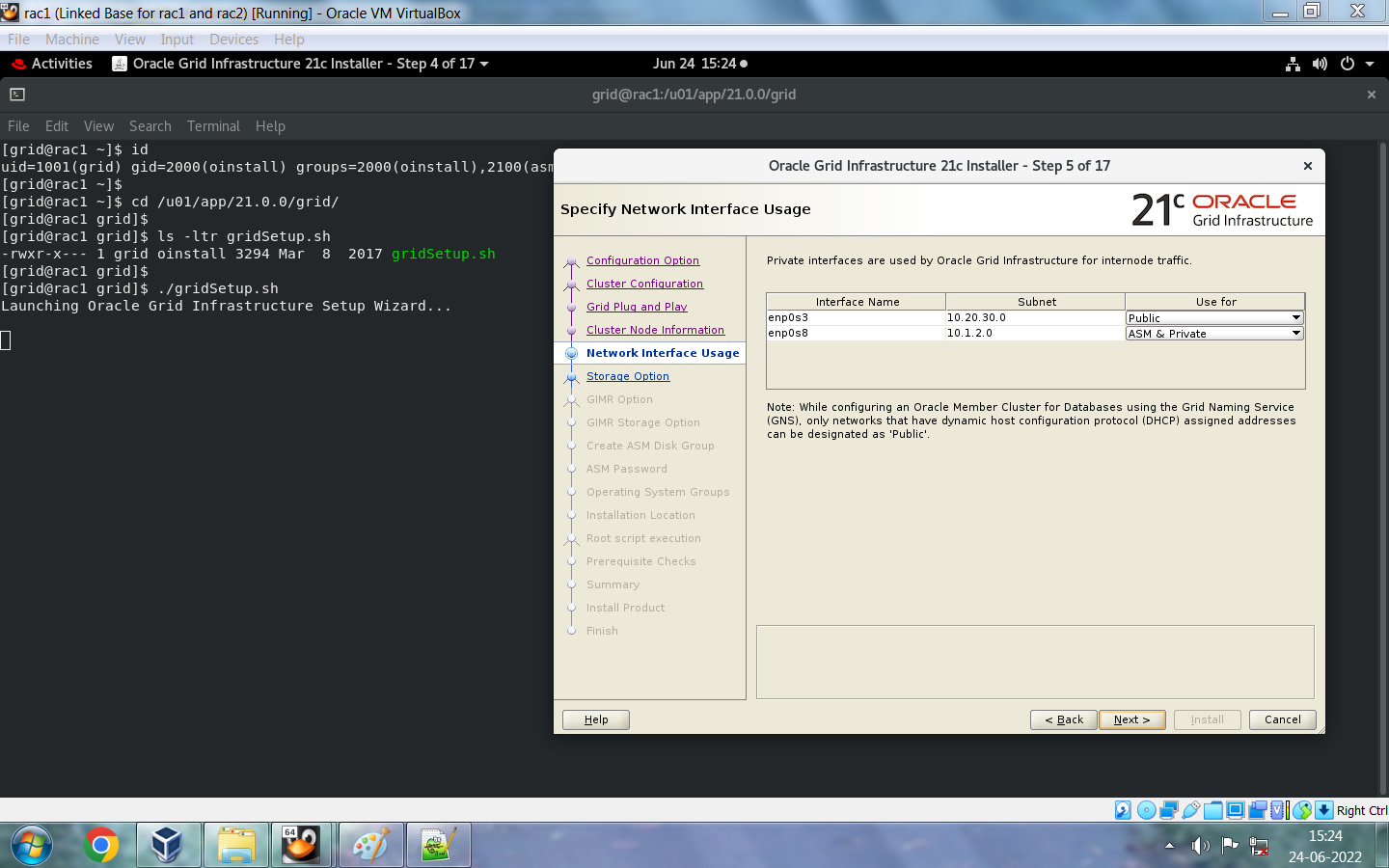

Thông tin về các tùy chọn lưu trữ:
Oracle Cluster Registry (OCR) và các đĩa bỏ phiếu được sử dụng để quản lý cụm. Bạn phải đặt OCR và các đĩa bỏ phiếu trên bộ nhớ dùng chung. Trên Linux và UNIX, bạn có thể sử dụng Oracle Automatic Storage Management (Oracle ASM) hoặc hệ thống tệp dùng chung để lưu trữ OCR và các đĩa bỏ phiếu, còn trên Windows, bạn phải đặt chúng trên Oracle ASM. Hãy chọn một trong các tùy chọn sau:
- Sử dụng Oracle Flex ASM để lưu trữ: Trong cấu hình Oracle Flex Cluster, bộ nhớ được quản lý bằng các phiên bản Oracle ASM được cài đặt trên cùng một cụm.
- Cấu hình thành Cụm máy khách ASM: Lưu trữ các tệp dữ liệu Oracle Grid Infrastructure trên Oracle ASM được cấu hình trên cụm máy chủ lưu trữ. Chọn tệp thông tin xác thực máy khách Oracle ASM.
- Sử dụng Hệ thống Tệp Chia sẻ: Chọn phương pháp này nếu bạn muốn lưu trữ các đĩa OCR và đĩa bỏ phiếu trên một hệ thống tệp chia sẻ. Tùy chọn này chỉ khả dụng cho các nền tảng Linux và UNIX.

Tùy chọn Grid Infrastructure Management Repository:
Như được sử dụng bởi Oracle Autonomous Health Framework (AHF) và các thành phần Grid Infrastructure, Kho lưu trữ quản lý Grid Infrastructure (GIMR) có thể được cấu hình tùy chọn như một phần của quá trình cài đặt Grid Infrastructure. Kho lưu trữ quản lý Grid Infrastructure là một cơ sở hạ tầng của cơ sở dữ liệu Oracle lưu trữ dữ liệu từ tất cả các nút cụm và cơ sở dữ liệu trong một khoảng thời gian lưu giữ được chỉ định để hỗ trợ quản lý hiệu suất và các hoạt động chẩn đoán. Nó được tự quản lý và không yêu cầu người quản trị cơ sở dữ liệu (DBA). Các thành phần AHF và Grid Infrastructure sử dụng kho lưu trữ này bao gồm Cluster Health Monitor, Cluster Health Advisor, Quality of Service Management, Fleet Provisioning and Patching và Cluster Activity Log. Oracle khuyến nghị nên cài đặt tùy chọn này hoặc kết nối với GIMR từ xa.
Hãy chọn một trong các tùy chọn sau:
- Use a Local GIMR database: Chọn tùy chọn này để tạo GIMR cục bộ. Sau khi cài đặt Oracle Grid Infrastructure, bạn phải cài đặt phần mềm Oracle RAC trên tất cả các nút cụm trước khi tạo GIMR.
- Use an Existing GIMR database: Chọn tùy chọn này để sử dụng GIMR từ xa từ Cụm Oracle độc lập hoặc Cụm Dịch vụ Miền Oracle, và chỉ định tệp dữ liệu máy khách GIMR.

Tạo nhóm đĩa ASM:
Hãy nhập tên của nhóm đĩa ban đầu mà bạn muốn cấu hình vào trường Tên nhóm đĩa.
Bảng Thêm đĩa hiển thị các đĩa được cấu hình là đĩa ứng cử viên. Chọn số lượng đĩa ứng cử viên hoặc đĩa đã được cấp phát (hoặc phân vùng trên hệ thống tệp) cần thiết cho mức độ dự phòng mà bạn muốn cho nhóm đĩa đầu tiên của mình.
Đối với các nhóm đĩa tiêu chuẩn, chế độ dự phòng cao yêu cầu tối thiểu ba đĩa. Chế độ bình thường yêu cầu tối thiểu hai đĩa. Chế độ bên ngoài yêu cầu tối thiểu một đĩa. Chế độ dự phòng linh hoạt yêu cầu tối thiểu ba đĩa.
Oracle Cluster Registry và các tệp bỏ phiếu cho Oracle Grid Infrastructure được cấu hình trên Oracle ASM. Do đó, số lượng đĩa tối thiểu cần thiết cho nhóm đĩa sẽ cao hơn. Mức độ dự phòng cao yêu cầu tối thiểu năm đĩa. Mức độ dự phòng thông thường yêu cầu tối thiểu ba đĩa. Mức độ dự phòng bên ngoài yêu cầu tối thiểu một đĩa. Mức độ dự phòng linh hoạt yêu cầu tối thiểu ba đĩa.
Nếu bạn đang cấu hình cài đặt Oracle Extended Cluster, bạn cũng có thể chọn thêm tùy chọn dự phòng mở rộng.
Nếu bạn đã chọn mức độ dự phòng là Flex, Normal hoặc High, thì bạn có thể nhấp vào Specify Failure Groups và cung cấp chi tiết về các nhóm lỗi cần sử dụng cho đĩa Oracle ASM. Chọn nhóm lỗi quorum cho các tệp bỏ phiếu.
Nếu bạn không thấy các đĩa ứng cử viên được hiển thị, hãy nhấp vào Thay đổi Đường dẫn Khám phá và nhập đường dẫn mà Oracle Universal Installer (OUI) có thể tìm thấy các đĩa ứng cử viên. Hãy đảm bảo rằng bạn chỉ định đường dẫn khám phá Oracle ASM cho các đĩa Oracle ASM.
Chọn Cấu hình Trình điều khiển Bộ lọc Oracle ASM để sử dụng Trình điều khiển Bộ lọc Quản lý Lưu trữ Tự động Oracle (Oracle ASMFD) để cấu hình và quản lý các thiết bị đĩa Oracle ASM của bạn. Oracle ASMFD đơn giản hóa việc cấu hình và quản lý các thiết bị đĩa bằng cách loại bỏ nhu cầu phải liên kết lại các thiết bị đĩa được sử dụng với Oracle ASM mỗi khi hệ thống khởi động lại.


Hãy chỉ định mật khẩu ASM:
Quyền hệ thống Oracle Automatic Storage Management (Oracle ASM) (SYS) được gọi là SYSASM, để phân biệt với các quyền SYS dành cho quản trị cơ sở dữ liệu. Quyền ASMSNMP có một tập hợp con của các quyền SYS.
Hãy chỉ định mật khẩu cho người dùng SYSASM và người dùng ASMSNMP để cấp quyền quản trị cho tầng lưu trữ Oracle ASM. Bạn có thể sử dụng các mật khẩu khác nhau cho mỗi tài khoản để tạo các đặc quyền hệ thống dựa trên vai trò, hoặc bạn có thể sử dụng cùng một mật khẩu cho mỗi nhóm đặc quyền hệ thống.


Hỗ trợ cách ly lỗi:
Chọn tùy chọn Hỗ trợ cách ly lỗi mà bạn muốn sử dụng để quản lý phần mềm, sau đó nhấp vào Tiếp theo.
- Use Intelligent Platform Management Interface (IPMI): Oracle cung cấp tùy chọn triển khai Hỗ trợ Cách ly Lỗi bằng cách sử dụng Giao diện Quản lý Nền tảng Thông minh (IPMI). Hãy đảm bảo rằng bạn đã cài đặt phần cứng và trình điều khiển trước khi chọn tùy chọn này.
- Do not use Intelligent Platform Management Interface (IPMI): Chọn tùy chọn này để không sử dụng IPMI.
Giới thiệu về Intelligent Platform Management Interface (IPMI):
Đặc tả Giao diện Quản lý Nền tảng Thông minh (IPMI) định nghĩa một tập hợp các giao diện chung cho phần cứng và phần mềm máy tính mà các quản trị viên hệ thống có thể sử dụng để giám sát tình trạng hệ thống và quản lý máy chủ. IPMI hoạt động độc lập với hệ điều hành và cho phép các quản trị viên quản lý hệ thống từ xa ngay cả khi không có hệ điều hành hoặc phần mềm quản lý hệ thống, hoặc ngay cả khi hệ thống được giám sát không được bật nguồn. IPMI cũng có thể hoạt động khi hệ điều hành đã khởi động và cung cấp các tính năng nâng cao khi được sử dụng cùng với phần mềm quản lý hệ thống.

Chỉ định các tùy chọn quản lý:
Quản lý Oracle Grid Infrastructure và Oracle Automatic Storage Management (Oracle ASM) bằng Oracle Enterprise Manager Cloud Control.

Chọn các nhóm hệ điều hành mà bạn muốn cấp quyền quản trị cho hệ thống lưu trữ Oracle Automatic Storage Management cho các thành viên của chúng. Các thành viên của các nhóm này được cấp quyền quản trị hệ thống bằng cách sử dụng xác thực nhóm hệ điều hành. Bạn có thể sử dụng cùng một nhóm để cấp tất cả các quyền hệ thống, hoặc bạn có thể định nghĩa các nhóm riêng biệt để cung cấp các quyền hệ thống dựa trên vai trò thông qua tư cách thành viên trong các nhóm hệ điều hành:
Nhóm Quản trị viên Oracle ASM (OSASM): Các thành viên được cấp quyền quản trị SYSASM cho ASM, cung cấp quyền truy cập quản trị đầy đủ để cấu hình và quản lý phiên bản lưu trữ. Nếu trình cài đặt tìm thấy một nhóm trên hệ thống của bạn có tên là asmadmin, thì đó là nhóm OSASM mặc định.
Bạn có thể sử dụng một nhóm làm nhóm quản trị (ví dụ: dba), hoặc bạn có thể phân tách các quyền hệ thống bằng cách chỉ định các nhóm cụ thể cho mỗi nhóm quyền hệ thống. ASM có thể hỗ trợ nhiều cơ sở dữ liệu. Nếu bạn dự định có nhiều hơn một cơ sở dữ liệu trên hệ thống của mình, thì bạn có thể chỉ định một nhóm OSASM riêng biệt và sử dụng một người dùng riêng biệt với người dùng cơ sở dữ liệu để sở hữu cài đặt Oracle Clusterware và ASM.
Nhóm Quản trị viên cơ sở dữ liệu Oracle ASM (OSDBA cho ASM): Các thành viên được cấp quyền đọc và ghi vào các tệp do ASM quản lý. Chủ sở hữu cài đặt Oracle Grid Infrastructure phải là thành viên của nhóm này, và tất cả các chủ sở hữu cài đặt cơ sở dữ liệu mà bạn muốn có quyền truy cập vào các tệp do ASM quản lý đều phải là thành viên của nhóm OSDBA cho ASM. Nếu trình cài đặt tìm thấy một nhóm trên hệ thống của bạn có tên là asmdba, thì đó là nhóm OSDBA cho ASM mặc định. Không cung cấp giá trị này khi bạn cấu hình cụm máy khách, tức là nếu bạn đã chọn tùy chọn lưu trữ Oracle ASM Client.
Nhóm Oracle ASM Operator (OSOPER for ASM) (Tùy chọn): Các thành viên được cấp quyền truy cập vào một tập hợp con các đặc quyền SYSASM, chẳng hạn như khởi động và dừng tầng lưu trữ. Nếu trình cài đặt tìm thấy một nhóm trên hệ thống của bạn có tên là asmoper, thì đó là nhóm OSOPER for ASM mặc định. Nếu bạn không có nhóm asmoper trên máy chủ của mình, hoặc bạn muốn chỉ định một nhóm khác mà các thành viên được cấp đặc quyền OSOPER for ASM, thì bạn có thể chỉ định một nhóm trên máy chủ. Hãy để trống trường này nếu bạn chọn không chỉ định nhóm đặc quyền OSOPER for ASM.
Nếu bạn muốn có nhóm OSOPER cho ASM, thì nhóm đó phải tồn tại trên hệ điều hành của bạn hoặc trên Dịch vụ Thông tin Mạng (NIS).

Tìm hiểu về Oracle Base Directory:
Trong quá trình cài đặt, bạn sẽ được yêu cầu chỉ định vị trí thư mục gốc của Oracle, thư mục này thuộc sở hữu của người dùng thực hiện cài đặt. Thư mục gốc của Oracle là nơi lưu trữ các tệp nhật ký dành riêng cho người dùng đó. Bạn có thể chọn một vị trí thư mục không có cấu trúc tương ứng với thư mục gốc của Oracle.
Việc sử dụng đường dẫn thư mục gốc của Oracle giúp đơn giản hóa việc tổ chức các cài đặt Oracle và đảm bảo rằng các cài đặt nhiều cơ sở dữ liệu duy trì cấu hình Kiến trúc linh hoạt tối ưu (OFA).
Thư mục gốc của Oracle cho cài đặt Oracle Grid Infrastructure là nơi lưu trữ nhật ký chẩn đoán và quản trị, cũng như các nhật ký khác liên quan đến Oracle ASM và Oracle Clusterware. Đối với các cài đặt Oracle khác ngoài Oracle Grid Infrastructure cho cụm máy chủ, đây cũng là vị trí đặt thư mục cài đặt Oracle home.
Tuy nhiên, trong trường hợp cài đặt Oracle Grid Infrastructure, bạn phải tạo một đường dẫn khác để đường dẫn đến thư mục gốc của Oracle vẫn khả dụng cho các cài đặt Oracle khác.

GRID_BASE phải nằm ngoài GRID_HOME, tức là hai thư mục trên khác nhau, không giống như RDBMS BASE và HOME.
Tìm hiểu về thư mục Oracle Home:
- Thư mục cài đặt Oracle Home cho phần mềm Oracle Grid Infrastructure (Grid home) phải có định dạng u[00-99][00-99]/app/release/grid, trong đó release là số phiên bản của phần mềm Oracle Grid Infrastructure. Trong quá trình cài đặt, quyền sở hữu đường dẫn đến Grid home sẽ được chuyển cho người dùng root. Nếu bạn không tạo một đường dẫn duy nhất đến Grid home, thì sau khi cài đặt Grid, bạn có thể gặp lỗi quyền truy cập đối với các cài đặt khác, bao gồm cả các cài đặt hiện có nằm dưới cùng một đường dẫn.
- Nếu bạn tạo đường dẫn trước khi cài đặt, thì đường dẫn đó phải thuộc sở hữu của người cài đặt Oracle Grid Infrastructure (thường là oracle đối với người cài đặt duy nhất cho tất cả phần mềm Oracle, hoặc grid đối với người cài đặt Oracle Grid Infrastructure dựa trên vai trò), và được đặt quyền truy cập là 775.
- Nó nên được tạo trong một đường dẫn nằm ngoài các thư mục cài đặt Oracle hiện có, bao gồm cả các thư mục cài đặt Oracle Clusterware.
- Vị trí này không được trùng với vị trí thư mục gốc của Oracle dành cho chủ sở hữu cài đặt Oracle Grid Infrastructure (grid), hoặc thư mục gốc của Oracle của bất kỳ chủ sở hữu cài đặt Oracle nào khác (ví dụ: /u01/app/oracle).
- Nó không nên được đặt trong thư mục chính của người dùng.
- Nó nên được tạo dưới dạng thư mục con trong một đường dẫn mà tất cả các tệp đều thuộc sở hữu của người dùng root, hoặc trong một đường dẫn duy nhất.
- Oracle khuyến nghị bạn nên cài đặt các tệp nhị phân Oracle Grid Infrastructure trên thư mục cài đặt cục bộ, thay vì sử dụng thư mục cài đặt dùng chung trên bộ nhớ dùng chung.

Chỉ định thư mục Oracle Inventory:
Lần đầu tiên cài đặt phần mềm Oracle trên hệ thống, bạn sẽ được yêu cầu cung cấp đường dẫn thư mục oraInventory. Khi bạn cung cấp đường dẫn cơ sở của Oracle khi được yêu cầu trong quá trình cài đặt, hoặc bạn đã thiết lập biến môi trường ORACLE_BASE cho người dùng thực hiện cài đặt Oracle Grid Infrastructure, OUI sẽ tạo thư mục Oracle Inventory trong đường dẫn ORACLE_BASE/../oraInventory.
Nếu bạn không nhập đường dẫn cũng như không thiết lập ORACLE_BASE, thì thư mục Oracle Inventory sẽ được đặt trong thư mục chính của người dùng thực hiện cài đặt. Ví dụ: /home/oracle/oraInventory. Vì vị trí này có thể gây ra lỗi quyền truy cập trong các lần cài đặt tiếp theo với nhiều người dùng sở hữu phần mềm Oracle, Oracle khuyến nghị bạn không nên chấp nhận tùy chọn này.

Cấu hình thực thi tập lệnh gốc:
Nếu bạn muốn chạy các tập lệnh thủ công với quyền root cho từng nút thành viên của cụm, hãy nhấp vào Tiếp theo để chuyển sang màn hình tiếp theo. Nếu bạn muốn ủy quyền chạy các tập lệnh với quyền quản trị, hãy chọn Tự động chạy các tập lệnh cấu hình.


Các điều kiện tiên quyết dưới đây đã không được đáp ứng.
- Dịch vụ tên DNS/NIS - Bài kiểm tra này xác minh rằng các tra cứu Dịch vụ Tên cho Máy chủ Tên Phân tán (DNS) và Dịch vụ Thông tin Mạng (NIS) khớp với các mục tên SCAN. Bạn có thể bỏ qua điều này vì tôi không sử dụng DNS.
- Cơ sở dữ liệu Trình quản lý gói RPM - Xác minh các tệp cơ sở dữ liệu Trình quản lý gói RPM Lỗi: PRVG-11250: Việc kiểm tra "Cơ sở dữ liệu Trình quản lý gói RPM" không được thực hiện vì nó cần quyền người dùng 'root'. Chúng ta có thể bỏ qua điều này vì tôi đã xác minh trước đó trong cluvfy.
- Single Client Access Name (SCAN) - Bài kiểm tra này xác minh cấu hình Tên truy cập máy khách đơn. PRVG-11368: Nên sử dụng SCAN để phân giải thành "3" hoặc nhiều địa chỉ IP, nhưng SCAN "rac-scan" chỉ phân giải thành "10.20.30.105". Đây không phải là lỗi, mà là thông báo cảnh báo vì tôi chỉ sử dụng một địa chỉ IP quét.
- Kích thước bộ nhớ ảo (Swap Size) - Đây là điều kiện tiên quyết để kiểm tra xem hệ thống có đủ dung lượng bộ nhớ ảo hay không. Tôi bỏ qua điều này vì đây là môi trường thử nghiệm. Vui lòng không bỏ qua điều này trên máy chủ sản xuất của bạn.
- Bộ nhớ vật lý - Đây là điều kiện tiên quyết để kiểm tra xem hệ thống có ít nhất 8GB (8388608.0KB) bộ nhớ vật lý hay không. Tôi bỏ qua điều này vì đây là máy chủ thử nghiệm. Vui lòng không bỏ qua điều này trên máy chủ cơ sở dữ liệu sản xuất của bạn.


- /u01/app/oraInventory/orainstRoot.sh
- /u01/app/21.0.0/grid/root.sh

Chạy từng đoạn mã trên một trên cả hai nút và nhấp OK để tiếp tục nếu bạn không gặp sự cố nào trong quá trình thực thi. Nếu bạn nhận được bất kỳ thông báo lỗi nào trong khi thực thi các đoạn mã này, bạn phải khắc phục sự cố đó trước khi tiếp tục.
Node1: [grid@rac1 grid]$ su - Password: [root@rac1 ~]# /u01/app/oraInventory/orainstRoot.sh Changing permissions of /u01/app/oraInventory. Adding read,write permissions for group. Removing read,write,execute permissions for world. Changing groupname of /u01/app/oraInventory to oinstall. The execution of the script is complete. [root@rac1 ~]# Node2: [root@rac2 ~]# /u01/app/oraInventory/orainstRoot.sh Changing permissions of /u01/app/oraInventory. Adding read,write permissions for group. Removing read,write,execute permissions for world. Changing groupname of /u01/app/oraInventory to oinstall. The execution of the script is complete. [root@rac2 ~]# Node1: [root@rac1 ~]# /u01/app/21.0.0/grid/root.sh Performing root user operation. The following environment variables are set as: ORACLE_OWNER= grid ORACLE_HOME= /u01/app/21.0.0/grid Enter the full pathname of the local bin directory: [/usr/local/bin]: Copying dbhome to /usr/local/bin ... Copying oraenv to /usr/local/bin ... Copying coraenv to /usr/local/bin ... Creating /etc/oratab file... Entries will be added to the /etc/oratab file as needed by Database Configuration Assistant when a database is created Finished running generic part of root script. Now product-specific root actions will be performed. Relinking oracle with rac_on option Using configuration parameter file: /u01/app/21.0.0/grid/crs/install/crsconfig_params 2022-06-24 16:11:18: Got permissions of file /u01/app/grid/crsdata/rac1/crsconfig: 0775 2022-06-24 16:11:18: Got permissions of file /u01/app/grid/crsdata: 0775 2022-06-24 16:11:18: Got permissions of file /u01/app/grid/crsdata/rac1: 0775 The log of current session can be found at: /u01/app/grid/crsdata/rac1/crsconfig/rootcrs_rac1_2022-06-24_04-11-18PM.log 2022/06/24 16:11:35 CLSRSC-594: Executing installation step 1 of 19: 'SetupTFA'. 2022/06/24 16:11:35 CLSRSC-594: Executing installation step 2 of 19: 'ValidateEnv'. 2022/06/24 16:11:35 CLSRSC-594: Executing installation step 3 of 19: 'CheckFirstNode'. 2022/06/24 16:11:37 CLSRSC-594: Executing installation step 4 of 19: 'GenSiteGUIDs'. 2022/06/24 16:11:38 CLSRSC-594: Executing installation step 5 of 19: 'SetupOSD'. Redirecting to /bin/systemctl restart rsyslog.service 2022/06/24 16:11:39 CLSRSC-594: Executing installation step 6 of 19: 'CheckCRSConfig'. 2022/06/24 16:11:40 CLSRSC-594: Executing installation step 7 of 19: 'SetupLocalGPNP'. 2022/06/24 16:11:52 CLSRSC-594: Executing installation step 8 of 19: 'CreateRootCert'. 2022/06/24 16:11:57 CLSRSC-594: Executing installation step 9 of 19: 'ConfigOLR'. 2022/06/24 16:12:13 CLSRSC-594: Executing installation step 10 of 19: 'ConfigCHMOS'. 2022/06/24 16:12:13 CLSRSC-594: Executing installation step 11 of 19: 'CreateOHASD'. 2022/06/24 16:12:20 CLSRSC-594: Executing installation step 12 of 19: 'ConfigOHASD'. 2022/06/24 16:12:21 CLSRSC-330: Adding Clusterware entries to file 'oracle-ohasd.service' 2022/06/24 16:12:43 CLSRSC-594: Executing installation step 13 of 19: 'InstallAFD'. 2022/06/24 16:12:43 CLSRSC-594: Executing installation step 14 of 19: 'InstallACFS'. 2022/06/24 16:12:52 CLSRSC-4002: Successfully installed Oracle Autonomous Health Framework (AHF). 2022/06/24 16:13:08 CLSRSC-594: Executing installation step 15 of 19: 'InstallKA'. 2022/06/24 16:13:13 CLSRSC-594: Executing installation step 16 of 19: 'InitConfig'. 2022/06/24 16:14:52 CLSRSC-482: Running command: '/u01/app/21.0.0/grid/bin/ocrconfig -upgrade grid oinstall' CRS-4256: Updating the profile Successful addition of voting disk e00eeeab988c4fb8bffb967f2dc6f18e. Successful addition of voting disk 53c535b4d02b4f2dbfebd0a482ee8693. Successful addition of voting disk b7615ccc130d4f81bf5decc3c9ef6cd1. Successfully replaced voting disk group with +OCR. CRS-4256: Updating the profile CRS-4266: Voting file(s) successfully replaced ## STATE File Universal Id File Name Disk group -- ----- ----------------- --------- --------- 1. ONLINE e00eeeab988c4fb8bffb967f2dc6f18e (/dev/oracleasm/disks/OCRDISK1) [OCR] 2. ONLINE 53c535b4d02b4f2dbfebd0a482ee8693 (/dev/oracleasm/disks/OCRDISK2) [OCR] 3. ONLINE b7615ccc130d4f81bf5decc3c9ef6cd1 (/dev/oracleasm/disks/OCRDISK3) [OCR] Located 3 voting disk(s). 2022/06/24 16:15:53 CLSRSC-594: Executing installation step 17 of 19: 'StartCluster'. 2022/06/24 16:16:51 CLSRSC-343: Successfully started Oracle Clusterware stack 2022/06/24 16:16:51 CLSRSC-594: Executing installation step 18 of 19: 'ConfigNode'. 2022/06/24 16:18:20 CLSRSC-594: Executing installation step 19 of 19: 'PostConfig'. 2022/06/24 16:18:37 CLSRSC-325: Configure Oracle Grid Infrastructure for a Cluster ... succeeded Node2: [root@rac2 ~]# /u01/app/21.0.0/grid/root.sh Performing root user operation. The following environment variables are set as: ORACLE_OWNER= grid ORACLE_HOME= /u01/app/21.0.0/grid Enter the full pathname of the local bin directory: [/usr/local/bin]: Copying dbhome to /usr/local/bin ... Copying oraenv to /usr/local/bin ... Copying coraenv to /usr/local/bin ... Creating /etc/oratab file... Entries will be added to the /etc/oratab file as needed by Database Configuration Assistant when a database is created Finished running generic part of root script. Now product-specific root actions will be performed. Relinking oracle with rac_on option Using configuration parameter file: /u01/app/21.0.0/grid/crs/install/crsconfig_params 2022-06-24 16:21:07: Got permissions of file /u01/app/grid/crsdata/rac2/crsconfig: 0775 2022-06-24 16:21:07: Got permissions of file /u01/app/grid/crsdata: 0775 2022-06-24 16:21:07: Got permissions of file /u01/app/grid/crsdata/rac2: 0775 The log of current session can be found at: /u01/app/grid/crsdata/rac2/crsconfig/rootcrs_rac2_2022-06-24_04-21-07PM.log 2022/06/24 16:21:22 CLSRSC-594: Executing installation step 1 of 19: 'SetupTFA'. 2022/06/24 16:21:22 CLSRSC-594: Executing installation step 2 of 19: 'ValidateEnv'. 2022/06/24 16:21:22 CLSRSC-594: Executing installation step 3 of 19: 'CheckFirstNode'. 2022/06/24 16:21:23 CLSRSC-594: Executing installation step 4 of 19: 'GenSiteGUIDs'. 2022/06/24 16:21:23 CLSRSC-594: Executing installation step 5 of 19: 'SetupOSD'. Redirecting to /bin/systemctl restart rsyslog.service 2022/06/24 16:21:24 CLSRSC-594: Executing installation step 6 of 19: 'CheckCRSConfig'. 2022/06/24 16:21:26 CLSRSC-594: Executing installation step 7 of 19: 'SetupLocalGPNP'. 2022/06/24 16:21:27 CLSRSC-594: Executing installation step 8 of 19: 'CreateRootCert'. 2022/06/24 16:21:27 CLSRSC-594: Executing installation step 9 of 19: 'ConfigOLR'. 2022/06/24 16:21:35 CLSRSC-594: Executing installation step 10 of 19: 'ConfigCHMOS'. 2022/06/24 16:21:35 CLSRSC-594: Executing installation step 11 of 19: 'CreateOHASD'. 2022/06/24 16:21:37 CLSRSC-594: Executing installation step 12 of 19: 'ConfigOHASD'. 2022/06/24 16:21:37 CLSRSC-330: Adding Clusterware entries to file 'oracle-ohasd.service' 2022/06/24 16:22:07 CLSRSC-594: Executing installation step 13 of 19: 'InstallAFD'. 2022/06/24 16:22:07 CLSRSC-594: Executing installation step 14 of 19: 'InstallACFS'. 2022/06/24 16:22:27 CLSRSC-4002: Successfully installed Oracle Autonomous Health Framework (AHF). 2022/06/24 16:22:33 CLSRSC-594: Executing installation step 15 of 19: 'InstallKA'. 2022/06/24 16:22:35 CLSRSC-594: Executing installation step 16 of 19: 'InitConfig'. 2022/06/24 16:22:47 CLSRSC-594: Executing installation step 17 of 19: 'StartCluster'. 2022/06/24 16:23:34 CLSRSC-343: Successfully started Oracle Clusterware stack 2022/06/24 16:23:34 CLSRSC-594: Executing installation step 18 of 19: 'ConfigNode'. 2022/06/24 16:23:42 CLSRSC-594: Executing installation step 19 of 19: 'PostConfig'. 2022/06/24 16:23:47 CLSRSC-325: Configure Oracle Grid Infrastructure for a Cluster ... succeeded |


# Ở đây, tôi gặp lỗi xác thực cluvfy, có thể bỏ qua vì tôi không sử dụng DNS. Nếu bạn sử dụng DNS thì đừng bỏ qua những lỗi này. Cluvfy verification tasks are failed. Ignore these checks which I already explained above and proceed. [INS-20801] Configuration Assistant 'Oracle Cluster Verification Utility' failed. Cause - Refer to the logs for additional information. Action - Refer to the logs or contact Oracle Support Services. Additional Information: Execution of /bin/sh script is failed/unexecuted on nodes : [rac1] Execution status of failed node:rac1 Standard output : , Performing following verification checks ... , , Node Connectivity ... , Hosts File ...PASSED , Check that maximum (MTU) size packet goes through subnet ...PASSED , subnet mask consistency for subnet "10.1.2.0" ...PASSED , subnet mask consistency for subnet "10.20.30.0" ...PASSED , Node Connectivity ...PASSED , Multicast or broadcast check ...PASSED , Time zone consistency ...PASSED , Path existence, ownership, permissions and attributes ... , Path "/var" ...PASSED , Path "/var/lib/oracle" ...PASSED , Path "/dev/asm" ...PASSED , Path "/dev/shm" ...PASSED , Path "/etc/oracleafd.conf" ...PASSED , Path "/etc/init.d/ohasd" ...PASSED , Path "/etc/init.d/init.ohasd" ...PASSED , Path "/etc/init.d/init.tfa" ...PASSED , Path "/etc/oracle/maps" ...PASSED , Path "/etc/tmpfiles.d/oracleGI.conf" ...PASSED , Path "/u01/app/grid/diag/crs/rac1/crs/incpkg" ...PASSED , Path "/u01/app/grid/diag/crs/rac1/crs/trace" ...PASSED , Path "/u01/app/grid/diag/crs/rac1/crs/alert" ...PASSED , Path "/u01/app/grid/diag/crs/rac1/crs/stage" ...PASSED , Path "/u01/app/grid/diag/crs/rac1/crs/cdump" ...PASSED , Path "/u01/app/grid/diag/crs/rac1/crs/metadata" ...PASSED , Path "/u01/app/grid/diag/crs/rac1/crs/metadata_pv" ...PASSED , Path "/u01/app/grid/diag/crs/rac1/crs/sweep" ...PASSED , Path "/u01/app/grid/diag/crs/rac1/crs/incident" ...PASSED , Path "/u01/app/grid/diag/crs/rac1/crs/metadata_dgif" ...PASSED , Path "/u01/app/grid/diag/crs/rac1/crs/lck" ...PASSED , Path "/u01/app/grid/diag/crs/rac1/crs/log" ...PASSED , Path existence, ownership, permissions and attributes ...PASSED , Cluster Manager Integrity ...PASSED , User Mask ...PASSED , Cluster Integrity ...PASSED , OCR Integrity ...PASSED , CRS Integrity ... , Clusterware Version Consistency ...PASSED , CRS Integrity ...PASSED , Node Application Existence ...PASSED , Single Client Access Name (SCAN) ... , DNS/NIS name service 'rac-scan' ... , Name Service Switch Configuration File Integrity ...PASSED , DNS/NIS name service 'rac-scan' ...FAILED (PRVG-1101) , Single Client Access Name (SCAN) ...FAILED (PRVG-11372, PRVG-1101) , OLR Integrity ...PASSED , Voting Disk ...PASSED , ASM Integrity ...PASSED , ASM Network ...PASSED , ASM disk group free space ...PASSED , User Not In Group "root": grid ...PASSED , Clock Synchronization ...PASSED , VIP Subnet configuration check ...PASSED , Network configuration consistency checks ...PASSED , File system mount options for path GI_HOME ...PASSED , Cleanup of communication socket files ...PASSED , Domain Sockets ...PASSED , , Post-check for cluster services setup was unsuccessful. , Checks did not pass for the following nodes: , rac2,rac1 , , , Failures were encountered during execution of CVU verification request "stage -post crsinst". , , Single Client Access Name (SCAN) ...FAILED , PRVG-11372 : Number of SCAN IP addresses that SCAN "rac-scan" resolved to did , not match the number of SCAN VIP resources , , DNS/NIS name service 'rac-scan' ...FAILED , PRVG-1101 : SCAN name "rac-scan" failed to resolve , , , CVU operation performed: stage -post crsinst , Date: Jun 24, 2022 4:25:09 PM , Clusterware version: 21.0.0.0.0 , CVU home: /u01/app/21.0.0/grid , Grid home: /u01/app/21.0.0/grid , User: grid , Operating system: Linux4.18.0-305.el8.x86_64 |


Node1: [grid@rac1 ~]$ id uid=1001(grid) gid=2000(oinstall) groups=2000(oinstall),2100(asmadmin),2200(dba),2300(oper),2400(asmdba),2500(asmoper) [grid@rac1 ~]$ ps -ef | grep pmon grid 37650 4929 0 16:16 ? 00:00:00 asm_pmon_+ASM1 grid 66328 21049 0 16:31 pts/1 00:00:00 grep --color=auto pmon [grid@rac1 ~]$ ps -ef | grep tns root 24 2 0 14:34 ? 00:00:00 [netns] grid 38937 4929 0 16:17 ? 00:00:00 /u01/app/21.0.0/grid/bin/tnslsnr ASMNET1LSNR_ASM -no_crs_notify -inherit grid 39494 4929 0 16:17 ? 00:00:00 /u01/app/21.0.0/grid/bin/tnslsnr LISTENER_SCAN1 -no_crs_notify -inherit grid 41288 4929 0 16:18 ? 00:00:00 /u01/app/21.0.0/grid/bin/tnslsnr LISTENER -no_crs_notify -inherit grid 66351 21049 0 16:31 pts/1 00:00:00 grep --color=auto tns [grid@rac1 ~]$ ps -ef | grep d.bin root 36570 4929 1 16:15 ? 00:00:11 /u01/app/21.0.0/grid/bin/ohasd.bin reboot BLOCKING_STACK_LOCALE_OHAS=AMERICAN_AMERICA.AL32UTF8 root 36668 4929 0 16:15 ? 00:00:03 /u01/app/21.0.0/grid/bin/orarootagent.bin grid 36792 4929 0 16:15 ? 00:00:04 /u01/app/21.0.0/grid/bin/oraagent.bin grid 36815 4929 0 16:15 ? 00:00:01 /u01/app/21.0.0/grid/bin/mdnsd.bin grid 36816 4929 0 16:15 ? 00:00:04 /u01/app/21.0.0/grid/bin/evmd.bin grid 36857 4929 0 16:15 ? 00:00:02 /u01/app/21.0.0/grid/bin/gpnpd.bin grid 36902 36816 0 16:15 ? 00:00:02 /u01/app/21.0.0/grid/bin/evmlogger.bin -o /u01/app/21.0.0/grid/log/[HOSTNAME]/evmd/evmlogger.info -l /u01/app/21.0.0/grid/log/[HOSTNAME]/evmd/evmlogger.log grid 36996 4929 0 16:16 ? 00:00:05 /u01/app/21.0.0/grid/bin/gipcd.bin root 37060 4929 0 16:16 ? 00:00:02 /u01/app/21.0.0/grid/bin/cssdmonitor root 37067 4929 1 16:16 ? 00:00:10 /u01/app/21.0.0/grid/bin/osysmond.bin root 37108 4929 0 16:16 ? 00:00:02 /u01/app/21.0.0/grid/bin/cssdagent grid 37128 4929 1 16:16 ? 00:00:09 /u01/app/21.0.0/grid/bin/onmd.bin -S 1 grid 37130 4929 0 16:16 ? 00:00:05 /u01/app/21.0.0/grid/bin/ocssd.bin -S 1 root 37382 4929 0 16:16 ? 00:00:04 /u01/app/21.0.0/grid/bin/octssd.bin reboot root 37604 4929 0 16:16 ? 00:00:04 /u01/app/21.0.0/grid/bin/ologgerd -M root 37875 4929 2 16:16 ? 00:00:24 /u01/app/21.0.0/grid/bin/crsd.bin reboot root 38882 4929 1 16:17 ? 00:00:08 /u01/app/21.0.0/grid/bin/orarootagent.bin grid 38912 4929 0 16:17 ? 00:00:07 /u01/app/21.0.0/grid/bin/oraagent.bin grid 38937 4929 0 16:17 ? 00:00:00 /u01/app/21.0.0/grid/bin/tnslsnr ASMNET1LSNR_ASM -no_crs_notify -inherit grid 39494 4929 0 16:17 ? 00:00:00 /u01/app/21.0.0/grid/bin/tnslsnr LISTENER_SCAN1 -no_crs_notify -inherit grid 39557 4929 0 16:17 ? 00:00:01 /u01/app/21.0.0/grid/bin/scriptagent.bin grid 40634 4929 0 16:18 ? 00:00:02 /u01/app/21.0.0/grid/bin/crscdpd.bin grid 41288 4929 0 16:18 ? 00:00:00 /u01/app/21.0.0/grid/bin/tnslsnr LISTENER -no_crs_notify -inherit grid 66436 21049 0 16:31 pts/1 00:00:00 grep --color=auto d.bin [grid@rac1 ~]$ . oraenv ORACLE_SID = [+ASM1] ? ORACLE_HOME = [/home/oracle] ? /u01/app/21.0.0/grid The Oracle base has been changed from u01/app/21.0.0/grid to /u01/app/grid [grid@rac1 ~]$ crsctl check crs CRS-4638: Oracle High Availability Services is online CRS-4537: Cluster Ready Services is online CRS-4529: Cluster Synchronization Services is online CRS-4533: Event Manager is online [grid@rac1 ~]$ crsctl stat res -t -------------------------------------------------------------------------------- Name Target State Server State details -------------------------------------------------------------------------------- Local Resources -------------------------------------------------------------------------------- ora.LISTENER.lsnr ONLINE ONLINE rac1 STABLE ONLINE ONLINE rac2 STABLE ora.chad ONLINE ONLINE rac1 STABLE ONLINE ONLINE rac2 STABLE ora.net1.network ONLINE ONLINE rac1 STABLE ONLINE ONLINE rac2 STABLE ora.ons ONLINE ONLINE rac1 STABLE ONLINE ONLINE rac2 STABLE -------------------------------------------------------------------------------- Cluster Resources -------------------------------------------------------------------------------- ora.ASMNET1LSNR_ASM.lsnr(ora.asmgroup) 1 ONLINE ONLINE rac1 STABLE 2 ONLINE ONLINE rac2 STABLE ora.LISTENER_SCAN1.lsnr 1 ONLINE ONLINE rac1 STABLE ora.OCR.dg(ora.asmgroup) 1 ONLINE ONLINE rac1 STABLE 2 ONLINE ONLINE rac2 STABLE ora.asm(ora.asmgroup) 1 ONLINE ONLINE rac1 Started,STABLE 2 ONLINE ONLINE rac2 Started,STABLE ora.asmnet1.asmnetwork(ora.asmgroup) 1 ONLINE ONLINE rac1 STABLE 2 ONLINE ONLINE rac2 STABLE ora.cdp1.cdp 1 ONLINE ONLINE rac1 STABLE ora.cvu 1 ONLINE ONLINE rac1 STABLE ora.qosmserver 1 ONLINE ONLINE rac1 STABLE ora.rac1.vip 1 ONLINE ONLINE rac1 STABLE ora.rac2.vip 1 ONLINE ONLINE rac2 STABLE ora.scan1.vip 1 ONLINE ONLINE rac1 STABLE -------------------------------------------------------------------------------- Node2: [grid@rac2 ~]$ id uid=1001(grid) gid=2000(oinstall) groups=2000(oinstall),2100(asmadmin),2200(dba),2300(oper),2400(asmdba),2500(asmoper) [grid@rac2 ~]$ ps -ef | grep pmon grid 48726 1 0 16:23 ? 00:00:00 asm_pmon_+ASM2 grid 70349 70306 0 16:34 pts/1 00:00:00 grep --color=auto pmon [grid@rac2 ~]$ ps -ef | grep tns root 24 2 0 15:07 ? 00:00:00 [netns] grid 48209 1 0 16:23 ? 00:00:00 /u01/app/21.0.0/grid/bin/tnslsnr ASMNET1LSNR_ASM -no_crs_notify -inherit grid 48619 1 0 16:23 ? 00:00:00 /u01/app/21.0.0/grid/bin/tnslsnr LISTENER -no_crs_notify -inherit grid 70381 70306 0 16:34 pts/1 00:00:00 grep --color=auto tns [grid@rac2 ~]$ ps -ef | grep d.bin root 46563 1 1 16:22 ? 00:00:08 /u01/app/21.0.0/grid/bin/ohasd.bin reboot BLOCKING_STACK_LOCALE_OHAS=AMERICAN_AMERICA.AL32UTF8 root 46721 1 0 16:22 ? 00:00:03 /u01/app/21.0.0/grid/bin/orarootagent.bin grid 46908 1 0 16:22 ? 00:00:03 /u01/app/21.0.0/grid/bin/oraagent.bin grid 46932 1 0 16:22 ? 00:00:01 /u01/app/21.0.0/grid/bin/mdnsd.bin grid 46933 1 0 16:22 ? 00:00:04 /u01/app/21.0.0/grid/bin/evmd.bin grid 46976 1 0 16:22 ? 00:00:02 /u01/app/21.0.0/grid/bin/gpnpd.bin grid 47029 46933 0 16:22 ? 00:00:01 /u01/app/21.0.0/grid/bin/evmlogger.bin -o /u01/app/21.0.0/grid/log/[HOSTNAME]/evmd/evmlogger.info -l /u01/app/21.0.0/grid/log/[HOSTNAME]/evmd/evmlogger.log grid 47047 1 0 16:22 ? 00:00:05 /u01/app/21.0.0/grid/bin/gipcd.bin root 47079 1 0 16:22 ? 00:00:02 /u01/app/21.0.0/grid/bin/cssdmonitor root 47084 1 1 16:22 ? 00:00:07 /u01/app/21.0.0/grid/bin/osysmond.bin root 47117 1 0 16:22 ? 00:00:02 /u01/app/21.0.0/grid/bin/cssdagent grid 47137 1 1 16:22 ? 00:00:09 /u01/app/21.0.0/grid/bin/onmd.bin -S 2 grid 47139 1 0 16:22 ? 00:00:04 /u01/app/21.0.0/grid/bin/ocssd.bin -S 2 root 47496 1 0 16:23 ? 00:00:04 /u01/app/21.0.0/grid/bin/octssd.bin reboot root 47891 1 1 16:23 ? 00:00:06 /u01/app/21.0.0/grid/bin/crsd.bin reboot root 47979 1 1 16:23 ? 00:00:06 /u01/app/21.0.0/grid/bin/orarootagent.bin grid 48044 1 0 16:23 ? 00:00:06 /u01/app/21.0.0/grid/bin/oraagent.bin grid 48209 1 0 16:23 ? 00:00:00 /u01/app/21.0.0/grid/bin/tnslsnr ASMNET1LSNR_ASM -no_crs_notify -inherit grid 48619 1 0 16:23 ? 00:00:00 /u01/app/21.0.0/grid/bin/tnslsnr LISTENER -no_crs_notify -inherit grid 70420 70306 0 16:34 pts/1 00:00:00 grep --color=auto d.bin [grid@rac2 ~]$ [grid@rac2 ~]$ [grid@rac2 ~]$ . oraenv ORACLE_SID = [grid] ? +ASM2 ORACLE_HOME = [/home/oracle] ? /u01/app/21.0.0/grid The Oracle base has been set to /u01/app/grid [grid@rac2 ~]$ [grid@rac2 ~]$ crsctl check crs CRS-4638: Oracle High Availability Services is online CRS-4537: Cluster Ready Services is online CRS-4529: Cluster Synchronization Services is online CRS-4533: Event Manager is online [grid@rac2 ~]$ [grid@rac2 ~]$ crsctl stat res -t -------------------------------------------------------------------------------- Name Target State Server State details -------------------------------------------------------------------------------- Local Resources -------------------------------------------------------------------------------- ora.LISTENER.lsnr ONLINE ONLINE rac1 STABLE ONLINE ONLINE rac2 STABLE ora.chad ONLINE ONLINE rac1 STABLE ONLINE ONLINE rac2 STABLE ora.net1.network ONLINE ONLINE rac1 STABLE ONLINE ONLINE rac2 STABLE ora.ons ONLINE ONLINE rac1 STABLE ONLINE ONLINE rac2 STABLE -------------------------------------------------------------------------------- Cluster Resources -------------------------------------------------------------------------------- ora.ASMNET1LSNR_ASM.lsnr(ora.asmgroup) 1 ONLINE ONLINE rac1 STABLE 2 ONLINE ONLINE rac2 STABLE ora.LISTENER_SCAN1.lsnr 1 ONLINE ONLINE rac1 STABLE ora.OCR.dg(ora.asmgroup) 1 ONLINE ONLINE rac1 STABLE 2 ONLINE ONLINE rac2 STABLE ora.asm(ora.asmgroup) 1 ONLINE ONLINE rac1 Started,STABLE 2 ONLINE ONLINE rac2 Started,STABLE ora.asmnet1.asmnetwork(ora.asmgroup) 1 ONLINE ONLINE rac1 STABLE 2 ONLINE ONLINE rac2 STABLE ora.cdp1.cdp 1 ONLINE ONLINE rac1 STABLE ora.cvu 1 ONLINE ONLINE rac1 STABLE ora.qosmserver 1 ONLINE ONLINE rac1 STABLE ora.rac1.vip 1 ONLINE ONLINE rac1 STABLE ora.rac2.vip 1 ONLINE ONLINE rac2 STABLE ora.scan1.vip 1 ONLINE ONLINE rac1 STABLE -------------------------------------------------------------------------------- |
Nhấp vào đây để xem hướng dẫn cài đặt phần mềm cơ sở dữ liệu Oracle 21c RAC từng bước - Phần 2
TƯ VẤN: Click hoặc Hotline/Zalo 090.29.12.888
=============================
Website không chứa bất kỳ quảng cáo nào, mọi đóng góp để duy trì phát triển cho website (donation) xin vui lòng gửi về STK 90.2142.8888 - Ngân hàng Vietcombank Thăng Long - TRAN VAN BINH
=============================
Nếu bạn không muốn bị AI thay thế và tiết kiệm 3-5 NĂM trên con đường trở thành DBA chuyên nghiệp hay làm chủ Database thì hãy đăng ký ngay KHOÁ HỌC ORACLE DATABASE A-Z ENTERPRISE, được Coaching trực tiếp từ tôi với toàn bộ bí kíp thực chiến, thủ tục, quy trình của gần 20 năm kinh nghiệm (mà bạn sẽ KHÔNG THỂ tìm kiếm trên Internet/Google) từ đó giúp bạn dễ dàng quản trị mọi hệ thống Core tại Việt Nam và trên thế giới, đỗ OCP.
- CÁCH ĐĂNG KÝ: Gõ (.) hoặc để lại số điện thoại hoặc inbox https://m.me/tranvanbinh.vn hoặc Hotline/Zalo 090.29.12.888
- Chi tiết tham khảo:
https://bit.ly/oaz_w
=============================
2 khóa học online qua video giúp bạn nhanh chóng có những kiến thức nền tảng về Linux, Oracle, học mọi nơi, chỉ cần có Internet/4G:
- Oracle cơ bản: https://bit.ly/admin_1200
- Linux: https://bit.ly/linux_1200
=============================
KẾT NỐI VỚI CHUYÊN GIA TRẦN VĂN BÌNH:
📧 Mail: binhoracle@gmail.com
☎️ Mobile/Zalo: 0902912888
👨 Facebook: https://www.facebook.com/BinhOracleMaster
👨 Inbox Messenger: https://m.me/101036604657441 (profile)
👨 Fanpage: https://www.facebook.com/tranvanbinh.vn
👨 Inbox Fanpage: https://m.me/tranvanbinh.vn
👨👩 Group FB: https://www.facebook.com/groups/DBAVietNam
👨 Website: https://www.tranvanbinh.vn
👨 Blogger: https://tranvanbinhmaster.blogspot.com
🎬 Youtube: https://www.youtube.com/@binhguru
👨 Tiktok: https://www.tiktok.com/@binhguru
👨 Linkin: https://www.linkedin.com/in/binhoracle
👨 Twitter: https://twitter.com/binhguru
👨 Podcast: https://www.podbean.com/pu/pbblog-eskre-5f82d6
👨 Địa chỉ: Tòa nhà Sun Square - 21 Lê Đức Thọ - Phường Mỹ Đình 1 - Quận Nam Từ Liêm - TP.Hà Nội
=============================
cơ sở dữ liệu, cơ sở dữ liệu quốc gia, database, AI, trí tuệ nhân tạo, artificial intelligence, machine learning, deep learning, LLM, ChatGPT, DeepSeek, Grok, oracle tutorial, học oracle database, Tự học Oracle, Tài liệu Oracle 12c tiếng Việt, Hướng dẫn sử dụng Oracle Database, Oracle SQL cơ bản, Oracle SQL là gì, Khóa học Oracle Hà Nội, Học chứng chỉ Oracle ở đầu, Khóa học Oracle online,sql tutorial, khóa học pl/sql tutorial, học dba, học dba ở việt nam, khóa học dba, khóa học dba sql, tài liệu học dba oracle, Khóa học Oracle online, học oracle sql, học oracle ở đâu tphcm, học oracle bắt đầu từ đâu, học oracle ở hà nội, oracle database tutorial, oracle database 12c, oracle database là gì, oracle database 11g, oracle download, oracle database 19c/21c/23c/23ai, oracle dba tutorial, oracle tunning, sql tunning , oracle 12c, oracle multitenant, Container Databases (CDB), Pluggable Databases (PDB), oracle cloud, oracle security, oracle fga, audit_trail,oracle RAC, ASM, oracle dataguard, oracle goldengate, mview, oracle exadata, oracle oca, oracle ocp, oracle ocm , oracle weblogic, postgresql tutorial, mysql tutorial, mariadb tutorial, ms sql server tutorial, nosql, mongodb tutorial, oci, cloud, middleware tutorial, docker, k8s, micro service, hoc solaris tutorial, hoc linux tutorial, hoc aix tutorial, unix tutorial, securecrt, xshell, mobaxterm, putty


