
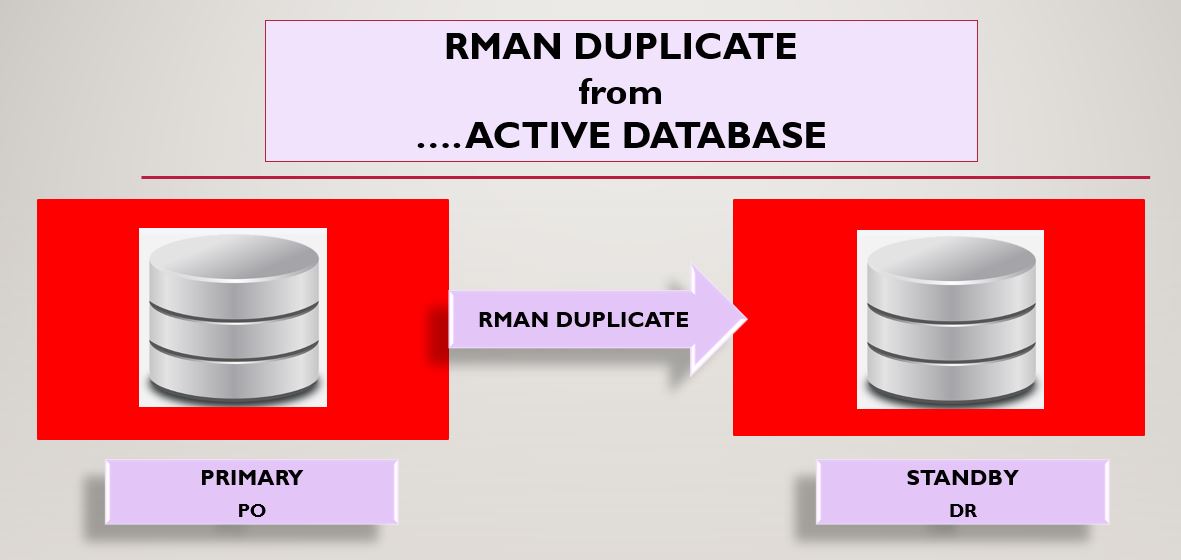
Primary Database Name: PO
Primary DB Unique Name: PO
Primary Database Version: 19.0.0.0
Standby Database Name: PO
Standby DB Unique Name: DR
Operating System: Windows 10 Pro 64 Bit
Lưu ý: Việc tạo cơ sở dữ liệu dự phòng vật lý bằng lệnh RMAN DUPLICATE ...FROM ACTIVE DATABASE không yêu cầu phải tắt cơ sở dữ liệu chính. Ngoài ra, nó cũng không yêu cầu bất kỳ bản sao lưu nào. Đây là tính năng của Oracle 11g, cho phép sao chép sang cơ sở dữ liệu dự phòng mà không cần sao lưu.
Ở đây, tôi đang tạo cơ sở dữ liệu dự phòng vật lý trên cùng máy chủ với cơ sở dữ liệu chính. Vì vậy, các thông tin chi tiết bên dưới sẽ giống nhau cho cả cơ sở dữ liệu chính và dự phòng.
- tnsnames.ora
- listener.ora
- Các tệp nhị phân ORACLE_HOME
Bước 1: Tạo các thư mục riêng biệt cho cơ sở dữ liệu DR. Kiểm tra các thư mục cơ sở dữ liệu hiện có như data files, control files, redo log files, archived log files, etc. Kiểm tra kỹ lại các thư mục bạn đã thêm trong tệp pfile và lệnh duplicate.
SQL> set lines 300 pages 3000 SQL> col name for a12 SQL> col FORCE_LOGGING for a12 SQL> col DB_UNIQUE_NAME for a12 SQL> select name,db_unique_name,open_mode,database_role,protection_mode,force_logging,log_mode from v$database; NAME DB_UNIQUE_NA OPEN_MODE DATABASE_ROLE PROTECTION_MODE FORCE_LOGGIN LOG_MODE ----- ------------ ----------- ------------- ------------------ ------------ ---------- PO PO READ WRITE PRIMARY MAXIMUM PROTECTION YES ARCHIVELOG SQL> set lines 300 pages 3000 SQL> col name for a56 SQL> select name from v$datafile; NAME ----------------------------------------------- D:\RUPESH\APP\RGHUBADE\ORADATA\PO\SYSTEM01.DBF D:\RUPESH\APP\RGHUBADE\ORADATA\PO\DATA01.DBF D:\RUPESH\APP\RGHUBADE\ORADATA\PO\SYSAUX01.DBF D:\RUPESH\APP\RGHUBADE\ORADATA\PO\UNDOTBS02.DBF SQL> select name from v$tempfile; NAME -------------------------------------------- D:\RUPESH\APP\RGHUBADE\ORADATA\PO\TEMP01.DBF D:\RUPESH\APP\RGHUBADE\ORADATA\PO\TEMP02.DBF SQL> select name from v$controlfile; NAME ----------------------------------------------- D:\RUPESH\APP\RGHUBADE\ORADATA\PO\CONTROL01.CTL D:\RUPESH\APP\RGHUBADE\ORADATA\PO\CONTROL02.CTL SQL> archive log list; Database log mode Archive Mode Automatic archival Enabled Archive destination D:\RUPESH\app\rghubade\oradata\PO\archive Oldest online log sequence 691 Next log sequence to archive 693 Current log sequence 693 SQL> show parameter log_archive_dest_1 NAME TYPE VALUE --------------------- ------- ------------------------------ log_archive_dest_1 string LOCATION=D:\RUPESH\app\rghubad e\oradata\PO\archive Nếu bạn chưa bật chế độ force_logging trong cơ sở dữ liệu, bạn có thể bật nó bằng lệnh sau: SQL> alter database force logging; Database altered. SQL> select force_logging from v$database; FORCE_LOGGING ----------------- YES Dưới đây là tập tin pfile " INITDR.ORA" dùng để tạo cơ sở dữ liệu dự phòng trùng lặp. *._readable_standby_sync_timeout=60 *.audit_file_dest='D:\RUPESH\Setups\DR\adump' *.audit_trail='db' *.compatible='19.0.0' *.control_files='D:\RUPESH\Setups\DR\control01.ctl','D:\RUPESH\Setups\DR\control02.ctl' *.db_block_size=8192 *.db_keep_cache_size=218103808 *.db_name='PO' *.db_unique_name='DR' *.diagnostic_dest='D:\RUPESH\app\rghubade' *.log_archive_dest_1='LOCATION=D:\RUPESH\Setups\DR\archive' *.log_archive_format='%t_%s_%r.arc' *.nls_language='AMERICAN' *.nls_territory='AMERICA' *.open_cursors=300 *.pga_aggregate_limit=3221225472 *.pga_aggregate_target=1073741824 *.processes=1000 *.remote_login_passwordfile='EXCLUSIVE' *.sga_target=4831m *.undo_tablespace='UNDOTBS_NEW' *.standby_file_management='AUTO' *.log_archive_config='dg_config=(PO,DR)' *.db_create_file_dest='D:\RUPESH\Setups\DR' *.DB_CREATE_ONLINE_LOG_DEST_1='D:\RUPESH\Setups\DR' |
Bước 2: Tạo tệp mật khẩu cho cơ sở dữ liệu sao chép "DR" hoặc bạn có thể sao chép tệp mật khẩu cơ sở dữ liệu hiện có và đổi tên thành PWDDR.ora.
Bước 3: Cấu hình tệp tnsnames.ora và listener.ora cho cả cơ sở dữ liệu chính và cơ sở dữ liệu dự phòng (DR).
Lưu ý: Vui lòng thêm địa chỉ IP thực của bạn vào các tệp mạng bên dưới thay vì *.*.*.*.
Nội dung của tnsnames.ora PO = (DESCRIPTION = (ADDRESS_LIST = (ADDRESS = (PROTOCOL = TCP)(HOST = *.*.*.*)(PORT = 1530)) ) (CONNECT_DATA = (SERVICE_NAME = PO) ) ) DR = (DESCRIPTION = (ADDRESS_LIST = (ADDRESS = (PROTOCOL = TCP)(HOST = *.*.*.*)(PORT = 1531)) ) (CONNECT_DATA = (SERVICE_NAME = DR) ) ) Nội dung của listener.ora LISTENER_PO = (DESCRIPTION_LIST = (DESCRIPTION = (ADDRESS = (PROTOCOL = IPC)(KEY = EXTPROC2)) (ADDRESS = (PROTOCOL = TCP)(HOST = *.*.*.*)(PORT = 1530)) ) ) SID_LIST_LISTENER_PO = (SID_LIST = (SID_DESC = (GLOBAL_DBNAME = PO) (ORACLE_HOME = D:\RUPESH\Setups\WINDOWS.X64_193000_db_home) (SID_NAME = PO) ) ) LISTENER_DR = (DESCRIPTION_LIST = (DESCRIPTION = (ADDRESS = (PROTOCOL = IPC)(KEY = EXTPROC1)) (ADDRESS = (PROTOCOL = TCP)(HOST = *.*.*.*)(PORT = 1531)) ) ) SID_LIST_LISTENER_DR = (SID_LIST = (SID_DESC = (GLOBAL_DBNAME = DR) (ORACLE_HOME = D:\RUPESH\Setups\WINDOWS.X64_193000_db_home) (SID_NAME = DR) ) ) |
Bước 4: Thực hiện các thay đổi tham số sau trong cơ sở dữ liệu chính của bạn.
SQL> alter system set log_archive_dest_2='service=DR LGWR ASYNC valid_for=(all_logfiles,all_roles) db_unique_name=DR'; SQL> alter system set log_archive_config='dg_config=(PO,DR)'; SQL> show parameter remote_login_passwordfile NAME TYPE VALUE -------------------------- ------- ----------- remote_login_passwordfile string EXCLUSIVE SQL> show parameter log_archive_dest_1 NAME TYPE VALUE -------------------- ------ ------------------------------ log_archive_dest_1 string LOCATION=D:\RUPESH\app\rghubad e\oradata\PO\archive NAME TYPE VALUE -------------------- ------ ------------------------------ log_archive_dest_2 string service=DR LGWR ASYNC va lid_for=(all_logfiles,all_role s) db_unique_name=DR NAME TYPE VALUE -------------------- ------ ------------------------------ log_archive_config string dg_config=(PO,DR) |
Bước 5: Tạo dịch vụ cho cơ sở dữ liệu dự phòng (DR) như sau:
oradim -NEW -SID DR -syspwd sys123 -STARTMODE auto -PFILE D:\RUPESH\Setups\WINDOWS.X64_193000_db_home\database\INITDR.ORA Hãy đảm bảo các dịch vụ sau đang chạy trong services.msc - OracleServiceDR - OracleOraDB19Home1TNSListenerLISTENER_PO - OracleOraDB19Home1TNSListenerLISTENER_DR C:\windows\system32>tnsping po TNS Ping Utility for 64-bit Windows: Version 19.0.0.0.0 - Production on 30-MAR-2023 21:38:48 Copyright (c) 1997, 2022, Oracle. All rights reserved. Used parameter files: D:\RUPESH\Setups\WINDOWS.X64_193000_db_home\network\admin\sqlnet.ora Used TNSNAMES adapter to resolve the alias Attempting to contact (DESCRIPTION = (SDU = 65535) (ADDRESS_LIST = (ADDRESS = (PROTOCOL = TCP)(HOST = *.*.*.*)(PORT = 1530))) (CONNECT_DATA = (SERVICE_NAME = PO))) OK (0 msec) C:\windows\system32>tnsping dr TNS Ping Utility for 64-bit Windows: Version 19.0.0.0.0 - Production on 25-MAR-2023 23:18:44 Copyright (c) 1997, 2022, Oracle. All rights reserved. Used parameter files: D:\RUPESH\Setups\WINDOWS.X64_193000_db_home\network\admin\sqlnet.ora Used TNSNAMES adapter to resolve the alias Attempting to contact (DESCRIPTION = (ADDRESS_LIST = (ADDRESS = (PROTOCOL = TCP)(HOST = *.*.*.*)(PORT = 1531))) (CONNECT_DATA = (SERVICE_NAME = DR))) OK (0 msec) C:\windows\system32> set ORACLE_SID=DR C:\windows\system32>set o ORACLE_SID=DR OS=Windows_NT C:\windows\system32>sqlplus / as sysdba SQL*Plus: Release 19.0.0.0.0 - Production on Sat Mar 25 23:32:29 2023 Version 19.16.0.0.0 Copyright (c) 1982, 2022, Oracle. All rights reserved. Connected to an idle instance. SQL> startup nomount pfile='D:\RUPESH\Setups\WINDOWS.X64_193000_db_home\database\INITDR.ORA'; ORACLE instance started. Total System Global Area 5066718192 bytes Fixed Size 9038832 bytes Variable Size 889192448 bytes Database Buffers 4160749568 bytes Redo Buffers 7737344 bytes Verify sqlplus connectivity for both Primary and Standby(DR) database. C:\windows\system32>sqlplus sys/sys123@PO as sysdba SQL*Plus: Release 19.0.0.0.0 - Production on Sat Mar 25 23:36:20 2023 Version 19.16.0.0.0 Copyright (c) 1982, 2022, Oracle. All rights reserved. Connected to: Oracle Database 19c Enterprise Edition Release 19.0.0.0.0 - Production Version 19.16.0.0.0 SQL> select name,open_mode from v$database; NAME OPEN_MODE --------- -------------------- PO READ WRITE C:\windows\system32>sqlplus sys/sys123@DR as sysdba SQL*Plus: Release 19.0.0.0.0 - Production on Sat Mar 25 23:36:27 2023 Version 19.16.0.0.0 Copyright (c) 1982, 2022, Oracle. All rights reserved. Connected to: Oracle Database 19c Enterprise Edition Release 19.0.0.0.0 - Production Version 19.16.0.0.0 SQL> select name,open_mode from v$database; select name,open_mode from v$database * ERROR at line 1: ORA-01507: database not mounted C:\windows\system32>rman target sys/sys123@PO auxiliary sys/sys123@DR Recovery Manager: Release 19.0.0.0.0 - Production on Sat Mar 25 23:44:58 2023 Version 19.16.0.0.0 Copyright (c) 1982, 2022, Oracle and/or its affiliates. All rights reserved. connected to target database: PO (DBID=2972374659) connected to auxiliary database: PO (not mounted) RMAN> run { 2> allocate channel d1 type disk; 3> allocate channel d2 type disk; 4> allocate auxiliary channel a1 type DISK; 5> allocate auxiliary channel a2 type DISK; 6> duplicate target database for standby from active database nofilenamecheck dorecover; 7> } using target database control file instead of recovery catalog allocated channel: d1 channel d1: SID=777 device type=DISK allocated channel: d2 channel d2: SID=967 device type=DISK allocated channel: a1 channel a1: SID=196 device type=DISK allocated channel: a2 channel a2: SID=387 device type=DISK Starting Duplicate Db at 25-MAR-23 current log archived contents of Memory Script: { backup as copy reuse passwordfile auxiliary format 'D:\RUPESH\Setups\WINDOWS.X64_193000_db_home\DATABASE\PWDdr.ORA' ; } executing Memory Script Starting backup at 25-MAR-23 Finished backup at 25-MAR-23 duplicating Online logs to Oracle Managed File (OMF) location duplicating Datafiles to Oracle Managed File (OMF) location contents of Memory Script: { restore clone from service 'PO' standby controlfile; } executing Memory Script Starting restore at 25-MAR-23 channel a1: starting datafile backup set restore channel a1: using network backup set from service PO channel a1: restoring control file channel a1: restore complete, elapsed time: 00:00:01 output file name=D:\RUPESH\SETUPS\DR\CONTROL01.CTL output file name=D:\RUPESH\SETUPS\DR\CONTROL02.CTL Finished restore at 25-MAR-23 contents of Memory Script: { sql clone 'alter database mount standby database'; } executing Memory Script sql statement: alter database mount standby database contents of Memory Script: { set newname for clone tempfile 1 to new; set newname for clone tempfile 2 to new; switch clone tempfile all; set newname for clone datafile 1 to new; set newname for clone datafile 2 to new; set newname for clone datafile 3 to new; set newname for clone datafile 5 to new; restore from nonsparse from service 'PO' clone database ; sql 'alter system archive log current'; } executing Memory Script executing command: SET NEWNAME executing command: SET NEWNAME renamed tempfile 1 to D:\RUPESH\SETUPS\DR\DR\DATAFILE\O1_MF_TEMP_%U_.TMP in control file renamed tempfile 2 to D:\RUPESH\SETUPS\DR\DR\DATAFILE\O1_MF_TEMP2_%U_.TMP in control file executing command: SET NEWNAME executing command: SET NEWNAME executing command: SET NEWNAME executing command: SET NEWNAME Starting restore at 25-MAR-23 channel a1: starting datafile backup set restore channel a1: using network backup set from service PO channel a1: specifying datafile(s) to restore from backup set channel a1: restoring datafile 00001 to D:\RUPESH\SETUPS\DR\DR\DATAFILE\O1_MF_SYSTEM_%U_.DBF channel a2: starting datafile backup set restore channel a2: using network backup set from service PO channel a2: specifying datafile(s) to restore from backup set channel a2: restoring datafile 00002 to D:\RUPESH\SETUPS\DR\DR\DATAFILE\O1_MF_TEST_%U_.DBF channel a2: restore complete, elapsed time: 00:00:15 channel a2: starting datafile backup set restore channel a2: using network backup set from service PO channel a2: specifying datafile(s) to restore from backup set channel a2: restoring datafile 00003 to D:\RUPESH\SETUPS\DR\DR\DATAFILE\O1_MF_SYSAUX_%U_.DBF channel a1: restore complete, elapsed time: 00:00:19 channel a1: starting datafile backup set restore channel a1: using network backup set from service PO channel a1: specifying datafile(s) to restore from backup set channel a1: restoring datafile 00005 to D:\RUPESH\SETUPS\DR\DR\DATAFILE\O1_MF_UNDOTBS__%U_.DBF channel a1: restore complete, elapsed time: 00:00:07 channel a2: restore complete, elapsed time: 00:00:28 Finished restore at 25-MAR-23 sql statement: alter system archive log current current log archived contents of Memory Script: { restore clone force from service 'PO' archivelog from scn 9518522; switch clone datafile all; } executing Memory Script Starting restore at 25-MAR-23 channel a1: starting archived log restore to default destination channel a1: using network backup set from service PO channel a1: restoring archived log archived log thread=1 sequence=239 channel a2: starting archived log restore to default destination channel a2: using network backup set from service PO channel a2: restoring archived log archived log thread=1 sequence=240 channel a1: restore complete, elapsed time: 00:00:00 channel a2: restore complete, elapsed time: 00:00:01 Finished restore at 25-MAR-23 datafile 1 switched to datafile copy input datafile copy RECID=5 STAMP=1132443964 file name=D:\RUPESH\SETUPS\DR\DR\DATAFILE\O1_MF_SYSTEM_L1YGKQ3B_.DBF datafile 2 switched to datafile copy input datafile copy RECID=6 STAMP=1132443965 file name=D:\RUPESH\SETUPS\DR\DR\DATAFILE\O1_MF_TEST_L1YGKQ99_.DBF datafile 3 switched to datafile copy input datafile copy RECID=7 STAMP=1132443965 file name=D:\RUPESH\SETUPS\DR\DR\DATAFILE\O1_MF_SYSAUX_L1YGL6FC_.DBF datafile 5 switched to datafile copy input datafile copy RECID=8 STAMP=1132443965 file name=D:\RUPESH\SETUPS\DR\DR\DATAFILE\O1_MF_UNDOTBS__L1YGL9O2_.DBF contents of Memory Script: { set until scn 9518705; recover standby clone database delete archivelog ; } executing Memory Script executing command: SET until clause Starting recover at 25-MAR-23 starting media recovery archived log for thread 1 with sequence 239 is already on disk as file D:\RUPESH\SETUPS\DR\ARCHIVE\1_239_1084451655.ARC archived log for thread 1 with sequence 240 is already on disk as file D:\RUPESH\SETUPS\DR\ARCHIVE\1_240_1084451655.ARC archived log file name=D:\RUPESH\SETUPS\DR\ARCHIVE\1_239_1084451655.ARC thread=1 sequence=239 archived log file name=D:\RUPESH\SETUPS\DR\ARCHIVE\1_240_1084451655.ARC thread=1 sequence=240 media recovery complete, elapsed time: 00:00:01 Finished recover at 25-MAR-23 contents of Memory Script: { delete clone force archivelog all; } executing Memory Script deleted archived log archived log file name=D:\RUPESH\SETUPS\DR\ARCHIVE\1_239_1084451655.ARC RECID=1 STAMP=1132443963 Deleted 1 objects deleted archived log archived log file name=D:\RUPESH\SETUPS\DR\ARCHIVE\1_240_1084451655.ARC RECID=2 STAMP=1132443963 Deleted 1 objects Finished Duplicate Db at 25-MAR-23 released channel: d1 released channel: d2 released channel: a1 released channel: a2 RMAN> exit Recovery Manager complete. C:\windows\system32> SQL> select name,open_mode,database_role from v$database; NAME OPEN_MODE DATABASE_ROLE --------- -------------------- ---------------- PO MOUNTED PHYSICAL STANDBY Primary: SQL> select name,open_mode,database_role from v$database; NAME OPEN_MODE DATABASE_ROLE --------- ----------- ------------- PO READ WRITE PRIMARY SQL> select dest_id,error from v$archive_dest; DEST_ID ERROR ---------- --------- 1 2 3 4 5 6 7 8 9 10 11 12 13 14 15 16 17 18 19 20 21 22 23 24 25 26 27 28 29 30 31 32 32 rows selected. Các tham số FAL bên dưới là tùy chọn, không bắt buộc. Tôi chưa thiết lập các tham số này. SQL> show parameter fal NAME TYPE VALUE -------------- ----------- ------ fal_client string fal_server string SQL> select max(sequence#) from v$archived_log; MAX(SEQUENCE#) -------------- 241 SQL> alter system switch logfile; System altered. SQL> / System altered. SQL> / System altered. SQL> / System altered. SQL> SQL> / System altered. SQL> / System altered. SQL> select max(sequence#) from v$archived_log; MAX(SEQUENCE#) -------------- 247 Standby: SQL> select name,open_mode,database_role from v$database; NAME OPEN_MODE DATABASE_ROLE --------- ----------- ---------------- PO MOUNTED PHYSICAL STANDBY SQL> select max(sequence#) from v$archived_log where applied='YES'; MAX(SEQUENCE#) -------------- 240 SQL> / MAX(SEQUENCE#) -------------- 240 SQL> / MAX(SEQUENCE#) -------------- 240 SQL> / MAX(SEQUENCE#) -------------- 240 SQL> / MAX(SEQUENCE#) -------------- 240 SQL> select process,status from v$managed_standby; PROCESS STATUS --------- ------------ DGRD ALLOCATED ARCH CONNECTED DGRD ALLOCATED ARCH CONNECTED ARCH CONNECTED ARCH CONNECTED RFS IDLE RFS IDLE RFS IDLE 9 rows selected. SQL> recover managed standby database disconnect from session; Media recovery complete. SQL> select process,status from v$managed_standby; PROCESS STATUS --------- ------------ DGRD ALLOCATED ARCH CONNECTED DGRD ALLOCATED ARCH CONNECTED ARCH CONNECTED ARCH CONNECTED RFS IDLE RFS IDLE RFS IDLE MRP0 WAIT_FOR_LOG SQL> select max(sequence#) from v$archived_log where applied='YES'; MAX(SEQUENCE#) -------------- 247 |
TƯ VẤN: Click hoặc Hotline/Zalo 090.29.12.888
=============================
Website không chứa bất kỳ quảng cáo nào, mọi đóng góp để duy trì phát triển cho website (donation) xin vui lòng gửi về STK 90.2142.8888 - Ngân hàng Vietcombank Thăng Long - TRAN VAN BINH
=============================
Nếu bạn không muốn bị AI thay thế và tiết kiệm 3-5 NĂM trên con đường trở thành DBA chuyên nghiệp hay làm chủ Database thì hãy đăng ký ngay KHOÁ HỌC ORACLE DATABASE A-Z ENTERPRISE, được Coaching trực tiếp từ tôi với toàn bộ bí kíp thực chiến, thủ tục, quy trình của gần 20 năm kinh nghiệm (mà bạn sẽ KHÔNG THỂ tìm kiếm trên Internet/Google) từ đó giúp bạn dễ dàng quản trị mọi hệ thống Core tại Việt Nam và trên thế giới, đỗ OCP.
- CÁCH ĐĂNG KÝ: Gõ (.) hoặc để lại số điện thoại hoặc inbox https://m.me/tranvanbinh.vn hoặc Hotline/Zalo 090.29.12.888
- Chi tiết tham khảo:
https://bit.ly/oaz_w
=============================
2 khóa học online qua video giúp bạn nhanh chóng có những kiến thức nền tảng về Linux, Oracle, học mọi nơi, chỉ cần có Internet/4G:
- Oracle cơ bản: https://bit.ly/admin_1200
- Linux: https://bit.ly/linux_1200
=============================
KẾT NỐI VỚI CHUYÊN GIA TRẦN VĂN BÌNH:
📧 Mail: binhoracle@gmail.com
☎️ Mobile/Zalo: 0902912888
👨 Facebook: https://www.facebook.com/BinhOracleMaster
👨 Inbox Messenger: https://m.me/101036604657441 (profile)
👨 Fanpage: https://www.facebook.com/tranvanbinh.vn
👨 Inbox Fanpage: https://m.me/tranvanbinh.vn
👨👩 Group FB: https://www.facebook.com/groups/DBAVietNam
👨 Website: https://www.tranvanbinh.vn
👨 Blogger: https://tranvanbinhmaster.blogspot.com
🎬 Youtube: https://www.youtube.com/@binhguru
👨 Tiktok: https://www.tiktok.com/@binhguru
👨 Linkin: https://www.linkedin.com/in/binhoracle
👨 Twitter: https://twitter.com/binhguru
👨 Podcast: https://www.podbean.com/pu/pbblog-eskre-5f82d6
👨 Địa chỉ: Tòa nhà Sun Square - 21 Lê Đức Thọ - Phường Mỹ Đình 1 - Quận Nam Từ Liêm - TP.Hà Nội
=============================
cơ sở dữ liệu, cơ sở dữ liệu quốc gia, database, AI, trí tuệ nhân tạo, artificial intelligence, machine learning, deep learning, LLM, ChatGPT, DeepSeek, Grok, oracle tutorial, học oracle database, Tự học Oracle, Tài liệu Oracle 12c tiếng Việt, Hướng dẫn sử dụng Oracle Database, Oracle SQL cơ bản, Oracle SQL là gì, Khóa học Oracle Hà Nội, Học chứng chỉ Oracle ở đầu, Khóa học Oracle online,sql tutorial, khóa học pl/sql tutorial, học dba, học dba ở việt nam, khóa học dba, khóa học dba sql, tài liệu học dba oracle, Khóa học Oracle online, học oracle sql, học oracle ở đâu tphcm, học oracle bắt đầu từ đâu, học oracle ở hà nội, oracle database tutorial, oracle database 12c, oracle database là gì, oracle database 11g, oracle download, oracle database 19c/21c/23c/23ai, oracle dba tutorial, oracle tunning, sql tunning , oracle 12c, oracle multitenant, Container Databases (CDB), Pluggable Databases (PDB), oracle cloud, oracle security, oracle fga, audit_trail,oracle RAC, ASM, oracle dataguard, oracle goldengate, mview, oracle exadata, oracle oca, oracle ocp, oracle ocm , oracle weblogic, postgresql tutorial, mysql tutorial, mariadb tutorial, ms sql server tutorial, nosql, mongodb tutorial, oci, cloud, middleware tutorial, docker, k8s, micro service, hoc solaris tutorial, hoc linux tutorial, hoc aix tutorial, unix tutorial, securecrt, xshell, mobaxterm, putty


